
NekoNameTags
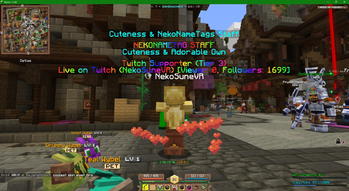
NekoNameTags is a cross-platform mod that adds customizable, animated name tags and status displays across games and social platforms like Resonite, ChilloutVR, and Minecraft.
Screenshots
About this Mod
NekoNameTags
NekoNameTags is a cross-platform name tag system designed to enhance how player information is displayed in multiplayer environments.
It allows players and communities to display customizable name tags, statuses, and dynamic information above characters in supported games and social platforms.
The goal of NekoNameTags is to create a consistent and flexible name tag experience across multiple platforms, allowing communities to share identity, roles, and live information in a clear and visually appealing way.
Features
Customizable Name Tags
Display styled player names with colors, formatting, and additional information.
Multi-Line Information Display
Show extra details such as roles, supporter status, community ranks, or activity indicators.
Cross-Platform Support
Designed to work across multiple environments including:
Resonite
ChilloutVR
Minecraft
Additional platforms planned for future releases.
Dynamic Information
Name tags can display live data such as status indicators, streaming activity, or other supported integrations.
Community Integration
Useful for communities, servers, and creators who want a consistent identity system across different platforms.
Use Cases
NekoNameTags can be used for:
Community ranks and roles
Streamer indicators or activity status
Server staff tags
Player customization and identity
Events and community recognition systems
Future Plans
The project is actively being developed with plans to support additional platforms and expand customization options.
Future updates may include:
Additional platform integrations
Expanded customization features
Improved synchronization across supported environments
Compatibility
Current supported environments:
Resonite
ChilloutVR
Minecraft
More platforms will be added as development continues.
Available Versions
How to Install NekoNameTags on Your Server
Order Server
Order a Minecraft Java server with at least 3 GB RAM (4 GB recommended).
Set fabric Loader
In the panel under "Egg", select the fabric loader and matching Minecraft version (1.21.11).
Install Mod
Open the mod browser in the dashboard and search for "NekoNameTags". Click "Install" – done! Alternatively, upload the .jar via SFTP to the /mods folder.
Compatibility
Mod Loaders
Minecraft Versions
1.21.11, 1.21.1
Server-side
✗ UnsupportedRecommended RAM
4 GB(min. 3 GB)Frequently Asked Questions
NekoNameTags server crashes on startup – what to do?
Most common cause: wrong fabric version or insufficient RAM. Check the server log (latest.log) for "OutOfMemoryError" or "Mixin" errors. With Mado Hosting: ensure at least 3 GB RAM is allocated and the loader matches the mod version (1.21.11). You can switch loaders with one click in the panel.
Is NekoNameTags compatible with fabric and neoforge?
NekoNameTags officially supports fabric, neoforge for Minecraft 1.21.11, 1.21.1. The Mado dashboard automatically detects incompatible loader combinations.
Server lagging with NekoNameTags – how to optimize performance?
Recommended RAM: 4 GB (per 8 players). Use /spark profiler to check if NekoNameTags consumes the most tick time. Common fixes: reduce server view-distance to 8-10, install "performant" or "starlight" as supplementary mods on Forge. With Mado Hosting, your server runs on NVMe SSDs with dedicated CPU cores for minimal latency.
Similar Mods






Rent Modded Server
Install NekoNameTags with just one click on your server.