
NeoFactions
A lightweight, server-side factions mod for NeoForge. Create factions, manage ranks, and show your faction prefix in chat, TAB, and above your head. No client mod required.
Screenshots
About this Mod
NeoFactions
A lightweight, server-side factions mod for NeoForge 1.21.1. No client mod required.
What is NeoFactions?
Factions adds a complete faction system to your Minecraft server. Players can create and manage factions with a three-tier hierarchy, invite or recruit members, and represent their faction with a colored prefix visible in chat, the TAB list, and above their head.
Built to be simple and reliable — no bloat, no dependencies, no client-side installation needed. Just drop the jar in your server's mods/ folder and you're good to go.
Features
Faction management — Create, dissolve, and manage factions entirely through in-game commands.
Three-tier hierarchy — Leader (★), Officer (▲), and Member (•), each with appropriate permissions for inviting, kicking, and promoting.
Recruitment system — Two ways to join a faction: officers can invite players directly, or players can apply and wait for approval.
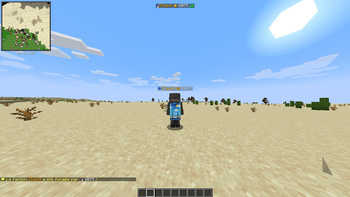
Visual identity — Your faction name and rank appear as a colored prefix in chat, in the player list (TAB), and above your head.
Persistent data — Faction data is saved to the world folder and survives server restarts.
Server-side only — Players don't need to install anything. Works with vanilla clients.
Commands
- /faction create
| Create a new faction - /faction disband | Dissolve your faction (leader only)
- /faction invite
| Invite a player (officer+) - /faction accept | Accept a pending invitation
- /faction apply
| Apply to join a faction - /faction acceptapply
| Accept an application (officer+) - /faction kick
| Kick a member - /faction leave | Leave your faction
- /faction promote
| Promote member → officer (leader only) - /faction demote
| Demote officer → member (leader only) - /faction transfer
| Transfer leadership (leader only) - /faction info [name] | View faction details/faction listList all factions
- /faction language english/french | Change the main language of the mod to english or french ( op only )
- /faction xpshare | 10% of picked up XP is redistributed to nearby faction members within 50 blocks
Requirements
NeoForge 1.21.1 (21.1.77+)
Java 21
Available Versions
How to Install NeoFactions on Your Server
Order Server
Order a Minecraft Java server with at least 3 GB RAM (4 GB recommended).
Set neoforge Loader
In the panel under "Egg", select the neoforge loader and matching Minecraft version (1.21.1).
Install Mod
Open the mod browser in the dashboard and search for "NeoFactions". Click "Install" – done! Alternatively, upload the .jar via SFTP to the /mods folder.
Compatibility
Mod Loaders
Minecraft Versions
1.21.1
Server-side
✓ RequiredRecommended RAM
4 GB(min. 3 GB)Frequently Asked Questions
NeoFactions server crashes on startup – what to do?
Most common cause: wrong neoforge version or insufficient RAM. Check the server log (latest.log) for "OutOfMemoryError" or "Mixin" errors. With Mado Hosting: ensure at least 3 GB RAM is allocated and the loader matches the mod version (1.21.1). You can switch loaders with one click in the panel.
Is NeoFactions compatible with neoforge?
NeoFactions officially supports neoforge for Minecraft 1.21.1. The Mado dashboard automatically detects incompatible loader combinations.
Server lagging with NeoFactions – how to optimize performance?
Recommended RAM: 4 GB (per 8 players). Use /spark profiler to check if NeoFactions consumes the most tick time. Common fixes: reduce server view-distance to 8-10, install "performant" or "starlight" as supplementary mods on Forge. With Mado Hosting, your server runs on NVMe SSDs with dedicated CPU cores for minimal latency.
Similar Mods






Rent Modded Server
Install NeoFactions with just one click on your server.