
NeoPlots
Professional-grade, server-side plot management. Based on a plugin, but built natively for the modded ecosystem.
Screenshots
About this Mod
NeoPlots
Professional-grade, server-side plot management for NeoForge 1.21+
A modern, high-performance replacement for legacy plot plugins, re-engineered natively for the NeoForge ecosystem. Designed for stability, scalability, and seamless mod integration.
✨ Key Features
🌍 Server-Side Architecture: Vanilla clients can join without installing the mod.
⚡ O(1) Deterministic Generation: Custom GridChunkGenerator completely bypasses vanilla noise maps. Zero lag generation.
🧹 Clean World Logic:
No Noise/Biomes: Explicitly disables vanilla decoration (trees, grass, lava lakes).
No Structures: Hard-coded prevention of Villages, Strongholds, and Ruined Portals.
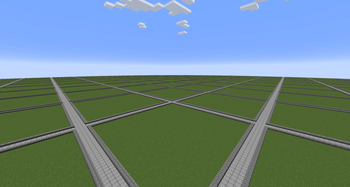
Visual Borders: Classic "PlotMe" style slab borders with mathematically perfect intersections.
🌐 Cross-Dimension Navigation: Smart teleportation handling. /plot auto automatically moves players to the plot dimension; /plot spawn returns them to the Overworld.
🗣️ Internationalization (i18n): Native support for 10+ languages (EN, PT-BR, ES, FR, DE, RU, CN, JP, KR).
💾 Human-Readable Persistence: Optimized JSON storage using Google GSON. Easy to edit, backup, and migrate. Thread-safe caching ensures zero I/O lag on the main thread.
🛡️ Flag System: Configurable rules per plot (PvP, Use, Break) accessible via commands.
Available Versions
How to Install NeoPlots on Your Server
Order Server
Order a Minecraft Java server with at least 4 GB RAM (6 GB recommended).
Set neoforge Loader
In the panel under "Egg", select the neoforge loader and matching Minecraft version (1.21.1).
Install Mod
Open the mod browser in the dashboard and search for "NeoPlots". Click "Install" – done! Alternatively, upload the .jar via SFTP to the /mods folder.
Compatibility
Mod Loaders
Minecraft Versions
1.21.1
Server-side
✓ RequiredRecommended RAM
6 GB(min. 4 GB)Frequently Asked Questions
NeoPlots server crashes on startup – what to do?
Most common cause: wrong neoforge version or insufficient RAM. Check the server log (latest.log) for "OutOfMemoryError" or "Mixin" errors. With Mado Hosting: ensure at least 4 GB RAM is allocated and the loader matches the mod version (1.21.1). You can switch loaders with one click in the panel.
Is NeoPlots compatible with neoforge?
NeoPlots officially supports neoforge for Minecraft 1.21.1. The Mado dashboard automatically detects incompatible loader combinations.
Server lagging with NeoPlots – how to optimize performance?
Recommended RAM: 6 GB (per 5 players). Use /spark profiler to check if NeoPlots consumes the most tick time. Common fixes: reduce server view-distance to 8-10, install "performant" or "starlight" as supplementary mods on Forge. With Mado Hosting, your server runs on NVMe SSDs with dedicated CPU cores for minimal latency.
Rent Modded Server
Install NeoPlots with just one click on your server.