
Nether Portal Coords
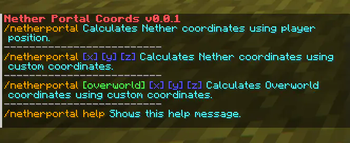
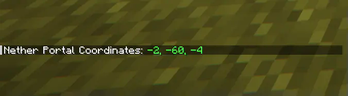
This lightweight mod adds a command to your game that allows you to quickly calculate Nether and Overworld coordinates based on your current position or custom coordinates.
Screenshots



About this Mod
Nether Portal Coord Mod




The Nether Portal Coord Mod is a useful tool for Minecraft players who frequently travel between the Overworld and the Nether. This lightweight mod adds a command to your game that allows you to quickly calculate Nether and Overworld coordinates based on your current position or custom coordinates.
Key Features:
- Effortless Coordination: With just a simple command, you can instantly calculate Nether or Overworld coordinates.
- Multiple Options: Choose between calculating coordinates based on your current position or inputting custom coordinates to suit your needs.
- Help Command: Access a built-in help command to learn how to use the mod's features quickly and easily.
- Saves Time: Say goodbye to manual calculations or guesswork when it comes to navigating between dimensions. This mod streamlines the process, saving you time and hassle.
Whether you're exploring new realms, building intricate structures, or simply trying to navigate the vast Minecraft world, the Nether Portal Coord Mod is your indispensable companion for efficient travel and precise location tracking.
⚠️ This Mod is Tested with alot of Mods and is compatible with all of them, if there would be an issue please make a ticket on our Github Page. here
This took a little bit of my time, want to support me? Come say hello and buy me a coffee <3

Available Versions
How to Install Nether Portal Coords on Your Server
Order Server
Order a Minecraft Java server with at least 3 GB RAM (4 GB recommended).
Set fabric Loader
In the panel under "Egg", select the fabric loader and matching Minecraft version (1.21.3).
Install Mod
Open the mod browser in the dashboard and search for "Nether Portal Coords". Click "Install" – done! Alternatively, upload the .jar via SFTP to the /mods folder.
Compatibility
Mod Loaders
Minecraft Versions
1.21.3, 1.21.2, 1.21.1 (+1 more)
Server-side
✗ UnsupportedRecommended RAM
4 GB(min. 3 GB)Frequently Asked Questions
Nether Portal Coords server crashes on startup – what to do?
Most common cause: wrong fabric version or insufficient RAM. Check the server log (latest.log) for "OutOfMemoryError" or "Mixin" errors. With Mado Hosting: ensure at least 3 GB RAM is allocated and the loader matches the mod version (1.21.3). You can switch loaders with one click in the panel.
Is Nether Portal Coords compatible with fabric?
Nether Portal Coords officially supports fabric for Minecraft 1.21.3, 1.21.2, 1.21.1. The Mado dashboard automatically detects incompatible loader combinations.
Server lagging with Nether Portal Coords – how to optimize performance?
Recommended RAM: 4 GB (per 8 players). Use /spark profiler to check if Nether Portal Coords consumes the most tick time. Common fixes: reduce server view-distance to 8-10, install "performant" or "starlight" as supplementary mods on Forge. With Mado Hosting, your server runs on NVMe SSDs with dedicated CPU cores for minimal latency.
Similar Mods




Rent Modded Server
Install Nether Portal Coords with just one click on your server.