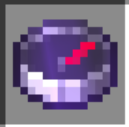
NetherFortressCompass
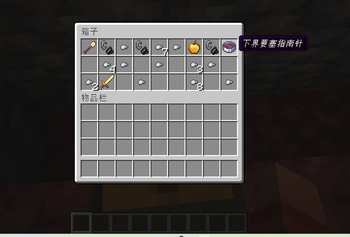
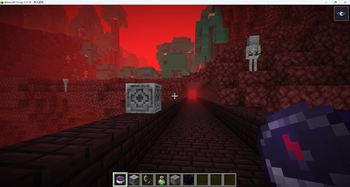
打开下界传送门遗址箱子可获得下界要塞指南针, 补完遗迹去到下界后,该指南针可指向最近的下界要塞。 Opening the Nether Portal Ruins chest grants a Nether Fortress Compass. After completing the ruins and going to the Nether, this compass will point to the nearest Nether Fortress.
Screenshots
About this Mod
主要功能介绍
你还在为找不到下界要塞而苦恼?本模组提供最丝滑且符合游戏流程的引导,探索主世界时,在下界传送门遗址里找到箱子并打开,即可获得一枚特殊的「下界要塞指南针」。模组会根据该遗址在你世界中的位置,自动在下界对应区域寻找最近的下界要塞,并在要塞附近放置磁石,将指南针与之绑定。当你补完遗迹、进入下界后,只需手持这枚指南针,即可沿指针方向前往离你最近的要塞,省去盲目乱逛的时间。每个遗址箱子只会触发一次,进度会随存档保存,适合生存探险与速通下界资源。
机制 + 联机说明
每个遗址箱子仅触发一次,进度写入存档;联机时需服务端与客户端均安装本模组方可正常游玩。
Main Features
Still struggling to find a Nether Fortress? This mod provides a smooth and immersive guidance system that fits naturally into Minecraft’s progression. While exploring the Overworld, you can discover a chest inside a Ruined Portal. Opening it grants a special Nether Fortress Compass.
Based on the location of that Ruined Portal in your world, the mod automatically searches the corresponding Nether region for the nearest Nether Fortress, then places a lodestone near the fortress and binds the compass to it.
After repairing the portal and entering the Nether, simply hold the compass in your hand and follow its direction to reach the nearest fortress, saving you from wandering aimlessly across the Nether. Each Ruined Portal chest can only trigger once, and all progress is saved with the world, making the mod suitable for both survival exploration and speedrunning Nether progression.
Mechanics & Multiplayer
Each Ruined Portal chest can only be triggered once, and all progress is stored in the world save.
For multiplayer, both the server and all clients must have this mod installed for proper gameplay.
Available Versions
How to Install NetherFortressCompass on Your Server
Order Server
Order a Minecraft Java server with at least 3 GB RAM (4 GB recommended).
Set fabric Loader
In the panel under "Egg", select the fabric loader and matching Minecraft version (1.21.11).
Install Mod
Open the mod browser in the dashboard and search for "NetherFortressCompass". Click "Install" – done! Alternatively, upload the .jar via SFTP to the /mods folder.
Compatibility
Mod Loaders
Minecraft Versions
1.21.11, 1.21.10
Server-side
✓ RequiredRecommended RAM
4 GB(min. 3 GB)Frequently Asked Questions
NetherFortressCompass server crashes on startup – what to do?
Most common cause: wrong fabric version or insufficient RAM. Check the server log (latest.log) for "OutOfMemoryError" or "Mixin" errors. With Mado Hosting: ensure at least 3 GB RAM is allocated and the loader matches the mod version (1.21.11). You can switch loaders with one click in the panel.
Is NetherFortressCompass compatible with fabric and forge?
NetherFortressCompass officially supports fabric, forge for Minecraft 1.21.11, 1.21.10. Note: Forge and Fabric mods are NOT cross-compatible – pick one loader and stick with it. The Mado dashboard automatically detects incompatible loader combinations.
Server lagging with NetherFortressCompass – how to optimize performance?
Recommended RAM: 4 GB (per 8 players). Use /spark profiler to check if NetherFortressCompass consumes the most tick time. Common fixes: reduce server view-distance to 8-10, install "performant" or "starlight" as supplementary mods on Forge. With Mado Hosting, your server runs on NVMe SSDs with dedicated CPU cores for minimal latency.
Similar Mods




Rent Modded Server
Install NetherFortressCompass with just one click on your server.