
Netherite Eternal
Netherite tools never break! They become unusable when depleted and need repair, remaining eternally in your inventory.
Screenshots
About this Mod
Netherite Eternal
English: A mod that honors the value of netherite! Minecraft's most valuable tools will no longer be destroyed when their durability runs out.
Español: ¡Un mod que honra el valor de la netherita! Las herramientas más valiosas de Minecraft ya no se destruirán cuando se agote su durabilidad.
✨ Features / Características
English:
- 🔧 Eternal Preservation: Netherite tools never break
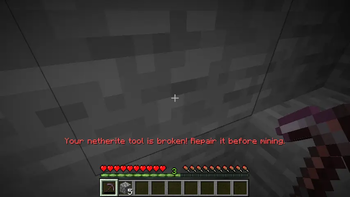
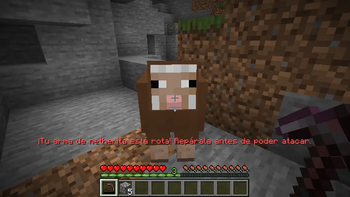
- ⚡ Unusable Status: When they reach 0 durability, they are locked until repaired
- 🎯 Clear Feedback: Intuitive messages let you know when you need to repair
- 🛡️ Full Compatibility: Works with all Netherite tools
Español:
- 🔧 Preservación Eterna: Las herramientas de netherita nunca se rompen
- ⚡ Estado Inutilizable: Cuando llegan a 0 de durabilidad, se bloquean hasta ser reparadas
- 🎯 Feedback Claro: Mensajes intuitivos te avisan cuando necesitas reparar
- 🛡️ Compatibilidad Total: Funciona con todas las herramientas de netherita
🎮 How It Works / Como funciona
English:
- Normal Use: Use your netherite tools as usual
- Zero Durability: When depleted, the tool becomes unusable
- Smart Lockout: You cannot mine or attack with broken tools
- Repair: Repair it on an anvil with netherite to restore it
Español:
- Uso Normal: Usa tus herramientas de netherita como siempre
- Durabilidad Cero: Cuando se agota, la herramienta se vuelve inutilizable
- Bloqueo Inteligente: No puedes minar o atacar con herramientas rotas
- Reparación: Repárala en un yunque con netherita para restaurarla
🛠️ Affected tools / Herramientas afectadas
English:
- Netherite Sword
- Netherite Pickaxe
- Netherite Axe
- Netherite Shovel
- Netherite Hoe
Español:
- Espada de netherita
- Pico de netherita
- Hacha de netherita
- Pala de netherita
- Azada de netherita
📦 Requirements / Requisitos
English:
- Minecraft 1.20.1
- Fabric Loader 0.14.22+
- Fabric API (recommended)
Español:
- Minecraft 1.20.1
- Fabric Loader 0.14.22+
- Fabric API (recomendado)
🔧 Installation / Instalación
English:
- Install Fabric Loader
- Download Fabric API (optional but recommended)
- Place the
.jarfile in yourmodsfolder - Enjoy eternal netherite!
Español:
- Instala Fabric Loader
- Descarga Fabric API (opcional pero recomendado)
- Coloca el archivo
.jaren tu carpetamods - ¡Disfruta de la netherita eterna!
Available Versions
How to Install Netherite Eternal on Your Server
Order Server
Order a Minecraft Java server with at least 3 GB RAM (4 GB recommended).
Set fabric Loader
In the panel under "Egg", select the fabric loader and matching Minecraft version (1.20.1).
Install Mod
Open the mod browser in the dashboard and search for "Netherite Eternal". Click "Install" – done! Alternatively, upload the .jar via SFTP to the /mods folder.
Compatibility
Mod Loaders
Minecraft Versions
1.20.1
Server-side
✓ RequiredRecommended RAM
4 GB(min. 3 GB)Frequently Asked Questions
Netherite Eternal server crashes on startup – what to do?
Most common cause: wrong fabric version or insufficient RAM. Check the server log (latest.log) for "OutOfMemoryError" or "Mixin" errors. With Mado Hosting: ensure at least 3 GB RAM is allocated and the loader matches the mod version (1.20.1). You can switch loaders with one click in the panel.
Is Netherite Eternal compatible with fabric?
Netherite Eternal officially supports fabric for Minecraft 1.20.1. The Mado dashboard automatically detects incompatible loader combinations.
Server lagging with Netherite Eternal – how to optimize performance?
Recommended RAM: 4 GB (per 8 players). Use /spark profiler to check if Netherite Eternal consumes the most tick time. Common fixes: reduce server view-distance to 8-10, install "performant" or "starlight" as supplementary mods on Forge. With Mado Hosting, your server runs on NVMe SSDs with dedicated CPU cores for minimal latency.
Similar Mods




![[TaCZ] Timeless and Classics Zero](https://cdn.modrinth.com/data/SzzJttH8/fd27766d2bb8390d284696b1dbd358f87e081439_96.webp)

Rent Modded Server
Install Netherite Eternal with just one click on your server.