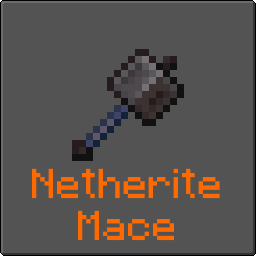
Netherite Mace
A fireproof Mace for your convenience.
Screenshots
About this Mod

Description
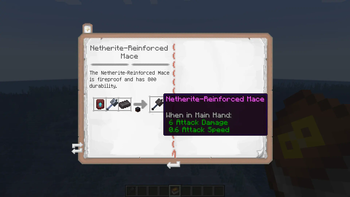
Do you love your Mace, but hate how it always gets destroyed when you expose it to fire? This mod adds a Netherite-Reinforced Mace that is fireproof.
Features:
- Create a Netherite-Reinforced Mace by combining a Netherite Upgrade Template, a Netherite Ingot, and a Mace in the Smithing Table
- More difficult recipe added if Slow Your Roll is installed (version 1.21.4-1.0.2)
- In-game documentation is available via Treatise if installed
For inquiries, email [email protected]. For issues, report on GitHub issues page.
See below for a short video tutorial from our YouTube channel.
Support
Looking for a Forge port? Check out Reforged Netherite Mace by Binaris00.
If you have a bug report, feature request, or any other type of issue, please post on our GitHub issues page. This is an issues page for all of our mods, so be sure to include the mod's name and version in your post. We appreciate all feedback!
If you'd like to support development, you can leave a tip at our BuyMeACoffee. Only if it's within your means- otherwise, using, sharing, and enjoying the mod is support enough. Thank you!
Available Versions
How to Install Netherite Mace on Your Server
Order Server
Order a Minecraft Java server with at least 3 GB RAM (4 GB recommended).
Set fabric Loader
In the panel under "Egg", select the fabric loader and matching Minecraft version (1.21.11).
Install Mod
Open the mod browser in the dashboard and search for "Netherite Mace". Click "Install" – done! Alternatively, upload the .jar via SFTP to the /mods folder.
Compatibility
Mod Loaders
Minecraft Versions
1.21.11, 1.21.10, 1.21.8 (+8 more)
Server-side
✓ RequiredRecommended RAM
4 GB(min. 3 GB)Frequently Asked Questions
Netherite Mace server crashes on startup – what to do?
Most common cause: wrong fabric version or insufficient RAM. Check the server log (latest.log) for "OutOfMemoryError" or "Mixin" errors. With Mado Hosting: ensure at least 3 GB RAM is allocated and the loader matches the mod version (1.21.11). You can switch loaders with one click in the panel.
Is Netherite Mace compatible with fabric?
Netherite Mace officially supports fabric for Minecraft 1.21.11, 1.21.10, 1.21.8. The Mado dashboard automatically detects incompatible loader combinations.
Server lagging with Netherite Mace – how to optimize performance?
Recommended RAM: 4 GB (per 8 players). Use /spark profiler to check if Netherite Mace consumes the most tick time. Common fixes: reduce server view-distance to 8-10, install "performant" or "starlight" as supplementary mods on Forge. With Mado Hosting, your server runs on NVMe SSDs with dedicated CPU cores for minimal latency.
Rent Modded Server
Install Netherite Mace with just one click on your server.