
Nether's Overhaul
👹A nether improve! with new mobs and equipment
Screenshots

About this Mod

This mod was made with mcreator (excuse me for my English I'm French)
information: I advise to use JEI for recipes
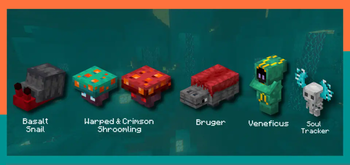
All mobs :
basalt snail:
- passive mob, found in basalt deltas biomes, drop 1 basalt, and 1 ember snail, if you feed it a warped mushroom it will give you a piece of shells
Warped and Crimson Shroomling:
- two totally passive adorable little creatures are very friendly, you can move them with a bucket
Bruger: - extremely aggressive crowd, woe to those who are hit by an attack from the bruger, it paralyzes your body for 10 seconds, iron armor will not be enough for you (easter egg if we rename it with a name tag "burger" the model changes)
Veneficus:
- a very powerful little magician, has several attacks like, you cut your vision, levitate you and teleport you into lava, veneficus and a formidable enemy
Soul Tracker: - aggressive mob, he runs very fast, if you hit him your vision will be cut
Veneficus hat :

Veneficus Hat : - do you have more than 1 xp? , equip this hat to teleport anywhere, it will cost you a little XP, practical for pvp, 30 second cooldown
Available Versions
How to Install Nether's Overhaul on Your Server
Order Server
Order a Minecraft Java server with at least 3 GB RAM (4 GB recommended).
Set forge Loader
In the panel under "Egg", select the forge loader and matching Minecraft version (1.20.1).
Install Mod
Open the mod browser in the dashboard and search for "Nether's Overhaul". Click "Install" – done! Alternatively, upload the .jar via SFTP to the /mods folder.
Compatibility
Mod Loaders
Minecraft Versions
1.20.1
Server-side
✓ RequiredRecommended RAM
4 GB(min. 3 GB)Frequently Asked Questions
Nether's Overhaul server crashes on startup – what to do?
Most common cause: wrong forge version or insufficient RAM. Check the server log (latest.log) for "OutOfMemoryError" or "Mixin" errors. With Mado Hosting: ensure at least 3 GB RAM is allocated and the loader matches the mod version (1.20.1). You can switch loaders with one click in the panel.
Is Nether's Overhaul compatible with forge?
Nether's Overhaul officially supports forge for Minecraft 1.20.1. The Mado dashboard automatically detects incompatible loader combinations.
Server lagging with Nether's Overhaul – how to optimize performance?
Recommended RAM: 4 GB (per 8 players). Use /spark profiler to check if Nether's Overhaul consumes the most tick time. Common fixes: reduce server view-distance to 8-10, install "performant" or "starlight" as supplementary mods on Forge. With Mado Hosting, your server runs on NVMe SSDs with dedicated CPU cores for minimal latency.
Similar Mods




Rent Modded Server
Install Nether's Overhaul with just one click on your server.