
New Horizons Coins
Mod for New Horizons SMP, adding coins, and a Smith for exchange
Screenshots
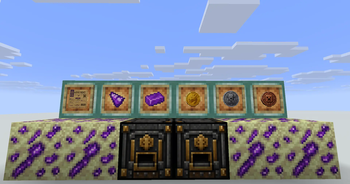
About this Mod
NHCoins
NHCoins is a vanilla-friendly economy and currency mod for Minecraft, designed for multiplayer survival servers and SMPs.
The mod introduces a complete custom currency system with immersive progression, rare resource gathering, and a dedicated exchange workstation while keeping the visual style close to vanilla Minecraft.
✨ Features
🪙 Custom Currency System
Adds three fully custom currencies:
- Bronze Sickles
- Silver Ducats
- Gold Mohurs
Each coin features unique Minecraft-style textures and distinct value tiers for server economies, trading, shops, and progression systems.
🏦 Coin Smith Workstation
Exchange and break down currency using the custom Coin Smith block.
Features:
- Custom GUI and menu
- Recipe-driven conversion system
- Shift-click bulk conversion
- Vanilla-style inventory interaction
- Fast denomination breakdown
🌌 Voidcore Resource Progression
Adds a rare End-themed material progression system:
- Voidcore Ore
- Voidcore Fragments
- Voidcore Ingots
Players can mine rare resources, refine them into high-tier materials, and convert them into premium currency.
🎨 Vanilla-Friendly Design
NHCoins is built to blend naturally into Minecraft with:
- Pixel-perfect Minecraft-inspired textures
- Vanilla-style GUI design
- Lightweight mechanics
- SMP-focused gameplay balance
🎯 Designed For
NHCoins works especially well for:
- SMP servers
- Roleplay economies
- Player shops and markets
- Long-term progression systems
- Server events and rewards
⚙️ Environment
This mod must be installed on both the client and server.
🔮 Planned Features
Future updates may include:
- Banking systems
- Advanced economy mechanics
- Additional rare resources
- Expanded exchange systems
- Currency sinks and balancing
Craft. Exchange. Prosper.
Available Versions
How to Install New Horizons Coins on Your Server
Order Server
Order a Minecraft Java server with at least 4 GB RAM (6 GB recommended).
Set fabric Loader
In the panel under "Egg", select the fabric loader and matching Minecraft version (26.1.2).
Install Mod
Open the mod browser in the dashboard and search for "New Horizons Coins". Click "Install" – done! Alternatively, upload the .jar via SFTP to the /mods folder.
Compatibility
Mod Loaders
Minecraft Versions
26.1.2, 26.1.1, 26.1
Server-side
✓ RequiredRecommended RAM
6 GB(min. 4 GB)Frequently Asked Questions
New Horizons Coins server crashes on startup – what to do?
Most common cause: wrong fabric version or insufficient RAM. Check the server log (latest.log) for "OutOfMemoryError" or "Mixin" errors. With Mado Hosting: ensure at least 4 GB RAM is allocated and the loader matches the mod version (26.1.2). You can switch loaders with one click in the panel.
Is New Horizons Coins compatible with fabric and neoforge?
New Horizons Coins officially supports fabric, neoforge for Minecraft 26.1.2, 26.1.1, 26.1. The Mado dashboard automatically detects incompatible loader combinations.
Server lagging with New Horizons Coins – how to optimize performance?
Recommended RAM: 6 GB (per 5 players). Use /spark profiler to check if New Horizons Coins consumes the most tick time. Common fixes: reduce server view-distance to 8-10, install "performant" or "starlight" as supplementary mods on Forge. With Mado Hosting, your server runs on NVMe SSDs with dedicated CPU cores for minimal latency.
Similar Mods



![CobbleDollars [Cobblemon Addon]](https://cdn.modrinth.com/data/s7N7AsqL/684040a264fc1d7f9b856ec5d2da39767398c7ad.png)

Rent Modded Server
Install New Horizons Coins with just one click on your server.