
Ngrok LAN
Open your singleplayer world as a server for you and your friends across the globe, in one click!
About this Mod
DEPRECATION NOTICE
This project is no longer actively maintained.
Due to a lack of bandwidth in the development team, we've unfortunately had to halt progress on this project, we appreciate your understanding.
We recommend alternatives such as e4mc for a similar featureset.
Thanks you for your support :)
Kind regards,
Alujjdnd/Flooflez
Ngrok LAN





Help Needed!
We are trying to port this mod to QuiltMC, many thanks to those who have contributed already! However, we are hope that a Quilt specific config library will become available to use soon, since our mod requires editing a config file we want the process to be as easy as possible for our users.
Introduction
Ngrok LAN is a Fabric mod that enables you to share your singleplayer world with your friends across the globe, all via
clicking on the new "Open Public Server" button! This mod uses Ngrok, a free service to ease the creation of servers, as
the main service to "tunnel" your connection to the internet, and will generate a link for your friends to connect to
after you click on "Open Public Server".
For more on how Ngrok-LAN works, check out What is Ngrok.
Installation/Quick Start
Dependencies
The mod requires the following mods:
Install Fabric Loader and Ngrok-LAN
- Go to the FabricMC website and download the latest installer
- Run the JAR, a window will pop up. Choose the correct version of Minecraft and loader (this mod currently requires
Minecraft v1.18.2 and loader v0.13.3), and click on "Install". - A new game version and profile will be created in the launcher's menu, which you can now use to launch Fabric.
- Put the mod JAR (available under Releases) into your "mods" folder,
along with the ClothConfig API and ModMenu JARs. (The Fabric API JAR should already be in your mods folder from the
previous section) - Run the newly installed profile from step 3, and Ngrok LAN should load
Configuring Ngrok-LAN
| Field | Description |
|---|---|
| "Enabled?" | This will enable/disable the mod, so you can configure whether the world is shared with Ngrok |
| "Ngrok Auth Token" | This is the field to input your Ngrok auth token, see getting your auth token |
| "Region" | This is where you can select the region of the Ngrok datacenter that you wish to use, use ones that are closest to you to minimise latency |
| "Require Authentication" | Ticking this box will start the server in online mode. If this box is unchecked, the server will be started in offline mode. This is mainly for when the other players are using cracked Minecraft accounts. |
| "Spawn Protection Radius" | Prevents non-opped players from breaking and placing blocks within X blocks of spawn |
Ngrok Regions
| Code | Region |
|---|---|
| US | United States |
| EU | Europe |
| AP | Asia/Pacific |
| AU | Australia |
| SA | South America |
| JP | Japan |
| IN | India |
Starting Ngrok LAN
- Make sure that Ngrok LAN is enabled, the auth token is valid, and the correct region is selected
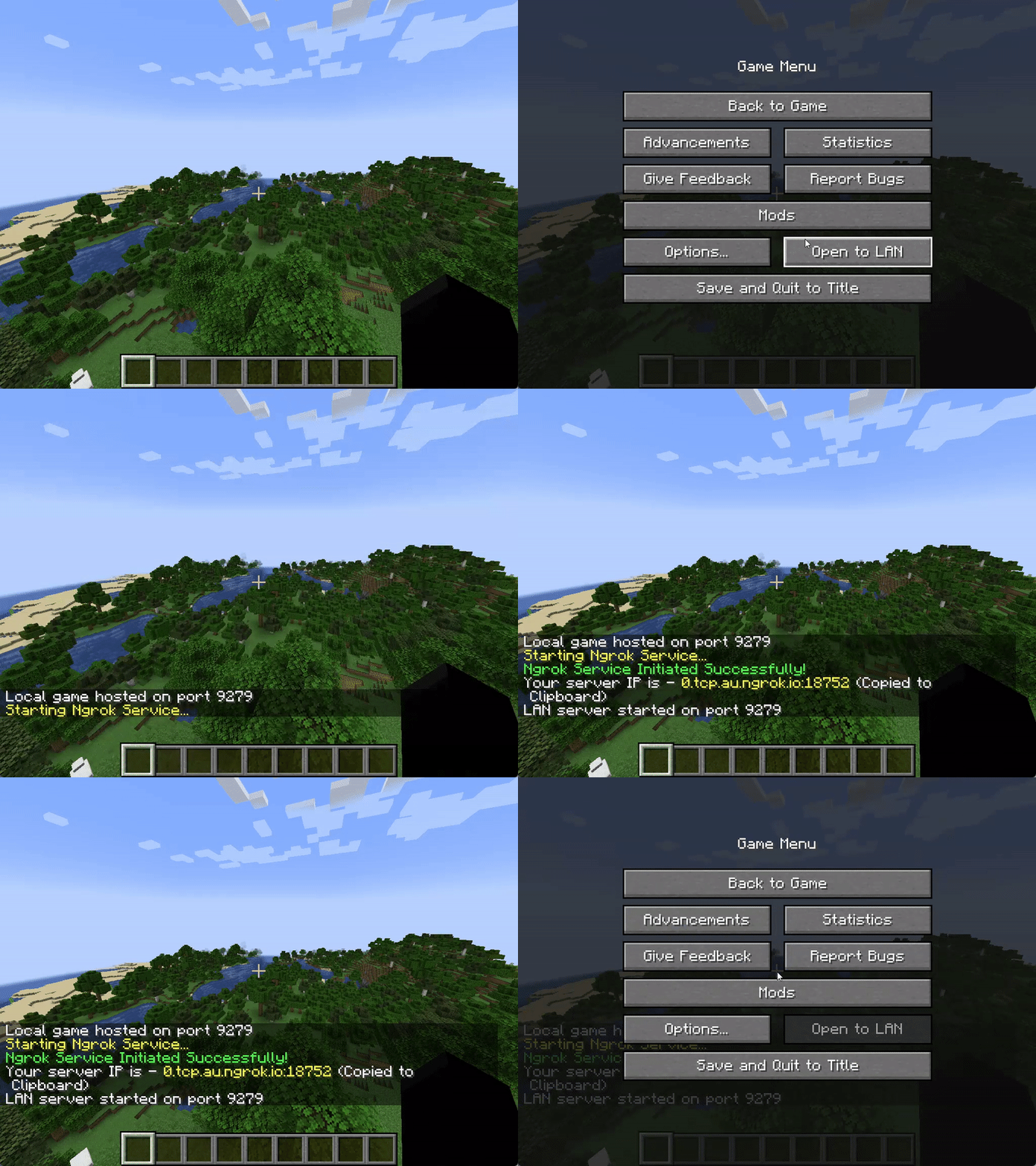
- Open a new singleplayer world, and click on Open to LAN
- Configure the game mode and whether to allow cheats
- Press on "Open Public Server"
- The message "Ngrok service initiated successfully" should appear in chat, with a link highlighted in yellow
- If not, check common issues below
- The link is automatically copied to your clipboard, and can now be shared with your friends
- Other people just need to put this as a server IP into their multiplayer list, and join the world
Getting your Ngrok Auth Token
- Go to https://ngrok.com/, and sign up for a new free account
- On the dashboard, on your left-hand side menu, click on Getting Started > Your Auth Token
- Copy the auth token, and put this into Ngrok LAN (don't share this token with other people)
Commands
| Command | Description |
|---|---|
/op <username> |
Gives the specified player server operator status. |
/deop <username> |
Removes server operator status from specified player. |
/whitelist add <username> |
Adds the player profile(s) to the whitelist. The player does not need to be online. |
/whitelist on |
Enables the server's use of a whitelist. |
/whitelist off |
Disables the server's use of a whitelist. |
/whitelist remove |
Removes the player profile(s) from the whitelist. The player does not need to be online. |
/whitelist list |
Displays all player profiles in the whitelist. |
/whitelist reload <username> |
Reloads the list of player profiles in whitelist.json from disk (used when whitelist.json has been modified outside of Minecraft). |
Common Issues
| Error Message | Resolution |
|---|---|
| An attempt was made to access a socket in a way forbidden by its access permissions. | Restart "Host Network Service" under the "Services" program |
| The authtoken you specified does not look like a proper ngrok tunnel (ERR_NGROK_105) | Check that your auth token is valid, and is correctly inputted into the mod config |
| Your account is limited to |
Check that you are not running any other tunnels with this auth token, try change to regions if you are still getting this error |
- For more errors, error codes and their resolution, check the Ngrok docs
Other Issues
Please open a new issue in Issues
What is Ngrok?
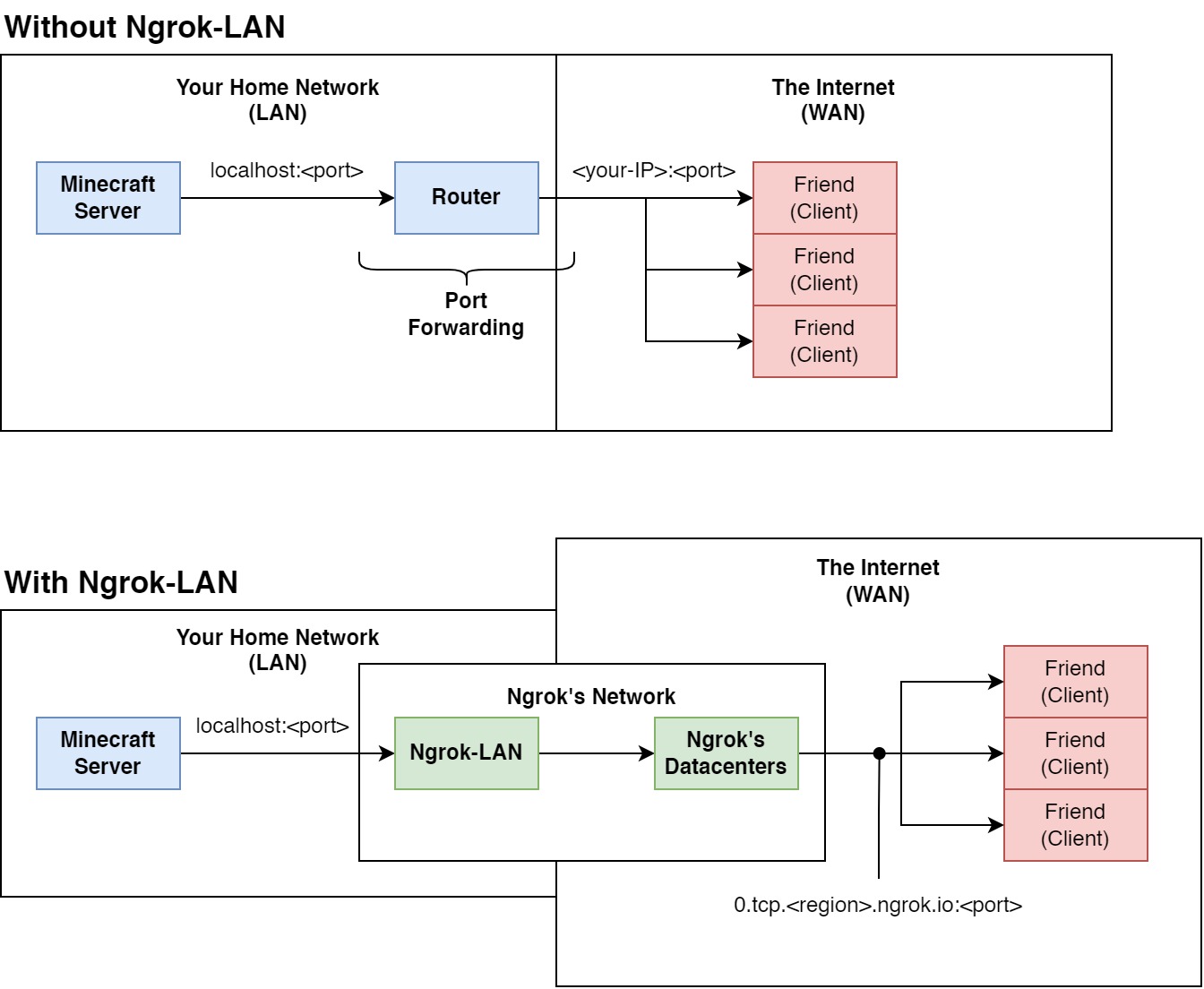
Ngrok is a free service that exposes your applications running locally to the internet, without port forwarding.
Usually, when setting up a Minecraft server, you would have to open the server, and "forward" your port through your
router. Port forwarding "publishes" your server to the internet, so anyone with you IP can join. Think of this as your
router "forwarding" the network packets from your server (part of your local network) to your friends (part of the wider
internet).
Using Ngrok, however, we don't need to forward the port. All the internet traffic is routed through an application (
Ngrok-LAN in this case), then their datacentres. Ngrok provides us with a link in return, that we can give to our
friends to connect to our server. This doesn't require any other configuration on your side - as long as you have
internet, and an Ngrok account, you can host your singleplayer world to your friends across the globe.
Ngrok Account Requirements
The mod only requires a free Ngrok account. The free tier for Ngrok allows you to have 1 free online tunnel
simultaenously, which means that, with one Ngrok free account, you can only host 1 Ngrok-LAN server at the same time.
The paid tiers allows you to have custom domains and more simultaenous online tunnels, but custom domains are not yet
supported in this mod.
More pricing info please refer to Ngrok's website
Known Incompatibilities
Please refer to Incompatibilities to find a list of incompatible mods.
Currently, only Proximity Voice Chat mods are incompatible. This is unlikely to be fixed.
TODO
- Port to QuiltMC (Please reach out and help us!)
- 1.17.1 Build
- 1.19 Build
License
This mod is available under the MIT license.
Available Versions
How to Install Ngrok LAN on Your Server
Order Server
Order a Minecraft Java server with at least 3 GB RAM (4 GB recommended).
Set fabric Loader
In the panel under "Egg", select the fabric loader and matching Minecraft version (1.20.2).
Install Mod
Open the mod browser in the dashboard and search for "Ngrok LAN". Click "Install" – done! Alternatively, upload the .jar via SFTP to the /mods folder.
Compatibility
Mod Loaders
Minecraft Versions
1.20.2, 1.20.1, 1.19.4 (+4 more)
Server-side
✗ UnsupportedRecommended RAM
4 GB(min. 3 GB)Frequently Asked Questions
Ngrok LAN server crashes on startup – what to do?
Most common cause: wrong fabric version or insufficient RAM. Check the server log (latest.log) for "OutOfMemoryError" or "Mixin" errors. With Mado Hosting: ensure at least 3 GB RAM is allocated and the loader matches the mod version (1.20.2). You can switch loaders with one click in the panel.
Is Ngrok LAN compatible with fabric?
Ngrok LAN officially supports fabric for Minecraft 1.20.2, 1.20.1, 1.19.4. The Mado dashboard automatically detects incompatible loader combinations.
Server lagging with Ngrok LAN – how to optimize performance?
Recommended RAM: 4 GB (per 8 players). Use /spark profiler to check if Ngrok LAN consumes the most tick time. Common fixes: reduce server view-distance to 8-10, install "performant" or "starlight" as supplementary mods on Forge. With Mado Hosting, your server runs on NVMe SSDs with dedicated CPU cores for minimal latency.
Similar Mods






Rent Modded Server
Install Ngrok LAN with just one click on your server.