
Nice Mob Manager
Probably the most advanced mob customizing data pack out there - tweak individual mobs, equipment, behavior and more easily via in-game menus.
Screenshots
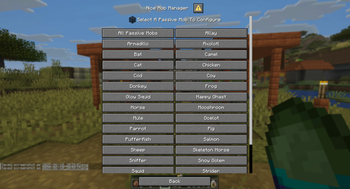
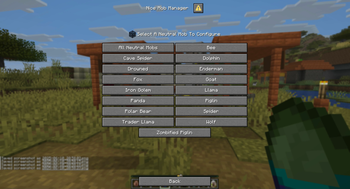
About this Mod

📖 Description
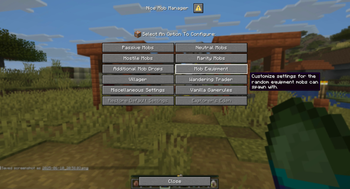
Nice Mob Manager is a super versatile tool that lets you control pretty much everything about mobs. It uses Mojang’s new Dialog system to give you easy, menu-based access to tons of features — only one command needed. You can tweak individual mobs or mob groups, add cool stuff like rarities with better loot, randomize gear, and even mess with vanilla gamerules. If you’ve thought about it, chances are you can do it.
Command to open the Menu
/function mob_manager
📋 Features
Mob Settings
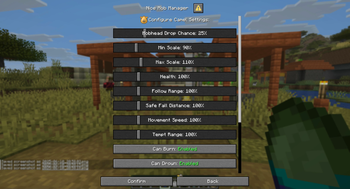
Tweak stuff like size, attack damage, health, and head drop chances for individual mobs or groups — perfect for dialing in your ideal playstyle or server vibe.
Rarity Mobs
Set up special mobs with rarity tags. They’re tougher by default and drop better loot — because rare should feel rare.
Mob Equipment
Randomize what gear mobs can spawn with — from helmets to boots. Mix it up or go full chaos mode.
Additional Mob Drops
Add extra drop chances for certain mobs — like letting Husks drop Sand or giving the Ender Dragon a shot at dropping a Dragon Egg.
Vanilla Gamerules
Easily check and tweak mob-related vanilla gamerules without digging through commands.
Villager Settings
Give Villagers custom names, randomize baby types, and even let them name their meeting points (or keep it boring, up to you).
Wandering Trader Settings
Control announcements, glowing effects, and set up fun trades like Miniblocks, Plushies, or Enchanted Books.
And many more!
There’s a ton more to explore — you’ll just have to dive in and see what you can mess with.
🛠️ Technical Gibberish
This data pack double functions as the optional resource pack needed for the Spawn Egg Locator Bar Icons. So simply slap that one also into your Resource folder and make sure to enable it in game for the textures to show properly. (This is not needed for the auto converted mod versions)
Custom Dialogs/Menus were first introduced in Minecraft 1.21.6 - Therefore a backport to older versions is simply not possible!
For PaperMC users, it is recommended to set the paper.maxChatCommandInputSize property to a value between 512 and 1024. More information can be found in the PaperMC Docs. Also make sure to have allow-non-player-entities-on-scoreboards enabled in your paper configs.
📝 Translations
Want to play in your own language? You can help us out by contributing on our Crowdin Page! Once a translation for a language is finished, it’ll be added to the data pack for you to enjoy.
✍️ Feedback, Questions & Suggestions
We're here to help! If you happen to have questions, suggestions or just encountered a bug, then feel free to hop on our discord server to ask for help in our Data Pack Section. Click to join the server
🎮 Explorer's Eden SMP
Join A Realm Recrafted, our Minecraft SMP! Enjoy a world featuring all of our (actively maintained) data packs, as well as some exclusive ones. It’s completely free without any microtransactions. Come build, explore, and craft with us today!
Available Versions
How to Install Nice Mob Manager on Your Server
Order Server
Order a Minecraft Java server with at least 3 GB RAM (4 GB recommended).
Set datapack Loader
In the panel under "Egg", select the datapack loader and matching Minecraft version (26.2).
Install Mod
Open the mod browser in the dashboard and search for "Nice Mob Manager". Click "Install" – done! Alternatively, upload the .jar via SFTP to the /mods folder.
Compatibility
Mod Loaders
Minecraft Versions
26.2, 26.1.2, 26.1.1 (+8 more)
Server-side
✓ RequiredRecommended RAM
4 GB(min. 3 GB)Frequently Asked Questions
Nice Mob Manager server crashes on startup – what to do?
Most common cause: wrong datapack version or insufficient RAM. Check the server log (latest.log) for "OutOfMemoryError" or "Mixin" errors. With Mado Hosting: ensure at least 3 GB RAM is allocated and the loader matches the mod version (26.2). You can switch loaders with one click in the panel.
Is Nice Mob Manager compatible with datapack and fabric and forge and neoforge and quilt?
Nice Mob Manager officially supports datapack, fabric, forge, neoforge, quilt for Minecraft 26.2, 26.1.2, 26.1.1. Note: Forge and Fabric mods are NOT cross-compatible – pick one loader and stick with it. The Mado dashboard automatically detects incompatible loader combinations.
Server lagging with Nice Mob Manager – how to optimize performance?
Recommended RAM: 4 GB (per 8 players). Use /spark profiler to check if Nice Mob Manager consumes the most tick time. Common fixes: reduce server view-distance to 8-10, install "performant" or "starlight" as supplementary mods on Forge. With Mado Hosting, your server runs on NVMe SSDs with dedicated CPU cores for minimal latency.
Similar Mods






Rent Modded Server
Install Nice Mob Manager with just one click on your server.