
Nick
昵称模组 /nick set "昵称" 设置,/nick reset 重置 (Nick mod, /nick set "nick" ,to set, /nick reset ,to reset)
Screenshots


About this Mod
Nick - 昵称模组 / Nickname Mod

此模组由AI生成(opencode内的DeepSeek V4) / AI-generated (DeepSeek V4 via opencode)
一个 Fabric 服务端模组,允许玩家修改自己的显示名称(昵称),支持团队颜色、前缀/后缀,并可通过昵称查找玩家。
A Fabric server-side mod that allows players to change their display name (nickname), supports team colors, prefixes/suffixes, and allows player lookup by nickname.
命令 / Commands
设置昵称 / Set Nickname
| 命令 / Command | 权限 / Permission | 说明 / Description |
|---|---|---|
/nick set <昵称/nickname> |
所有人 Everyone | 设置自己的昵称 Set your own nickname |
/nick set <目标/target> <昵称/nickname> |
OP | 设置他人的昵称 Set another player's nickname |
/nick reset |
所有人 Everyone | 重置自己的昵称 Reset your own nickname |
/nick reset <目标/target> |
OP | 重置他人的昵称 Reset another player's nickname |
<目标/target> 支持玩家名、@p、@a、@r、@s 等选择器。Supports player names and selectors.
昵称查找 / Nickname Lookup
设置昵称后,所有命令皆可用昵称替代玩家名。Once a nickname is set, all commands can use the nickname in place of the player name:
/tp 小明/tp Xiaoming/msg 小明/msg Xiaoming/kick 小明/kick Xiaoming
注意 Note:若昵称与真实玩家名同时存在,玩家名优先匹配。If a nickname and a real player name are identical, the real name takes priority.
昵称格式 / Nickname Format
- 单个词直接写 Single word:
/nick set 小明 - 带空格的昵称用引号 Nickname with spaces, use quotes:
/nick set "小明 同学" - 会显示队伍的团队颜色、前缀和后缀 Displays team color, prefix, and suffix when applicable
效果 / Features
| 功能 Feature | 状态 Status |
|---|---|
| 聊天消息显示昵称 Chat messages display nickname | ✅ |
| Tab 列表显示昵称(所有客户端,无需模组)Tab list displays nickname (all clients, no mod required) | ✅ |
| 头顶名签显示昵称(单人模式/需客户端装模组)Name tag shows nickname (singleplayer / requires client mod on server) | ✅ |
| 每位置客户端显示模式(默认/仅昵称/昵称+原名/隐藏)Per-location client display modes (default/nickname only/nickname+original/hide) | ✅ |
| 团队颜色生效 Team colors apply | ✅ |
| 昵称查找玩家 Lookup players by nickname | ✅ |
| 服务端日志显示原 MCID 以适配 MCDR Server logs show original MCID for MCDR | ✅ |
安装 / Installation
服务端 / Server
- 将
nick-*.jar放入mods/目录 Placenick-*.jarinto themods/directory - 重启服务器 Restart the server
客户端(可选)/ Client (Optional)
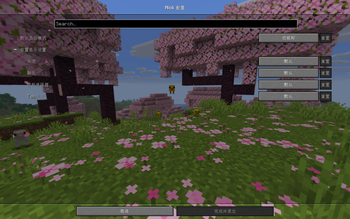
客户端安装后,头顶名签可在服务器模式下显示昵称,并可通过客户端配置调整每位置的显示方式。不装则仅聊天和 Tab 列表生效。
When installed on the client, name tags display nicknames in server mode, and the per-location client configuration screen is available. Without the mod, chat and tab list still work.
客户端配置 / Client Configuration
自动生成 config/nick-client.json,支持层级配置:全局默认模式 + 每位置覆盖。Auto-generated, supports hierarchical config: global default + per-location overrides.
显示模式 / Display Modes
| 值 Value | 效果 Effect | 示例 Example |
|---|---|---|
"nick_only" |
仅显示昵称(默认)Show nickname only | Xiao Ming |
"nick_and_original" |
昵称+原名 Nickname + original | [Xiao Ming]zxdnb |
"hide" |
隐藏昵称,显示原名 Hide nickname, show original | zxdnb |
位置 / Locations
| 位置 Location | 作用 Effect |
|---|---|
NAMETAG |
头顶名签 Overhead name tag |
CHAT |
聊天发送者 Chat sender display |
TARGET_SELECTOR |
选择器 Selector display |
TAB_LIST |
Tab 列表 Tab list entry |
配置文件 / Server Config
config/nick.json:
{
  "zxdnb": {"nick": "脏小豆"},
  "dongchengqiao": {"nick": "董丞乔"}
}
技术信息 / Technical Info
- Minecraft 版本 Version: 26.1
- 框架 Framework: Fabric Loader 0.19.2 / Fabric API 0.149.0+26.1.2
- Maven 组 Group:
com.dongchengqiao.nick - 主类 Main class:
com.dongchengqiao.nick.Nick
Available Versions
How to Install Nick on Your Server
Order Server
Order a Minecraft Java server with at least 3 GB RAM (4 GB recommended).
Set fabric Loader
In the panel under "Egg", select the fabric loader and matching Minecraft version (26.1.2).
Install Mod
Open the mod browser in the dashboard and search for "Nick". Click "Install" – done! Alternatively, upload the .jar via SFTP to the /mods folder.
Compatibility
Mod Loaders
Minecraft Versions
26.1.2, 26.1.1, 26.1
Server-side
✓ RequiredRecommended RAM
4 GB(min. 3 GB)Frequently Asked Questions
Nick server crashes on startup – what to do?
Most common cause: wrong fabric version or insufficient RAM. Check the server log (latest.log) for "OutOfMemoryError" or "Mixin" errors. With Mado Hosting: ensure at least 3 GB RAM is allocated and the loader matches the mod version (26.1.2). You can switch loaders with one click in the panel.
Is Nick compatible with fabric?
Nick officially supports fabric for Minecraft 26.1.2, 26.1.1, 26.1. The Mado dashboard automatically detects incompatible loader combinations.
Server lagging with Nick – how to optimize performance?
Recommended RAM: 4 GB (per 8 players). Use /spark profiler to check if Nick consumes the most tick time. Common fixes: reduce server view-distance to 8-10, install "performant" or "starlight" as supplementary mods on Forge. With Mado Hosting, your server runs on NVMe SSDs with dedicated CPU cores for minimal latency.
Similar Mods






Rent Modded Server
Install Nick with just one click on your server.