
Nick Paints
create custom paints for your nickname
Screenshots
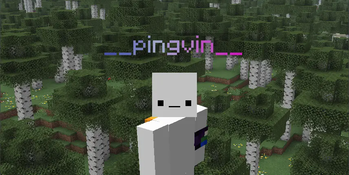
About this Mod
NickPaints
Dynamic, Cloud-Synced Gradient Nicknames for Minecraft
NickPaints is an advanced, client-side Fabric mod that brings your Minecraft identity to life with fully customizable, animated gradient nicknames.

- Animated Gradient Nicknames: Create beautiful, flowing gradients with multiple colors that animate smoothly over your nametag.
- Cloud Syncing: Design your unique paint and sync it to the cloud. Other players with the mod will see your custom nametag exactly as you designed it.
- Extensive Customization: Use a simple yet powerful syntax to control every aspect of your gradient, including animation speed, gradient length, style (smooth or blocky), animation direction, and more.
- Live In-Game GUI: Press a key (default
G) to open an interface with a real-time preview of your design. Features tab-completion for easy argument input. - Client-Side Control: Locally disable paints for all players or specific individuals with simple in-game commands. Your preferences are saved and persist across sessions.

This is a client-side Fabric mod.
- Install the Fabric Loader.
- Install the Fabric API. It is a required dependency.
- Download the latest version of NickPaints from the Modrinth Page
- Place the downloaded
.jarfile into yourmodsfolder. - Launch the game.

In-Game GUI
The easiest way to configure your paint is through the in-game GUI.
- Press
G(configurable in controls) to open the settings screen. - Enter your gradient string in the text field. You will see a live preview of your design at the top.
- Use
Tabto autocomplete arguments likespeed(),segment(), etc. - Click "Save & Sync to Cloud" to save your design and make it visible to other players. This requires a valid Mojang session.
Gradient Syntax
The core of the mod is its powerful gradient string syntax. It consists of a list of colors followed by optional arguments.
Colors
Colors are defined using standard HEX codes, separated by commas.#ff0000, #0000ff - A simple gradient from red to blue.
Arguments
Arguments are added after the colors, in any order.
| Argument | Description | Example |
|---|---|---|
speed(ms) |
Controls the animation speed in milliseconds. A full cycle takes this amount of time. | speed(2000) |
segment(chars) |
Stretches the full gradient over a specified number of characters. Allows long gradients to "scroll" across short names. | segment(15) |
style(block) |
Changes the gradient from a smooth blend to sharp, distinct color blocks. | style(block) |
direction(rtl) |
Reverses the gradient and animation direction from Right-to-Left instead of the default Left-to-Right. | direction(rtl) |
static(true) |
Completely disables all animation, creating a static gradient. | static(true) |
rainbow(ms) |
A special preset that creates an animated rainbow effect. Overrides any HEX colors. | rainbow(3000) |
Full Example:#e0c3fc, #8ec5fc, #8ec5fc, #e0c3fc speed(1000) segment(8) direction(rtl)

NickPaints provides a set of client-side commands for managing local settings.
| Command | Description |
|---|---|
/nickpaints clear-cache |
Clears the local cache of other players' paints, forcing the mod to re-fetch them. |
/nickpaints toggle global [true/false] |
Enables or disables the rendering of ALL custom paints. Toggles if no state is provided. |
/nickpaints toggle player <username> [true/false] |
Disables or enables rendering for a specific player. Supports tab-completion for online and already-disabled players. |
/nickpaints toggle list |
Displays the current global rendering status and lists all players for whom paints are locally disabled. |

This project is licensed under the MIT License. See the LICENSE file for details.
Available Versions
How to Install Nick Paints on Your Server
Order Server
Order a Minecraft Java server with at least 3 GB RAM (4 GB recommended).
Set fabric Loader
In the panel under "Egg", select the fabric loader and matching Minecraft version (1.21.8).
Install Mod
Open the mod browser in the dashboard and search for "Nick Paints". Click "Install" – done! Alternatively, upload the .jar via SFTP to the /mods folder.
Compatibility
Mod Loaders
Minecraft Versions
1.21.8, 1.21.7, 1.21.6 (+1 more)
Server-side
✗ UnsupportedRecommended RAM
4 GB(min. 3 GB)Frequently Asked Questions
Nick Paints server crashes on startup – what to do?
Most common cause: wrong fabric version or insufficient RAM. Check the server log (latest.log) for "OutOfMemoryError" or "Mixin" errors. With Mado Hosting: ensure at least 3 GB RAM is allocated and the loader matches the mod version (1.21.8). You can switch loaders with one click in the panel.
Is Nick Paints compatible with fabric?
Nick Paints officially supports fabric for Minecraft 1.21.8, 1.21.7, 1.21.6. The Mado dashboard automatically detects incompatible loader combinations.
Server lagging with Nick Paints – how to optimize performance?
Recommended RAM: 4 GB (per 8 players). Use /spark profiler to check if Nick Paints consumes the most tick time. Common fixes: reduce server view-distance to 8-10, install "performant" or "starlight" as supplementary mods on Forge. With Mado Hosting, your server runs on NVMe SSDs with dedicated CPU cores for minimal latency.
Similar Mods





Rent Modded Server
Install Nick Paints with just one click on your server.