
NightVisuals GUI
NightVisuals GUI. This modification is used for all our free submods.
Screenshots
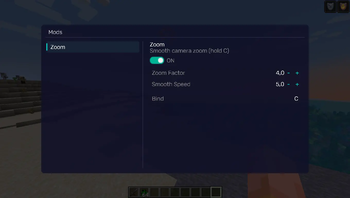
About this Mod
REQUIREMENTS
Fabric API
EN:
NightVisuals GUI is a core library required for mods within the NightVisuals ecosystem to function. It provides the unified graphical framework and configuration management backend necessary for dependent add-ons.
Important: This mod is a standalone technical dependency. It does not add any standalone user interfaces or features by itself. Without it, other NightVisuals modules (such as NightVisuals Zoom) will not be able to initialize their settings menus.
Key Features
- Unified GUI Framework: Core graphical layout and styling engine utilized by all dependent NightVisuals modules.
- Configuration Backend: Handles the underlying saving, modifying, and real-time application of settings configurations for linked add-ons.
Installation Guide
For dependent modules to work correctly, follow these steps:
- Install the required version of your mod loader and Fabric API.
- Download and place the NightVisuals GUI file into your
modsfolder. - Place any other desired NightVisuals modules into the same
modsfolder. - Launch the game.
To learn more about the ecosystem or explore the full premium visual suite, visit our official website: nightvisuals.fun
RU:
NightVisuals GUI — это базовая библиотека, необходимая для работы модификаций из экосистемы NightVisuals. Она предоставляет унифицированную графическую основу и бэкенд для управления конфигурациями зависимых дополнений.
Важно: Этот мод является исключительно технической зависимостью. Сам по себе он не добавляет в игру отдельные интерфейсы или функции. Без его установки другие модули NightVisuals (например, NightVisuals Zoom) не смогут запустить свои меню настроек.
Основные функции
- Графический фреймворк: Базовая графическая оболочка и стили, используемые всеми зависимыми модулями NightVisuals.
- Управление конфигурацией: Внутренняя система, отвечающая за сохранение, изменение и применение настроек для связанных дополнений.
Инструкция по установке
Чтобы зависимые модули работали корректно, выполните следующие шаги:
- Установите необходимую версию загрузчика модов и Fabric API.
- Скачайте и поместите файл NightVisuals GUI в папку
mods. - Поместите другие нужные модули NightVisuals в ту же папку
mods. - Запустите игру.
Узнать больше об экосистеме проектов или ознакомиться с полной премиум-версией визуального мода можно на нашем официальном сайте: nightvisuals.fun
Available Versions
How to Install NightVisuals GUI on Your Server
Order Server
Order a Minecraft Java server with at least 3 GB RAM (4 GB recommended).
Set fabric Loader
In the panel under "Egg", select the fabric loader and matching Minecraft version (1.21.4).
Install Mod
Open the mod browser in the dashboard and search for "NightVisuals GUI". Click "Install" – done! Alternatively, upload the .jar via SFTP to the /mods folder.
Compatibility
Mod Loaders
Minecraft Versions
1.21.4
Server-side
✗ UnsupportedRecommended RAM
4 GB(min. 3 GB)Frequently Asked Questions
NightVisuals GUI server crashes on startup – what to do?
Most common cause: wrong fabric version or insufficient RAM. Check the server log (latest.log) for "OutOfMemoryError" or "Mixin" errors. With Mado Hosting: ensure at least 3 GB RAM is allocated and the loader matches the mod version (1.21.4). You can switch loaders with one click in the panel.
Is NightVisuals GUI compatible with fabric?
NightVisuals GUI officially supports fabric for Minecraft 1.21.4. The Mado dashboard automatically detects incompatible loader combinations.
Server lagging with NightVisuals GUI – how to optimize performance?
Recommended RAM: 4 GB (per 8 players). Use /spark profiler to check if NightVisuals GUI consumes the most tick time. Common fixes: reduce server view-distance to 8-10, install "performant" or "starlight" as supplementary mods on Forge. With Mado Hosting, your server runs on NVMe SSDs with dedicated CPU cores for minimal latency.
Similar Mods



Rent Modded Server
Install NightVisuals GUI with just one click on your server.