
Nilcord
Yet another Discord bridge for Minecraft
Screenshots
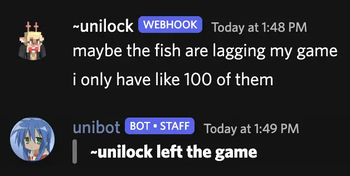
About this Mod
What started as a niche project for a niche modloader for a niche Minecraft version has now been extended to all Minecraft versions (that I personally care about)!
Nilcord | Yet another Discord bridge for Minecraft
Nilcord connects the chat of your Minecraft server to a specified Discord text channel, using a Discord bot and (optionally) webhook.
Installation
To get the mod set up, simply place the mod file in the mods directory (or nilmods with NilLoader), start your Minecraft server, and wait for it to generate the config file (and crash because it's not yet populated).
The config file, named nilcord.toml, is found in the config folder, and is pretty self-explanatory.
(default configuration)
# Settings pertaining to Discord itself
[discord]
	# The Discord bot token to use
	# default: EMPTY
	token = "EMPTY"
	# The Discord channel ID for the bot to send messages to / receive messages from
	# default: EMPTY
	channel_id = "EMPTY"

	# Settings pertaining to the Discord webhook
	[discord.webhook]
		# Whether to use a webhook for sending players' chat messages to Discord
		# default: false
		enabled = false
		# The webhook URL to use
		# default: EMPTY
		url = "EMPTY"

# Settings pertaining to Minecraft itself
[minecraft]
	# Whether to allow mentioning Discord users from Minecraft
	# default: false
	enable_mentions = false
	# Whether to allow mentioning @everyone and @here from Minecraft
	# default: false
	enable_everyone_and_here = false
	# Whether to show Discord message attachments in-game
	# default: true
	show_attachments = true
	# Whether to show messages from other Discord bots in-game
	# default: false
	show_bot_messages = false

# Settings pertaining to message formatting
[formatting]

	# Settings pertaining to messages visible in Discord
	# Available placeholders: <displayname> <username>
	[formatting.discord]
		# Server start message
		# Available placeholders: N/A
		# default: **Server started!**
		server_start_message = "**Server started!**"
		# Server stop message
		# Available placeholders: N/A
		# default: **Server stopped!**
		server_stop_message = "**Server stopped!**"
		# Player chat messages
		# Additional placeholders: <message>
		# default: **<<username>>** <message>
		chat_message = "**<<username>>** <message>"
		# Player join messages
		# Additional placeholders: N/A
		# default: > **<username> joined the game**
		join_message = "> **<username> joined the game**"
		# Player leave messages
		# Additional placeholders: N/A
		# default: > **<username> left the game**
		leave_message = "> **<username> left the game**"
		# Player advancement messages
		# Additional placeholders: <advancement_description> <advancement_title>
		# default: > **<username>** has just earned the achievement **[<advancement_title>]**\n> \> _<advancement_description>_
		advancement_fallback_message = "> **<username>** has just earned the achievement **[<advancement_title>]**\n> \\> _<advancement_description>_"
		# default: > **<username>** has completed the challenge **[<advancement_title>]**\n> \> _<advancement_description>_
		advancement_challenge_message = "> **<username>** has completed the challenge **[<advancement_title>]**\n> \\> _<advancement_description>_"
		# default: > **<username>** has reached the goal **[<advancement_title>]**\n> \> _<advancement_description>_
		advancement_goal_message = "> **<username>** has reached the goal **[<advancement_title>]**\n> \\> _<advancement_description>_"
		# default: > **<username>** has made the advancement **[<advancement_title>]**\n> \> _<advancement_description>_
		advancement_task_message = "> **<username>** has made the advancement **[<advancement_title>]**\n> \\> _<advancement_description>_"
		# Player death messages
		# Additional placeholders: <death_message>
		# default: **<username> died:** _<death_message>_
		death_message = "**<username> died:** _<death_message>_"

		# Settings pertaining to messages sent from the webhook, if enabled
		[formatting.discord.webhook]
			# The URL to use for the webhook's avatar
			# Additional placeholders: <uuid>
			# default: https://visage.surgeplay.com/bust/128/<uuid>
			avatar_url = "https://visage.surgeplay.com/bust/128/<uuid>"
			# The webhook's username
			# Additional placeholders: N/A
			# default: <username>
			username = "<username>"
			# Player chat messages
			# Additional placeholders: <message>
			# default: <message>
			chat_message = "<message>"

	# Settings pertaining to messages visible in Minecraft
	# Available placeholders: <message> <message_url> <nickname> <role_color> <username>
	[formatting.minecraft]
		# Discord messages
		# Additional placeholders: <attachment_format> <discord_format> <reply_format> <username_format>
		# default: [Discord] <reply_format><click:open_url:'<message_url>'><<username_format>></click> <message><attachment_format>
		discord_message = "[Discord] <reply_format><click:open_url:'<message_url>'><<username_format>></click> <message><attachment_format>"
		# Username format
		# Additional placeholders: N/A
		# default: <hover:show_text:'@<username>'><color:'<role_color>'><nickname></color></hover>
		username_format = "<hover:show_text:'@<username>'><color:'<role_color>'><nickname></color></hover>"
		# Mention format
		# Additional placeholders: N/A
		# default: <underline><hover:show_text:'@<username>'>@<nickname></hover></underline>
		mention_format = "<underline><hover:show_text:'@<username>'>@<nickname></hover></underline>"
		# Reply format
		# Additional placeholders: <reply_message> <reply_nickname> <reply_role_color> <reply_url> <reply_username>
		# default: <click:open_url:'<reply_url>'><hover:show_text:'@<reply_username>: <reply_message>'>[<aqua>←</aqua><color:'<reply_role_color>'><reply_nickname></color>]</hover></click>
		reply_format = "<click:open_url:'<reply_url>'><hover:show_text:'@<reply_username>: <reply_message>'>[<aqua>←</aqua><color:'<reply_role_color>'><reply_nickname></color>]</hover></click> "
		# Attachment format
		# Additional placeholders: <attachment_url>
		# default: <click:open_url:'<attachment_url>'>[<aqua>Attachment</aqua>]</click>
		attachment_format = "<click:open_url:'<attachment_url>'>[<aqua>Attachment</aqua>]</click>"
(Note that this is the config file for Nilcord 2.1.0+1.20.4+fabric. It may look different on other versions.)
Only the token and channel_id fields (under the discord category) are strictly required to be filled out; the mod falls back to sensible defaults for everything else. But feel free to change it to your liking!
Notes
For setting up a Discord application (to get a bot token), follow discord.js' guide: Setting up a bot application | discord.js Guide
For finding a Discord channel's "Channel ID", follow Discord's guide: Where can I find my User/Server/Message ID? - Discord
With 1.21.1 and below, the Fabric (and NeoForge!?) versions can also make use of the Simplified Text Format, as well as placeholders supplied by Text Placeholder API and the various mods that support it.
With 1.21.2 and above, the Fabric versions allow using QuickText as well.
The Forge 1.7.10 version has additional support for ChromatiCraft's progression messages, as well as ServerUtilities' AFK messages.
Comments? Questions? Suggestions? Demands? Open an issue on the issue tracker!
Available Versions
How to Install Nilcord on Your Server
Order Server
Order a Minecraft Java server with at least 3 GB RAM (4 GB recommended).
Set fabric Loader
In the panel under "Egg", select the fabric loader and matching Minecraft version (26.1.2).
Install Mod
Open the mod browser in the dashboard and search for "Nilcord". Click "Install" – done! Alternatively, upload the .jar via SFTP to the /mods folder.
Compatibility
Mod Loaders
Minecraft Versions
26.1.2, 26.1.1, 26.1 (+19 more)
Server-side
✓ RequiredRecommended RAM
4 GB(min. 3 GB)Frequently Asked Questions
Nilcord server crashes on startup – what to do?
Most common cause: wrong fabric version or insufficient RAM. Check the server log (latest.log) for "OutOfMemoryError" or "Mixin" errors. With Mado Hosting: ensure at least 3 GB RAM is allocated and the loader matches the mod version (26.1.2). You can switch loaders with one click in the panel.
Is Nilcord compatible with fabric and forge and neoforge and nilloader and quilt?
Nilcord officially supports fabric, forge, neoforge, nilloader, quilt for Minecraft 26.1.2, 26.1.1, 26.1. Note: Forge and Fabric mods are NOT cross-compatible – pick one loader and stick with it. The Mado dashboard automatically detects incompatible loader combinations.
Server lagging with Nilcord – how to optimize performance?
Recommended RAM: 4 GB (per 8 players). Use /spark profiler to check if Nilcord consumes the most tick time. Common fixes: reduce server view-distance to 8-10, install "performant" or "starlight" as supplementary mods on Forge. With Mado Hosting, your server runs on NVMe SSDs with dedicated CPU cores for minimal latency.
Similar Mods






Rent Modded Server
Install Nilcord with just one click on your server.