
NIRC
Channel-based chat mod for Minecraft Fabric — connects to a dedicated server with TLS and Mojang account verification.
Screenshots
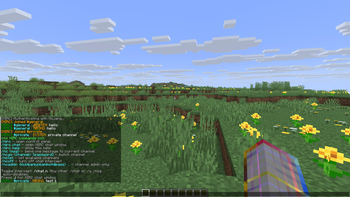
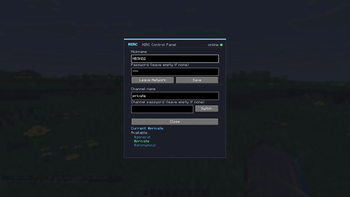
About this Mod
NIRC
A channel-based chat mod for Minecraft Fabric. Adds in-game chat that runs
over a secure custom protocol on a dedicated chat server — separate from
the Minecraft server you're playing on. Runs entirely client-side, so it
works on any server (vanilla, modded, LAN, singleplayer).
Features
- Channel-based chat with per-channel passwords, MOTDs, and admins
- Slash commands for sending, switching channels, and admin actions
- @mention highlight with sound notification
- Control panel UI for nickname / password / channel management
- Auto-restore last channel on reconnect
Security
- TLS 1.2 with client-side certificate pinning
- Mojang UUID verification — prevents trivial nick impersonation
- Yggdrasil challenge-response — verifies real Minecraft account ownership
- Per-IP and total rate limits on connections and messages
- Channel password lockout after repeated failures
Commands
| Command | Description |
|---|---|
/nirc |
Open the control panel |
/nirc chat |
Open the NIRC chat window |
/nc <message> |
Send one message to the current channel |
/ncgo <channel> [password] |
Switch channel |
/nclist |
List available channels |
/ncoff |
Disable chat |
/ch n |
Toggle chat |
/ncadmin <kick|ban|unban|motd|pass> ... |
Channel admin commands |
Server
This mod connects to a fixed server, intended
for a small invite-only community. There is no built-in mechanism to point
it at other servers.
Requirements
- Minecraft 1.21.10 – 1.21.11
- Fabric Loader ≥ 0.16
- Fabric API
- Java 21
Available Versions
How to Install NIRC on Your Server
Order Server
Order a Minecraft Java server with at least 3 GB RAM (4 GB recommended).
Set fabric Loader
In the panel under "Egg", select the fabric loader and matching Minecraft version (1.21.11).
Install Mod
Open the mod browser in the dashboard and search for "NIRC". Click "Install" – done! Alternatively, upload the .jar via SFTP to the /mods folder.
Compatibility
Mod Loaders
Minecraft Versions
1.21.11, 1.21.10
Server-side
✗ UnsupportedRecommended RAM
4 GB(min. 3 GB)Frequently Asked Questions
NIRC server crashes on startup – what to do?
Most common cause: wrong fabric version or insufficient RAM. Check the server log (latest.log) for "OutOfMemoryError" or "Mixin" errors. With Mado Hosting: ensure at least 3 GB RAM is allocated and the loader matches the mod version (1.21.11). You can switch loaders with one click in the panel.
Is NIRC compatible with fabric?
NIRC officially supports fabric for Minecraft 1.21.11, 1.21.10. The Mado dashboard automatically detects incompatible loader combinations.
Server lagging with NIRC – how to optimize performance?
Recommended RAM: 4 GB (per 8 players). Use /spark profiler to check if NIRC consumes the most tick time. Common fixes: reduce server view-distance to 8-10, install "performant" or "starlight" as supplementary mods on Forge. With Mado Hosting, your server runs on NVMe SSDs with dedicated CPU cores for minimal latency.
Similar Mods






Rent Modded Server
Install NIRC with just one click on your server.