
NJ Capybaras
Adds realistic capybaras to Minecraft with unique behaviors, breeding, custom drops, and immersive world generation.
Screenshots
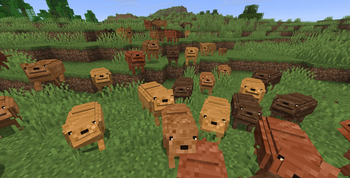
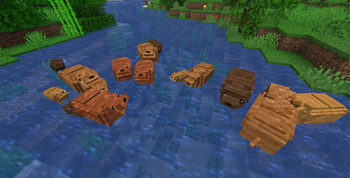
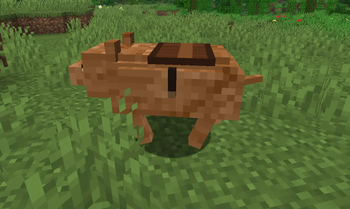
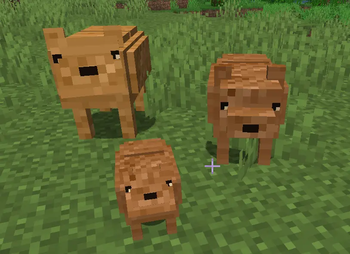
About this Mod
Capy Mod
Bring adorable capybaras to Minecraft!
Capy Mod adds naturally spawning capybaras to Minecraft with multiple unique variants, breeding mechanics, and dedicated server support. Explore your world, discover every capybara variant, and bring a relaxing new mob to your adventures.
Features
🦫 Four Unique Variants
Capy Mod currently includes four different capybara variants:
- Brown
- Dark
- Golden
- Rust
Each variant has its own appearance, giving players more variety while exploring the world.
🌍 Natural Spawning
Capybaras naturally generate in suitable biomes without changing Minecraft's vanilla gameplay.
Simply install the mod and start exploring.
❤️ Breeding
Breed capybaras to grow your own family.
Baby capybaras are fully supported and allow players to collect even more variants.
🥚 Capybara Spawn Egg
A Capybara Spawn Egg is included for Creative Mode, map makers, and testing.
👥 Multiplayer Compatible
Capy Mod works perfectly in both Singleplayer and Multiplayer.
Enjoy capybaras together with your friends on Fabric servers.
🖥️ Dedicated Server Support
The mod is fully compatible with dedicated Fabric servers.
Why Install Capy Mod?
- Adds a completely new peaceful mob.
- Multiple naturally spawning variants.
- Vanilla-friendly gameplay.
- Lightweight and performance-friendly.
- Multiplayer compatible.
- Easy to install.
- Regular updates with new content planned.
Requirements
- Minecraft 1.21.11
- Fabric Loader
- Fabric API
Supported Languages
Currently available in:
- 🇺🇸 English
- 🇩🇪 German
Additional translations are always welcome.
Current Status
⚠️ Alpha v0.1.0
Capy Mod is currently in active development.
This is the first public Alpha release. While the core features are already playable, many improvements and additional content are planned for future versions.
Because this is an early Alpha version, always create backups before using the mod on important worlds or servers.
Planned Features
The roadmap currently includes:
- 🤍 Albino Capybara
- 🥙 Gyros
- 💩 Poop
- 🎵 Custom sounds
- ✨ More animations
- 🦫 Additional capybara variants
- 🍃 More natural behaviors
- 🎮 More gameplay features
- 💡 Community-requested features
Feedback
Found a bug?
Have an idea?
Your feedback helps improve Capy Mod.
Bug reports, feature requests, balancing suggestions, and general feedback are always appreciated.
Looking for Contributors
We are currently looking for:
- 💻 Developers
- 🧪 Testers
- 🌍 Translators
Development access is restricted to approved contributors.
Interested developers can apply through our Discord server.
Community
Stay up to date with development and future projects.
- 🎮 Discord — Support, bug reports, community, and developer applications.
- 💻 GitHub — Source code, issue tracking, and development progress.
- 📺 YouTube — Showcases, updates, and development videos.
- 🎵 TikTok — Shorts and sneak peeks.
- 👻 Snapchat — Project updates.
Thank you for supporting Capy Mod!
Every download, suggestion, bug report, and piece of feedback helps improve the project and shape future updates.
Available Versions
How to Install NJ Capybaras on Your Server
Order Server
Order a Minecraft Java server with at least 4 GB RAM (6 GB recommended).
Set fabric Loader
In the panel under "Egg", select the fabric loader and matching Minecraft version (1.21.11).
Install Mod
Open the mod browser in the dashboard and search for "NJ Capybaras". Click "Install" – done! Alternatively, upload the .jar via SFTP to the /mods folder.
Compatibility
Mod Loaders
Minecraft Versions
1.21.11
Server-side
✓ RequiredRecommended RAM
6 GB(min. 4 GB)Frequently Asked Questions
NJ Capybaras server crashes on startup – what to do?
Most common cause: wrong fabric version or insufficient RAM. Check the server log (latest.log) for "OutOfMemoryError" or "Mixin" errors. With Mado Hosting: ensure at least 4 GB RAM is allocated and the loader matches the mod version (1.21.11). You can switch loaders with one click in the panel.
Is NJ Capybaras compatible with fabric?
NJ Capybaras officially supports fabric for Minecraft 1.21.11. The Mado dashboard automatically detects incompatible loader combinations.
Server lagging with NJ Capybaras – how to optimize performance?
Recommended RAM: 6 GB (per 5 players). Use /spark profiler to check if NJ Capybaras consumes the most tick time. Common fixes: reduce server view-distance to 8-10, install "performant" or "starlight" as supplementary mods on Forge. With Mado Hosting, your server runs on NVMe SSDs with dedicated CPU cores for minimal latency.
Similar Mods




Rent Modded Server
Install NJ Capybaras with just one click on your server.