
No Anvil Expensive
Fixes the "Too Expensive!" anvil bug.
Screenshots

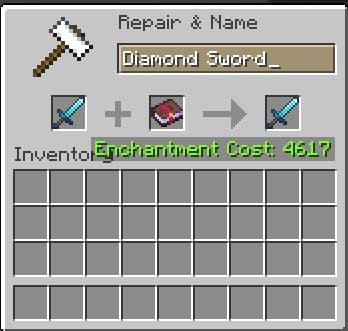
About this Mod
🔨 NoAnvilExpensive — Break the Anvil Limits!
Have you ever spent hours grinding for perfect enchantments in your personal survival world, only to place your favorite netherite sword into an anvil and see those frustrating red words: "Too Expensive!"?
In vanilla Minecraft, the game imposes an arbitrary 40-level limit on anvil operations. Every time you repair an item or add an enchantment, its hidden "prior work penalty" increases. Eventually, the game completely locks you out, forcing you to watch your legendary gear break forever.
NoAnvilExpensive is a lightweight Fabric mod designed specifically for Singleplayer and LAN play. It completely deletes this restriction from the internal game logic, allowing you and your friends to use anvils without any limits!
🚀 Key Features
- Complete Cap Removal: Completely eradicates the vanilla 40-level restriction. If an operation costs 42, 75, or 120 levels, the anvil will let you do it, provided you have the experience.
- Infinite Gear Longevity: Repair your favorite armor, tools, and weapons an infinite number of times. You will never have to craft a replacement piece of gear just because an anvil rejected it.
- Ultimate Enchantment Combining: Want to combine five different enchanted books to create the ultimate bow or helmet? Go right ahead. The mod dynamically handles the scaling cost without ever cutting you off.
- LAN Multiplayer Support: Open your world to your friends and play together! As long as everyone has the mod installed, everyone can enjoy unlimited anvil repairs.
🎮 How It Changes Your Experience
Without this mod, you are forced to use hyper-specific, confusing enchantment order guides just to avoid hitting the cap. If you make a mistake, your hard-earned item is permanently ruined.
With NoAnvilExpensive, you can experience your world with true freedom:
- Endgame Security: Your god-tier armor sets are safe forever. As long as you have an experience farm in your world, you can maintain your gear indefinitely.
- Stress-Free Enchanting: Order no longer matters. Combine books in whatever way is convenient for you.
- Co-op Ready: Perfect for small private sessions when you open your world to LAN to play with a friend.
🛠 Technical Specifications & Requirements
| Detail | Specification |
|---|---|
| Mod Loader | Fabric |
| Supported Game Versions | 1.21.4, 1.21.8, 1.21.11 |
| Environment | Client & Server (Integrated LAN) |
⚠️ Important Requirement for LAN:
If you open your world for friends to play over the local network (LAN), every player joining your world must have this mod installed in their game.(Note: This mod is optimized for Singleplayer/LAN worlds and is not meant for dedicated standalone servers).
Available Versions
How to Install No Anvil Expensive on Your Server
Order Server
Order a Minecraft Java server with at least 3 GB RAM (4 GB recommended).
Set fabric Loader
In the panel under "Egg", select the fabric loader and matching Minecraft version (1.21.11).
Install Mod
Open the mod browser in the dashboard and search for "No Anvil Expensive". Click "Install" – done! Alternatively, upload the .jar via SFTP to the /mods folder.
Compatibility
Mod Loaders
Minecraft Versions
1.21.11, 1.21.8, 1.21.4
Server-side
✓ RequiredRecommended RAM
4 GB(min. 3 GB)Frequently Asked Questions
No Anvil Expensive server crashes on startup – what to do?
Most common cause: wrong fabric version or insufficient RAM. Check the server log (latest.log) for "OutOfMemoryError" or "Mixin" errors. With Mado Hosting: ensure at least 3 GB RAM is allocated and the loader matches the mod version (1.21.11). You can switch loaders with one click in the panel.
Is No Anvil Expensive compatible with fabric?
No Anvil Expensive officially supports fabric for Minecraft 1.21.11, 1.21.8, 1.21.4. The Mado dashboard automatically detects incompatible loader combinations.
Server lagging with No Anvil Expensive – how to optimize performance?
Recommended RAM: 4 GB (per 8 players). Use /spark profiler to check if No Anvil Expensive consumes the most tick time. Common fixes: reduce server view-distance to 8-10, install "performant" or "starlight" as supplementary mods on Forge. With Mado Hosting, your server runs on NVMe SSDs with dedicated CPU cores for minimal latency.
Similar Mods






Rent Modded Server
Install No Anvil Expensive with just one click on your server.