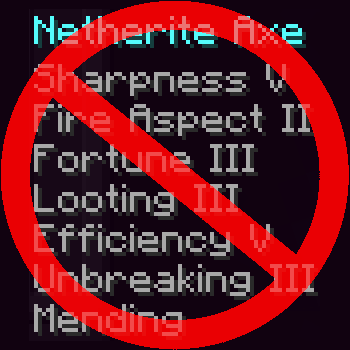
No Enchantment Overloading
Tools/Armor/Weapons will now have a limited number of enchantments
About this Mod
With this mod, you can't just shove every enchantment in one tool.
Instead, items will only take up a limited number of enchantments.
Each tool will have a certain weight capacity, and each enchantment level will consume a certain amount of weight.
Stronger tiered tools will have lower enchantment capacities than weaker tiers.
Cursed enchantments will also have negative weight, effectively letting you add more enchantments to an item.
Config Summary
item_capacities
Determines the amount of capacity each item will have.
For example,
"minecraft:netherite_sword": 1.5
defines the capacity of netherrite swords as 1.5.
Each entry must have a number greater than or equal to zero.
Tools without an entry will default to having no capacities, just like in vanilla
You may also specify multiple enchantments by tier.
For example,
"netherrite": 1.5
defines the capacity for netherite tiered armor and tools as 1.5
Capacities specified by id will override those specified by tier.
enchantment_weights
Determines how much weight each enchantment will consume per level.
Each enchantment can be specified by id for how many enchantments it will consume.
For example,
"minecraft:protection": [
  0.25,
  0.50,
  0.75,
  1.00
]
defines that for protection, it will consume 0.25 weight at level 1, 0.50 at level 2, 0.75 at level 3, and 1.00 at level 4.
Enchantments without a config entry will default to having consuming no weight, just like in vanilla Minecraft_
You can also apply default values for all enchantments of a certain max level.
For example,
"max_level_of_2": [
  0.5,
  1.0
]
defines that for all enchantments of with a max level of 2, it will consume 0.5 weight at level 1, and 1.0 at level 2.
Curses specified this way will have negative weight.
Weights specified by id will override those specified by tier.
You may freely use this mod in any modpack, as long as the download remains hosted within the Modrinth ecosystem.
You may also freely port this mod to a different version/modloader, as long as you reference the original mod and it is hosted within the Modrith ecosystem.
Available Versions
How to Install No Enchantment Overloading on Your Server
Order Server
Order a Minecraft Java server with at least 3 GB RAM (4 GB recommended).
Set fabric Loader
In the panel under "Egg", select the fabric loader and matching Minecraft version (1.21.1).
Install Mod
Open the mod browser in the dashboard and search for "No Enchantment Overloading". Click "Install" – done! Alternatively, upload the .jar via SFTP to the /mods folder.
Compatibility
Mod Loaders
Minecraft Versions
1.21.1
Server-side
✓ RequiredRecommended RAM
4 GB(min. 3 GB)Frequently Asked Questions
No Enchantment Overloading server crashes on startup – what to do?
Most common cause: wrong fabric version or insufficient RAM. Check the server log (latest.log) for "OutOfMemoryError" or "Mixin" errors. With Mado Hosting: ensure at least 3 GB RAM is allocated and the loader matches the mod version (1.21.1). You can switch loaders with one click in the panel.
Is No Enchantment Overloading compatible with fabric?
No Enchantment Overloading officially supports fabric for Minecraft 1.21.1. The Mado dashboard automatically detects incompatible loader combinations.
Server lagging with No Enchantment Overloading – how to optimize performance?
Recommended RAM: 4 GB (per 8 players). Use /spark profiler to check if No Enchantment Overloading consumes the most tick time. Common fixes: reduce server view-distance to 8-10, install "performant" or "starlight" as supplementary mods on Forge. With Mado Hosting, your server runs on NVMe SSDs with dedicated CPU cores for minimal latency.
Rent Modded Server
Install No Enchantment Overloading with just one click on your server.