
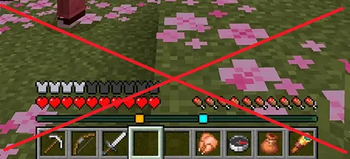
No player locator bar
Deletes the player locator bar, so no one can see where are you
Screenshots
About this Mod
IF USING SPIGOT OR PAPER, TYPE /activateNPLB IN YOUR WORLD TO ACTIVATE PLUGIN!
No Player Locator Bar is a functional utility mod designed to improve the Minecraft user interface by removing the player locator bar. In modern versions of the game. The HUD often features markers or bars that pinpoint the player's exact orientation and location. This mod disables that specific HUD element, so no one can see where are you.
Why use this mod?
Modern Minecraft UI can sometimes feel overly informative, providing guides that simplify the survival experience. This mod is specifically tailored for:
Hardcore & Realism Enthusiasts: If you prefer a gameplay style where the game doesn't show too much information, removing the locator bar is an essential step toward a true survival challenge.
Modpack Creators: An ideal addition for Expert or Realism themed modpacks where map navigation is intended to be a learned skill.
Cinematic Gameplay: Great for players who record gameplay or take screenshots and want to reduce the amount of artificial UI overlays on the screen.
Compatibility and Installation
Version Support: Compatible with major mod loaders (Fabric/Quilt/NeoForge) depending on the selected build.
Mod Compatibility: Works alongside other UI-altering mods. It strictly targets the player locator component and should not interfere with mini-map mods or inventory tweaks.
Lightweight Design: No external dependencies required. Simply drop the file into your mods folder and launch the game. (Use fabric API if playing on fabric)
Connect with us:
Support us on ko-fi: https://ko-fi.com/netheritegroup
CurseForge projects: https://www.curseforge.com/members/netheritegroup/projects
Modrinth profile: https://modrinth.com/user/NetheriteGroup
Available Versions
How to Install No player locator bar on Your Server
Order Server
Order a Minecraft Java server with at least 3 GB RAM (4 GB recommended).
Set datapack Loader
In the panel under "Egg", select the datapack loader and matching Minecraft version (1.21.8).
Install Mod
Open the mod browser in the dashboard and search for "No player locator bar". Click "Install" – done! Alternatively, upload the .jar via SFTP to the /mods folder.
Compatibility
Mod Loaders
Minecraft Versions
1.21.8
Server-side
✓ RequiredRecommended RAM
4 GB(min. 3 GB)Frequently Asked Questions
No player locator bar server crashes on startup – what to do?
Most common cause: wrong datapack version or insufficient RAM. Check the server log (latest.log) for "OutOfMemoryError" or "Mixin" errors. With Mado Hosting: ensure at least 3 GB RAM is allocated and the loader matches the mod version (1.21.8). You can switch loaders with one click in the panel.
Is No player locator bar compatible with datapack and fabric and neoforge?
No player locator bar officially supports datapack, fabric, neoforge for Minecraft 1.21.8. The Mado dashboard automatically detects incompatible loader combinations.
Server lagging with No player locator bar – how to optimize performance?
Recommended RAM: 4 GB (per 8 players). Use /spark profiler to check if No player locator bar consumes the most tick time. Common fixes: reduce server view-distance to 8-10, install "performant" or "starlight" as supplementary mods on Forge. With Mado Hosting, your server runs on NVMe SSDs with dedicated CPU cores for minimal latency.
Similar Mods




Rent Modded Server
Install No player locator bar with just one click on your server.