
No Ominous Banners
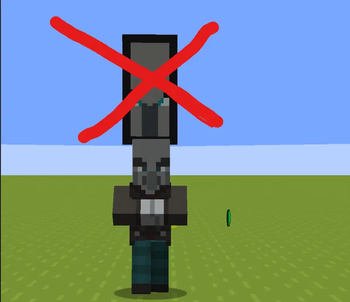
Pillager Captains no longer drop their banners upon death. This ensures unclogged farms and boots performance
Screenshots
About this Mod
🧭 Introduction
**This is a lightweight server-side optimization mod designed for Minecraft servers that frequently run raids or pillager-related farms. It focuses on improving farm efficiency and reducing unnecessary item clutter without changing core gameplay mechanics.
**
⚙️ What This Mod Does
** The mod prevents Pillager Captains from dropping Ominous Banners when they are defeated. By removing this drop, it stops banner items from accumulating during large-scale raid farms or patrol grinding setups.**
🚀 Performance Benefits
** By eliminating constant banner item drops, the mod reduces entity load and item lag in high-activity areas. This helps improve overall server stability, especially on survival SMPs or automated farming servers where raids are repeatedly triggered for Ominous Bottles and loot farming.**
🔧 Compatibility
** Fully server-side and does not require clients to install anything. Works seamlessly with vanilla mechanics and most fabric-based server environments.
**
A simple but effective optimization for smoother raid farming and cleaner servers ✨
Available Versions
How to Install No Ominous Banners on Your Server
Order Server
Order a Minecraft Java server with at least 3 GB RAM (4 GB recommended).
Set fabric Loader
In the panel under "Egg", select the fabric loader and matching Minecraft version (1.21.11).
Install Mod
Open the mod browser in the dashboard and search for "No Ominous Banners". Click "Install" – done! Alternatively, upload the .jar via SFTP to the /mods folder.
Compatibility
Mod Loaders
Minecraft Versions
1.21.11
Server-side
✓ RequiredRecommended RAM
4 GB(min. 3 GB)Frequently Asked Questions
No Ominous Banners server crashes on startup – what to do?
Most common cause: wrong fabric version or insufficient RAM. Check the server log (latest.log) for "OutOfMemoryError" or "Mixin" errors. With Mado Hosting: ensure at least 3 GB RAM is allocated and the loader matches the mod version (1.21.11). You can switch loaders with one click in the panel.
Is No Ominous Banners compatible with fabric?
No Ominous Banners officially supports fabric for Minecraft 1.21.11. The Mado dashboard automatically detects incompatible loader combinations.
Server lagging with No Ominous Banners – how to optimize performance?
Recommended RAM: 4 GB (per 8 players). Use /spark profiler to check if No Ominous Banners consumes the most tick time. Common fixes: reduce server view-distance to 8-10, install "performant" or "starlight" as supplementary mods on Forge. With Mado Hosting, your server runs on NVMe SSDs with dedicated CPU cores for minimal latency.
Similar Mods






Rent Modded Server
Install No Ominous Banners with just one click on your server.
Details
- License
- Creative Commons Attribution Non Commercial No Derivatives 4.0 International
- Server-side
- Required