
No Sleeping
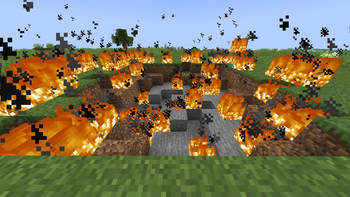
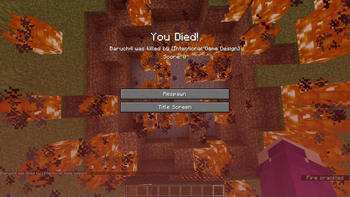
This data pack makes it so that beds explode in the overworld just like they do in the nether and end!
Screenshots

About this Mod
Update to 1.21.11 coming soon!
No Sleeping!
This is a simple data pack(and mod- see "versions") that makes it so that beds will explode when you try to sleep in them in the overworld, just like they do in the nether and the end.
Do NOT use Version 1.0.0 [release], it won't work. Version 0.3.0 [release cadidate] is the same feature-wise.
DATAPACK: Note that there are different versions for pre-1.21 and 1.21-and-onwards use, make sure you get the correct one!
MOD: Unfortunently I have not been able to test the latest (1.21.x) versions of the mod. They should work just fine but due to not having a ton of free time I cannot fully support them. So therefore, it is up to YOU to make sure you use it correctly (taking backups, etc.).
Make sure to use Fabric API. In my testing, it didn't seem to need the Fabric API (or Quilted Fabric API - QFAPI) when running on Quilt, but that could have changed since.
Respawn Anchor?!
Each version (after Version 1.3.0 [release]) will, in it's version number, let you know whether respawn anchors can allow players to set their spawn point in the overworld or not.
x.x.x+NoRespawnAnchorInOverworld - Respawn anchors have their vanilla behavior, and will explode in the overworld if you try to set your spawn on one.
x.x.x+RespawnAnchorInOverworld - Respawn anchors will NOT explode in the overworld if you try to set your spawn on one. They allow you to set your spawn in the overworld.
I plan to maintain both versions of this datapack/mod, as I see why some people may want either version.
If you'd like to make suggestions/report issues, you can do so on my discord!
Important
When loading a world with this data pack installed, it will tell you that "This world uses experimental settings that could stop working at any time. We cannot guarantee it will load or work. Here be dragons!"
I believe this is because this data pack uses some (fairly) new world generation files in its files. I take no responsibility for any issues this could cause. It's up to you to keep the world safe (backups are highly reccomended).
The files are overworld.json and overworld_caves.json if you were wondering. They're in the dimension_type folder.
Join My Discord
- Make suggestions, report issues, etc.
- View my to-do list with all planned future updates and new packs
- Might get early access to new packs in future
Potential Future Updates
- Creating versions for older minecraft versions
Available Versions
How to Install No Sleeping on Your Server
Order Server
Order a Minecraft Java server with at least 3 GB RAM (4 GB recommended).
Set datapack Loader
In the panel under "Egg", select the datapack loader and matching Minecraft version (25w07a).
Install Mod
Open the mod browser in the dashboard and search for "No Sleeping". Click "Install" – done! Alternatively, upload the .jar via SFTP to the /mods folder.
Compatibility
Mod Loaders
Minecraft Versions
25w07a, 25w06a, 25w05a (+38 more)
Server-side
✓ RequiredRecommended RAM
4 GB(min. 3 GB)Frequently Asked Questions
No Sleeping server crashes on startup – what to do?
Most common cause: wrong datapack version or insufficient RAM. Check the server log (latest.log) for "OutOfMemoryError" or "Mixin" errors. With Mado Hosting: ensure at least 3 GB RAM is allocated and the loader matches the mod version (25w07a). You can switch loaders with one click in the panel.
Is No Sleeping compatible with datapack and fabric and quilt?
No Sleeping officially supports datapack, fabric, quilt for Minecraft 25w07a, 25w06a, 25w05a. The Mado dashboard automatically detects incompatible loader combinations.
Server lagging with No Sleeping – how to optimize performance?
Recommended RAM: 4 GB (per 8 players). Use /spark profiler to check if No Sleeping consumes the most tick time. Common fixes: reduce server view-distance to 8-10, install "performant" or "starlight" as supplementary mods on Forge. With Mado Hosting, your server runs on NVMe SSDs with dedicated CPU cores for minimal latency.
Rent Modded Server
Install No Sleeping with just one click on your server.