
NoctisWraith
Essential Quality of Life features for Minecraft: Fast building, perfect vision v alpha, and smart stats.
Screenshots



About this Mod
🌑 Noctis Wraith | Reborn
Noctis Wraith is a high-performance, lightweight Quality of Life (QoL) utility engine for Fabric. It focuses on efficiency, a clean aesthetic, and a "legit" gameplay experience.
🚀 Current Features (Alpha 2)
🛠 Automation
Safe FastPlace: Build structures instantly without ghost blocks.

AutoTool: Automatically selects the most efficient tool for the job.

NoWeather: Disables rain and thunder for better visibility and FPS.

AutoSprint: Constant sprinting for faster travel.
📊 Professional HUD
Adaptive Bars: Custom HP, Hunger, and Armor bars (automatically hidden in Creative).

ArrayList: A sleek list of active modules in the corner.

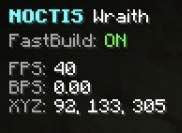
Resource Trackers: Real-time counters for FPS, Rockets, and Free Slots.
🛡 Survival Tools
Elytra Alert: Bold warning when your Elytra is about to break.

Armor Monitor: Tracks durability to prevent gear loss.
⌨️ Command Interface
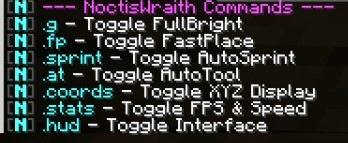
Prefix your commands with a dot (.)
Command Action
.fp Toggle FastPlace
.at Toggle AutoTool
.weather Toggle NoWeather
.hud Toggle Noctis Interface
.help Show all available commands
🔄 Changelog & Updates
v2.0-ALPHA (Current)
Reborn Update: Complete engine overhaul.

Added Adaptive HUD & Status Bars.

Fixed FastPlace crashes.

Added NoWeather and Elytra Alerts.
🌑 Technical Info
Platform: Fabric API

Version: 1.21.11

Developer: Morivis
Available Versions
How to Install NoctisWraith on Your Server
Order Server
Order a Minecraft Java server with at least 3 GB RAM (4 GB recommended).
Set fabric Loader
In the panel under "Egg", select the fabric loader and matching Minecraft version (1.21.11).
Install Mod
Open the mod browser in the dashboard and search for "NoctisWraith". Click "Install" – done! Alternatively, upload the .jar via SFTP to the /mods folder.
Compatibility
Mod Loaders
Minecraft Versions
1.21.11
Server-side
✗ UnsupportedRecommended RAM
4 GB(min. 3 GB)Frequently Asked Questions
NoctisWraith server crashes on startup – what to do?
Most common cause: wrong fabric version or insufficient RAM. Check the server log (latest.log) for "OutOfMemoryError" or "Mixin" errors. With Mado Hosting: ensure at least 3 GB RAM is allocated and the loader matches the mod version (1.21.11). You can switch loaders with one click in the panel.
Is NoctisWraith compatible with fabric?
NoctisWraith officially supports fabric for Minecraft 1.21.11. The Mado dashboard automatically detects incompatible loader combinations.
Server lagging with NoctisWraith – how to optimize performance?
Recommended RAM: 4 GB (per 8 players). Use /spark profiler to check if NoctisWraith consumes the most tick time. Common fixes: reduce server view-distance to 8-10, install "performant" or "starlight" as supplementary mods on Forge. With Mado Hosting, your server runs on NVMe SSDs with dedicated CPU cores for minimal latency.
Similar Mods






Rent Modded Server
Install NoctisWraith with just one click on your server.