
Nordic Expansion
Early Development. Barely to no content. Is currently for testing. Adding more content later. Stay tuned for updates.
About this Mod
⚔️ Nordic Expansion


🌟 Overview
Nordic Expansion brings the world of Norse mythology to Minecraft! Wield Viking-inspired weapons, craft ancient armor, and experience new food and drinks. Currently in early alpha, with a lot more content planned. Perfect for those who seek to forge their Viking legacy in the world of Minecraft!
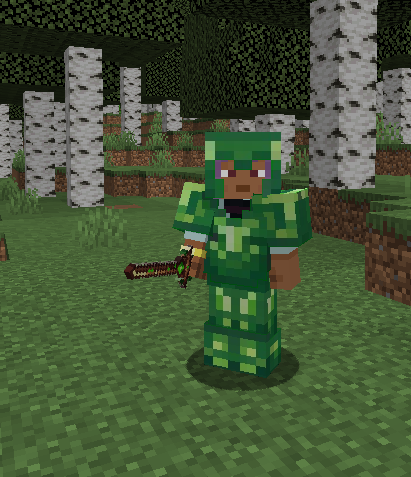
Test of custom Armory:
📊 Content Overview
🎮 Current Features vs 🔮 Planned Features
| Category | Current Content | Planned Features |
|---|---|---|
| 🍖 Food | Nordic Bread |
Traditional Meals Special Effects Brewing System |
| ⚔️ Weapons | -- |
Viking Axes Nordic Swords Legendary Weapons |
| 🛡️ Armor | -- |
Light Armor Sets Heavy Armor Sets Unique Set Bonuses |
| 🌍 Dimensions | -- |
Norse Realms Unique Biomes Special Structures |
| 🏗️ Building | -- |
Nordic Blocks Decorative Items Building Sets |
⚙️ Technical Details
Requirements
✔️ Minecraft: 1.20.1
✔️ Forge: Required
✔️ RAM: 4GB+ Recommended
📥 Installation Guide
Install via Modrinth Launcher
- Download and install Modrinth Launcher, and make a new Instance/Modpack.
- Search for Nordic Expansion in the Mod list and add it.
- Click Install and ensure the correct version and loader are installed.
- Launch Minecraft with the mod enabled.
- Enjoy your adventure in the Nordic realms!
Manual Installation (File-based)
If you're not using a launcher, you can manually install the mod:
- Download Nordic Expansion.
- Navigate to your Minecraft folder:
- Windows:
%AppData%\.minecraft\mods - macOS:
~/Library/Application Support/minecraft/mods/ - Linux:
~/.minecraft/mods/
- Windows:
- Move the downloaded .jar file into the mods folder.
- Launch Minecraft with Forge 1.20.1.
- Enjoy your adventure in the Nordic realms!
📝 Development Notes
Current Status
Alpha Stage Development
Future Plans
- 🔄 Updates will be based on mod popularity and free time we have
- 🌟 Focus on immersive content such as weapons, armor, realms, and biomes
Platform Support
✅ Forge: Current Focus
❌ Fabric: Not Planned
❌ Quilt: Not Planned
🤝 Community Engagement
Coming Soon
- 💬 Discord Server – To connect with others
- 📋 Issue Tracker – Report bugs and issues (will probably be through the Discord)
- 📚 Wiki – Learn about the mod's lore, features, and more(will be created if needed)
These features will launch when the mod gains more traction!
🎯 Known Issues
- Alpha stage: Expect bugs and incomplete content
- Limited features at this stage
- Work-in-progress: More features are coming!
💝 Support the Development
- 🔁 Share with your friends
- 🐞 Report bugs and issues
- 💬 Suggest features, weapons, and lore ideas
🌟 Development Roadmap
| Category | Next Steps |
|---|---|
| 🍖 Food | Add more Nordic food items with special effects |
| ⚔️ Weapons | Introduce Viking Axes and Nordic Swords |
| 🛡️ Armor | Develop Light and Heavy Armor Sets |
| 🌍 Dimensions | Add the first Norse Realm and unique biomes |
| 🏗️ Building | Add Nordic-themed building materials |
💬 Stay Updated
- Follow for future updates and sneak peeks
Made with ❤️ for the Minecraft community
Available Versions
How to Install Nordic Expansion on Your Server
Order Server
Order a Minecraft Java server with at least 3 GB RAM (4 GB recommended).
Set forge Loader
In the panel under "Egg", select the forge loader and matching Minecraft version (1.20.1).
Install Mod
Open the mod browser in the dashboard and search for "Nordic Expansion". Click "Install" – done! Alternatively, upload the .jar via SFTP to the /mods folder.
Compatibility
Mod Loaders
Minecraft Versions
1.20.1
Server-side
✓ RequiredRecommended RAM
4 GB(min. 3 GB)Frequently Asked Questions
Nordic Expansion server crashes on startup – what to do?
Most common cause: wrong forge version or insufficient RAM. Check the server log (latest.log) for "OutOfMemoryError" or "Mixin" errors. With Mado Hosting: ensure at least 3 GB RAM is allocated and the loader matches the mod version (1.20.1). You can switch loaders with one click in the panel.
Is Nordic Expansion compatible with forge?
Nordic Expansion officially supports forge for Minecraft 1.20.1. The Mado dashboard automatically detects incompatible loader combinations.
Server lagging with Nordic Expansion – how to optimize performance?
Recommended RAM: 4 GB (per 8 players). Use /spark profiler to check if Nordic Expansion consumes the most tick time. Common fixes: reduce server view-distance to 8-10, install "performant" or "starlight" as supplementary mods on Forge. With Mado Hosting, your server runs on NVMe SSDs with dedicated CPU cores for minimal latency.
Similar Mods




Rent Modded Server
Install Nordic Expansion with just one click on your server.