
Create: Northstar - Redux
Space exploration addon for Create.
Screenshots

About this Mod
🚀 Northstar Redux
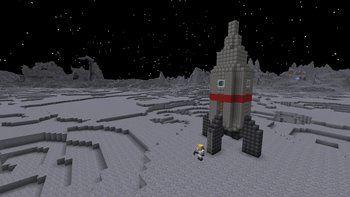
Using Northstar you can build a rocket and expand your Create factory to different planets!
Build and superglue your own rocket and fly to different planets and moons, currently including Mars, Earth (you should already be there), the Moon, Venus and much more to come.
Explore abandoned bases on different planets and build your own.
📜 Differences with Northstar:
- Support for ⚙️ Create 6.0 and 🦊 NeoForge 1.21.1.
- Pondering for ease of access.
- Added a new material, Titanium to replace iron sheets, plates and pillars.
- Reworked progression, recipes and textures to better fit the Create/Minecraft themes.
- Bugfixes ranging from small rendering issues to complete crashes for a smoother experience.
- Improved indirect compatibility with other mods/addons through tags.
- Direct compatibility with Create, Create Copycats+, Create Crafts & Additions, Create Diesel Generators, Create The Factory Must Grow.
- Community provided translations, currently including Chinese, Japanese and Russian
- And much more to come!
💡 Issues/Suggestions/Planned features:
Everything happens on GitHub or Discord! Check the readme and the issues/pull requests.
📖 Guide:
For beginners, JEI is recommended. Start by crafting and ponderinmodrino fiabout the rocket station. You should be able to find all the information you need in game using Ponder, JEI and the item tooltips. If not, you can always ask for help on our Discord.
For modders/modpack/datapack creators wishing to create new planets, fuels or just add compatibility with Northstar, please check out the wiki.
❗ Disclaimer:
Northstar Redux is a port and a continuation of Northstar for newer versions of Create.
This is mod is still in early stages of development. Please report any issues you find on GitHub. Suggestions are also welcome.
Available Versions
How to Install Create: Northstar - Redux on Your Server
Order Server
Order a Minecraft Java server with at least 4 GB RAM (6 GB recommended).
Set forge Loader
In the panel under "Egg", select the forge loader and matching Minecraft version (1.21.1).
Install Mod
Open the mod browser in the dashboard and search for "Create: Northstar - Redux". Click "Install" – done! Alternatively, upload the .jar via SFTP to the /mods folder.
Compatibility
Mod Loaders
Minecraft Versions
1.21.1, 1.20.1
Server-side
✓ RequiredRecommended RAM
6 GB(min. 4 GB)Frequently Asked Questions
Create: Northstar - Redux server crashes on startup – what to do?
Most common cause: wrong forge version or insufficient RAM. Check the server log (latest.log) for "OutOfMemoryError" or "Mixin" errors. With Mado Hosting: ensure at least 4 GB RAM is allocated and the loader matches the mod version (1.21.1). You can switch loaders with one click in the panel.
Is Create: Northstar - Redux compatible with forge and neoforge?
Create: Northstar - Redux officially supports forge, neoforge for Minecraft 1.21.1, 1.20.1. The Mado dashboard automatically detects incompatible loader combinations.
Server lagging with Create: Northstar - Redux – how to optimize performance?
Recommended RAM: 6 GB (per 5 players). Use /spark profiler to check if Create: Northstar - Redux consumes the most tick time. Common fixes: reduce server view-distance to 8-10, install "performant" or "starlight" as supplementary mods on Forge. With Mado Hosting, your server runs on NVMe SSDs with dedicated CPU cores for minimal latency.
Similar Mods




Rent Modded Server
Install Create: Northstar - Redux with just one click on your server.