
Notches Currency
A comprehensive server-side economy mod that introduces a secure currency system with ATMs, player trading, and NPC integration support.
Screenshots
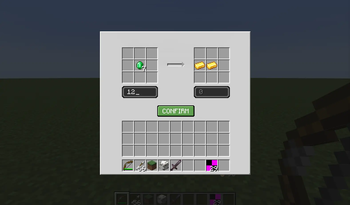
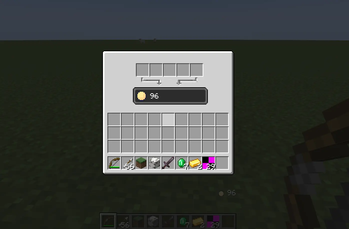
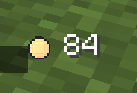
About this Mod
Notch Currency Mod




A server-side economy mod for Fabric 1.20.1 with ATMs, player trading, and NPC shop integration.
Heavily inspired by the Origin Realms economy system. The core concept isn't mine, but all the code and assets are written from scratch. I'm still fairly new to modding so development may be slow — open to collaboration if anyone's interested.
Features
Banking
- Physical ATM blocks for depositing and withdrawing currency
- Auto-deposit when Notch Chips are placed in an ATM
- Server-side transaction validation
- Persistent balance storage with backups
Trading
- Secure player-to-player item and currency exchange
- Both parties must confirm before a trade executes
- Configurable max trading distance
- Compatible with Shopkeeper mod — NPC trades update player balances
HUD
- Always-visible balance display with configurable position
- Smooth balance transition animations
Development Setup
- Import the project into IntelliJ IDEA
- Run
./gradlew genSources - Refresh the Gradle project
- Run the
Minecraft Clientconfiguration
Links
Credits
- FugginBeenus — initial work and maintenance
- Player Trade Mod — UI inspiration
- Origin Realms — economy system inspiration
Contributing
Bug reports and feature requests are welcome via GitHub Issues. PRs are open if you want to contribute code.
Available Versions
How to Install Notches Currency on Your Server
Order Server
Order a Minecraft Java server with at least 3 GB RAM (4 GB recommended).
Set fabric Loader
In the panel under "Egg", select the fabric loader and matching Minecraft version (1.20.1).
Install Mod
Open the mod browser in the dashboard and search for "Notches Currency". Click "Install" – done! Alternatively, upload the .jar via SFTP to the /mods folder.
Compatibility
Mod Loaders
Minecraft Versions
1.20.1
Server-side
✓ RequiredRecommended RAM
4 GB(min. 3 GB)Frequently Asked Questions
Notches Currency server crashes on startup – what to do?
Most common cause: wrong fabric version or insufficient RAM. Check the server log (latest.log) for "OutOfMemoryError" or "Mixin" errors. With Mado Hosting: ensure at least 3 GB RAM is allocated and the loader matches the mod version (1.20.1). You can switch loaders with one click in the panel.
Is Notches Currency compatible with fabric?
Notches Currency officially supports fabric for Minecraft 1.20.1. The Mado dashboard automatically detects incompatible loader combinations.
Server lagging with Notches Currency – how to optimize performance?
Recommended RAM: 4 GB (per 8 players). Use /spark profiler to check if Notches Currency consumes the most tick time. Common fixes: reduce server view-distance to 8-10, install "performant" or "starlight" as supplementary mods on Forge. With Mado Hosting, your server runs on NVMe SSDs with dedicated CPU cores for minimal latency.
Similar Mods




![CobbleDollars [Cobblemon Addon]](https://cdn.modrinth.com/data/s7N7AsqL/684040a264fc1d7f9b856ec5d2da39767398c7ad.png)
Rent Modded Server
Install Notches Currency with just one click on your server.