
Notify Me Mod
NotifyMe is a lightweight Fabric server-side mod for Minecraft 1.21.1 that watches common server events and sends notifications outside the game.
Screenshots
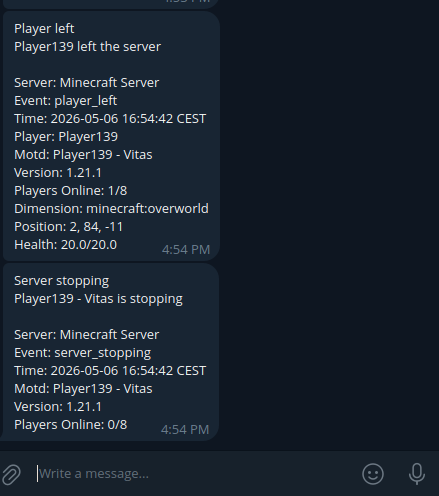
About this Mod
NotifyMe
NotifyMe is a lightweight Fabric server-side mod for Minecraft 1.21.1 that watches common server events and sends notifications outside the game.
It is built for server owners who want to know when important things happen without keeping the Minecraft client open. NotifyMe can alert operators in-game, send email through Postfix/sendmail, post Telegram bot messages, call a generic JSON webhook, or publish to an ntfy topic.
Features
- Server started and server stopping notifications
- Player join and leave notifications
- Player death notifications with death message, dimension, position, health, and damage metadata
- Optional chat, command broadcast, and game message notifications
- In-game notifications for operators or named recipients
- Email delivery through a Postfix-compatible
sendmailbinary - Telegram bot delivery
- Generic webhook delivery with optional secret header
- ntfy topic delivery with optional bearer token, priority, and tags
- Player filters for watched and ignored players
- Message-prefix filters for sensitive chat or command content
- Runtime admin commands for reloads, test notifications, and status checks
Requirements
- Minecraft 1.21.1
- Fabric Loader 0.18.4 or newer
- Fabric API
- Java 21 or newer
NotifyMe is server-side. Players do not need to install it on their clients.
Installation
- Install Fabric Loader and Fabric API on your Minecraft 1.21.1 server.
- Put the NotifyMe jar into the server
modsfolder. - Start the server once.
- Edit the generated config file at
config/notifymemod.json. - Run
/notifyme reloador restart the server. - Run
/notifyme testto verify your configured notification channels.
Notification Channels
In-Game
In-game notifications are enabled by default. By default, NotifyMe sends messages only to server operators.
Set inGame.opsOnly to false to send to all online players, or set inGame.recipients to a list of exact player names.
Postfix / sendmail
NotifyMe can pass email to a local sendmail command, which works well with Postfix.
Enable postfix.enabled, configure postfix.from, and add one or more addresses to postfix.to.
Example:
"postfix": {
  "enabled": true,
  "sendmailPath": "/usr/sbin/sendmail",
  "from": "[email protected]",
  "to": ["[email protected]"],
  "timeoutSeconds": 10
}
Postfix must already be configured on the server. NotifyMe only hands the message to sendmail; it does not configure SMTP, DNS, DKIM, SPF, or relay settings.
Telegram
Create a bot with BotFather, add it to the target chat, and configure the bot token and chat id.
Example:
"telegram": {
  "enabled": true,
  "botToken": "123456:bot-token",
  "chatId": "123456789",
  "messageThreadId": 0,
  "disableNotification": false,
  "timeoutSeconds": 10
}
For forum topics or supergroup threads, set messageThreadId.
Webhook
The webhook backend sends a JSON payload with the event name, title, message, compact message, player name, timestamp, and metadata.
Example:
"webhook": {
  "enabled": true,
  "url": "https://example.com/minecraft-webhook",
  "secretHeaderName": "X-NotifyMe-Secret",
  "secretHeaderValue": "change-me",
  "timeoutSeconds": 10
}
ntfy
NotifyMe can publish directly to an ntfy topic URL.
Example:
"ntfy": {
  "enabled": true,
  "topicUrl": "https://ntfy.sh/my-minecraft-topic",
  "token": "",
  "priority": "default",
  "tags": ["minecraft"],
  "timeoutSeconds": 10
}
For protected ntfy topics, set token.
Configuration
NotifyMe creates config/notifymemod.json on first run.
Default event settings:
"events": {
  "serverStarted": true,
  "serverStopping": true,
  "playerJoined": true,
  "playerLeft": true,
  "playerDied": true,
  "chatMessage": false,
  "commandMessage": false,
  "gameMessage": false,
  "test": true
}
Chat, command, and game-message notifications are disabled by default because they can be noisy and may contain private or sensitive information. Enable them only when that fits your server policy.
Filtering options:
"filters": {
  "watchedPlayers": [],
  "ignoredPlayers": [],
  "ignoreMessagesStartingWith": ["/login", "/register"]
}
watchedPlayers: if non-empty, only events for these players are sent.ignoredPlayers: events for these players are skipped.ignoreMessagesStartingWith: skips chat or command-message notifications with matching prefixes.
General options:
"serverName": "Minecraft Server",
"timezone": "system",
"subjectPrefix": "[Minecraft]"
serverNameappears in notification bodies.timezoneacceptssystemor a Java time zone id such asEurope/BerlinorAmerica/New_York.subjectPrefixis added to notification titles.
Commands
NotifyMe commands require permission level 2.
/notifyme reload
/notifyme test
/notifyme status
/notifyme reloadreloadsconfig/notifymemod.json./notifyme testqueues a test notification through enabled channels./notifyme statusshows the config path, enabled event types, and backend readiness.
Privacy Notes
External notification services can receive player names, chat content if enabled, death messages, coordinates, server metadata, and timestamps.
Review your configuration before enabling chat, command-message, game-message, webhook, Telegram, ntfy, or email delivery on public servers.
Compatibility
NotifyMe uses Fabric API event hooks and does not require mixins. It should be compatible with most server-side Fabric mods unless another mod changes the same events in unusual ways.
License
NotifyMe is licensed under CC0-1.0.
Available Versions
How to Install Notify Me Mod on Your Server
Order Server
Order a Minecraft Java server with at least 3 GB RAM (4 GB recommended).
Set fabric Loader
In the panel under "Egg", select the fabric loader and matching Minecraft version (1.21.1).
Install Mod
Open the mod browser in the dashboard and search for "Notify Me Mod". Click "Install" – done! Alternatively, upload the .jar via SFTP to the /mods folder.
Compatibility
Mod Loaders
Minecraft Versions
1.21.1
Server-side
✓ RequiredRecommended RAM
4 GB(min. 3 GB)Frequently Asked Questions
Notify Me Mod server crashes on startup – what to do?
Most common cause: wrong fabric version or insufficient RAM. Check the server log (latest.log) for "OutOfMemoryError" or "Mixin" errors. With Mado Hosting: ensure at least 3 GB RAM is allocated and the loader matches the mod version (1.21.1). You can switch loaders with one click in the panel.
Is Notify Me Mod compatible with fabric?
Notify Me Mod officially supports fabric for Minecraft 1.21.1. The Mado dashboard automatically detects incompatible loader combinations.
Server lagging with Notify Me Mod – how to optimize performance?
Recommended RAM: 4 GB (per 8 players). Use /spark profiler to check if Notify Me Mod consumes the most tick time. Common fixes: reduce server view-distance to 8-10, install "performant" or "starlight" as supplementary mods on Forge. With Mado Hosting, your server runs on NVMe SSDs with dedicated CPU cores for minimal latency.
Rent Modded Server
Install Notify Me Mod with just one click on your server.