
NSEW Compass HUD
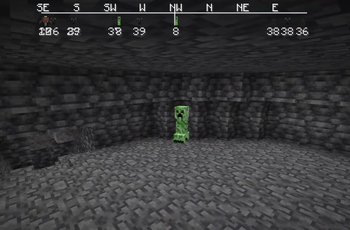
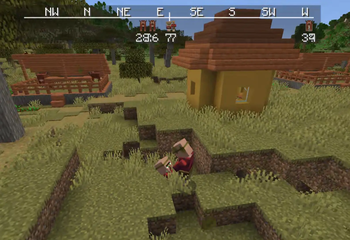
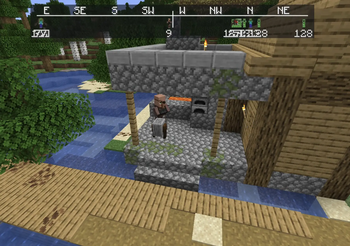
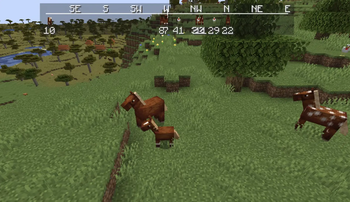
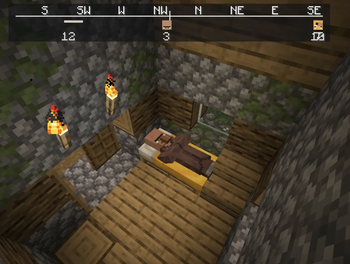
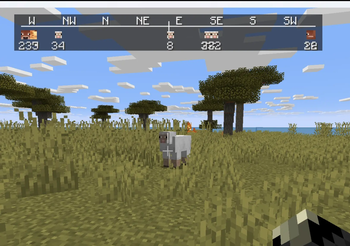
NSEW (North, South, East, West) Compass HUD adds a customizable QoL compass overlay that shows the direction of nearby players, passive mobs, and hostile mobs. It includes profile-style icons, per-mob filters, separate distance controls, and an in-game
Screenshots
About this Mod
NSEW (North, South, East, West) Compass HUD adds a customizable QoL compass overlay that shows the direction of nearby players, passive mobs, and hostile mobs. It includes profile-style icons, per-mob filters, separate distance controls, and an in-game settings menu!
To get to settings, click Esc, Options, and lastly NSEW!
Settings:
HUD Enabled = Turns the compass HUD on or off.
Players = Shows nearby players on the compass.
Player Faces = Replaces the normal player marker with that player’s face icon.
Passive Mobs = Shows passive mobs on the compass.
Hostile Mobs = Shows hostile mobs on the compass.
Show Distances = Shows the number of blocks away under each marker.
Fade Far Targets = Makes markers fade more as they get closer to the edge of your tracking distance.
Edge Clamping = Keeps markers pinned inside the compass instead of letting them disappear off the sides.
Player Distance = Sets how far away players can be and still show on the compass.
Passive Distance = Sets how far away passive mobs can be and still show on the compass.
Hostile Distance = Sets how far away hostile mobs can be and still show on the compass.
Update Speed = Controls how often the mod refreshes nearby entities.
1 = updates very often
25 = recommended
200 = updates less often, but uses fewer refresh checks
Mob Filters = Opens the mob list where you can choose exactly which mobs are allowed to appear on the compass.
Search Mobs = Lets you search the mob filter list by mob name or ID.
[x] / [ ] in Mob Filters = Enables or disables that specific mob from showing on the compass.
Green Mob Names = Passive mob entries.
Red Mob Names = Hostile mob entries.
Done = Saves settings and closes the menu.
Problems?? Post it on the official NSEW discord
Fabric api is required!
Available Versions
How to Install NSEW Compass HUD on Your Server
Order Server
Order a Minecraft Java server with at least 3 GB RAM (4 GB recommended).
Set fabric Loader
In the panel under "Egg", select the fabric loader and matching Minecraft version (26.1.2).
Install Mod
Open the mod browser in the dashboard and search for "NSEW Compass HUD". Click "Install" – done! Alternatively, upload the .jar via SFTP to the /mods folder.
Compatibility
Mod Loaders
Minecraft Versions
26.1.2, 1.21.11
Server-side
✗ UnsupportedRecommended RAM
4 GB(min. 3 GB)Frequently Asked Questions
NSEW Compass HUD server crashes on startup – what to do?
Most common cause: wrong fabric version or insufficient RAM. Check the server log (latest.log) for "OutOfMemoryError" or "Mixin" errors. With Mado Hosting: ensure at least 3 GB RAM is allocated and the loader matches the mod version (26.1.2). You can switch loaders with one click in the panel.
Is NSEW Compass HUD compatible with fabric?
NSEW Compass HUD officially supports fabric for Minecraft 26.1.2, 1.21.11. The Mado dashboard automatically detects incompatible loader combinations.
Server lagging with NSEW Compass HUD – how to optimize performance?
Recommended RAM: 4 GB (per 8 players). Use /spark profiler to check if NSEW Compass HUD consumes the most tick time. Common fixes: reduce server view-distance to 8-10, install "performant" or "starlight" as supplementary mods on Forge. With Mado Hosting, your server runs on NVMe SSDs with dedicated CPU cores for minimal latency.
Similar Mods




Rent Modded Server
Install NSEW Compass HUD with just one click on your server.