nsukchat
This mod is an addon that adds NPC dialogue functionality to the Simukarft mod
Screenshots
About this Mod
The core gameplay of this addon revolves around "dialogue-based relationship building" and "affection progression" with NPCs.
Dialogues in the mod are fully customizable.
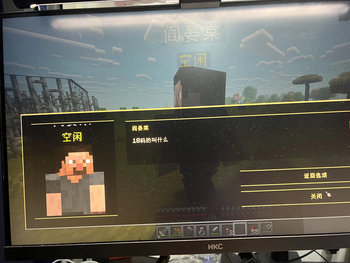
Right-click to open the mod's dialogue panel.
You can go to the game settings to set the key for opening the merchant NPC's purchase HUD.
如果希望更简洁一点,也可以这样:
Dialogues are customizable. Right-click to open the dialogue panel. The key for the merchant NPC's purchase HUD can be configured in the game settings.
需要我帮你整理成完整的 mod 功能描述文档吗?
By right-clicking an NPC, the player opens a dedicated interaction interface, where they can view the character and engage in dialogue.
The dialogue system supports two types of content sources:
ML Shorthand Code – Custom dialogue that can be bound to specific NPCs by name, UUID, or profession.
Pool Global Dialogue System – Based on the current affection level, the system randomly selects dialogue options from three pools: pool+1, pool-1, and pool0.
Different player responses directly affect the NPC's affection gain or loss. In turn, the affection level determines:
Which dialogue options appear,
What responses the NPC gives,
Whether the player can access further branching content.
The system also supports continuous replies, command suffixes, variable grouping, and hot-reloadable text. As a result, it can handle everything from casual daily chatter to story-driven quests, romance routes, event triggers, and highly personalized interactions.
Overall, the gameplay is about gradually turning an ordinary NPC into an interactive character with unique reactions and emotional depth through ongoing conversation.
Available Versions
How to Install nsukchat on Your Server
Order Server
Order a Minecraft Java server with at least 3 GB RAM (4 GB recommended).
Set forge Loader
In the panel under "Egg", select the forge loader and matching Minecraft version (1.20.1).
Install Mod
Open the mod browser in the dashboard and search for "nsukchat". Click "Install" – done! Alternatively, upload the .jar via SFTP to the /mods folder.
Compatibility
Mod Loaders
Minecraft Versions
1.20.1
Server-side
✓ RequiredRecommended RAM
4 GB(min. 3 GB)Frequently Asked Questions
nsukchat server crashes on startup – what to do?
Most common cause: wrong forge version or insufficient RAM. Check the server log (latest.log) for "OutOfMemoryError" or "Mixin" errors. With Mado Hosting: ensure at least 3 GB RAM is allocated and the loader matches the mod version (1.20.1). You can switch loaders with one click in the panel.
Is nsukchat compatible with forge?
nsukchat officially supports forge for Minecraft 1.20.1. The Mado dashboard automatically detects incompatible loader combinations.
Server lagging with nsukchat – how to optimize performance?
Recommended RAM: 4 GB (per 8 players). Use /spark profiler to check if nsukchat consumes the most tick time. Common fixes: reduce server view-distance to 8-10, install "performant" or "starlight" as supplementary mods on Forge. With Mado Hosting, your server runs on NVMe SSDs with dedicated CPU cores for minimal latency.
Similar Mods






Rent Modded Server
Install nsukchat with just one click on your server.