
Nugget
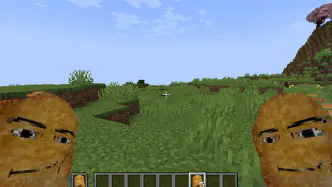
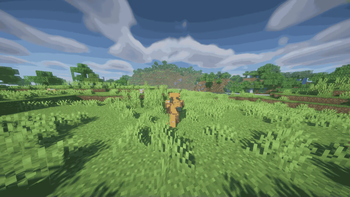
adds the famous nugget to mincraft!
Screenshots

About this Mod

About
This is a Minecraft 1.21 mod that brings the meme of Gegagedigedagedago Nugget into the Minecraft, Whether you’re building, mining, this mod introduces nugget into minecraft.
Video Preview
Features
Here’s what’s currently in the mod, with more to come in future updates:
- Nugget Block: nugget building blocks.
- Nugget Ores: Naturally generating nugget ores that allow you to mine and collect nuggets in your world.
- Raw Nugget and Nugget: nuggets serve as the foundation for many recipes and tools.
- Swords & Tools*: Equip yourself with nugget weapons and tools.
- Nugget Armor*: Protect yourself with nugget armor.
Soon-to-be Features
Here’s what we’re planning to add next! Feel free to suggest more ideas:
- Nugget Furnaces: A special furnace that boosts smelting efficiency when using nuggets as fuel.
- Nugget Cake: A cake made from nuggets to restore your hunger bar.
Installation
Follow these simple steps to get started:
- Download the Mod: Head over to the mod’s download page (or click the green “Download” button) to grab the latest version.
- Install Forge: Make sure you have the latest version of Forge installed for Minecraft 1.21.
- Save to Mods Folder: Place the downloaded mod file in the
modsfolder within your Minecraft directory.- On Windows: Press
Win + R, type%appdata%\.minecraft\mods, and hit Enter. - On Mac: Navigate to
~/Library/Application Support/minecraft/mods.
- On Windows: Press
- Launch Minecraft: Open Minecraft with the Forge profile, and the mod will load automatically.
Available Versions
How to Install Nugget on Your Server
Order Server
Order a Minecraft Java server with at least 3 GB RAM (4 GB recommended).
Set fabric Loader
In the panel under "Egg", select the fabric loader and matching Minecraft version (1.21.11).
Install Mod
Open the mod browser in the dashboard and search for "Nugget". Click "Install" – done! Alternatively, upload the .jar via SFTP to the /mods folder.
Compatibility
Mod Loaders
Minecraft Versions
1.21.11, 1.21.3, 1.21.1 (+1 more)
Server-side
✓ RequiredRecommended RAM
4 GB(min. 3 GB)Frequently Asked Questions
Nugget server crashes on startup – what to do?
Most common cause: wrong fabric version or insufficient RAM. Check the server log (latest.log) for "OutOfMemoryError" or "Mixin" errors. With Mado Hosting: ensure at least 3 GB RAM is allocated and the loader matches the mod version (1.21.11). You can switch loaders with one click in the panel.
Is Nugget compatible with fabric and forge and neoforge and quilt?
Nugget officially supports fabric, forge, neoforge, quilt for Minecraft 1.21.11, 1.21.3, 1.21.1. Note: Forge and Fabric mods are NOT cross-compatible – pick one loader and stick with it. The Mado dashboard automatically detects incompatible loader combinations.
Server lagging with Nugget – how to optimize performance?
Recommended RAM: 4 GB (per 8 players). Use /spark profiler to check if Nugget consumes the most tick time. Common fixes: reduce server view-distance to 8-10, install "performant" or "starlight" as supplementary mods on Forge. With Mado Hosting, your server runs on NVMe SSDs with dedicated CPU cores for minimal latency.
Similar Mods





Rent Modded Server
Install Nugget with just one click on your server.