
Nyctography
Adds the Nyctography substitution cipher as a usable Minecraft font.
Screenshots

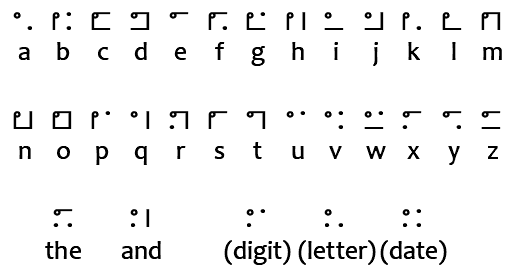
About this Mod

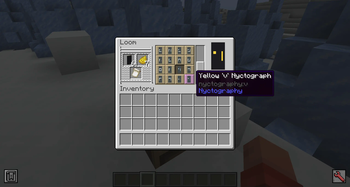
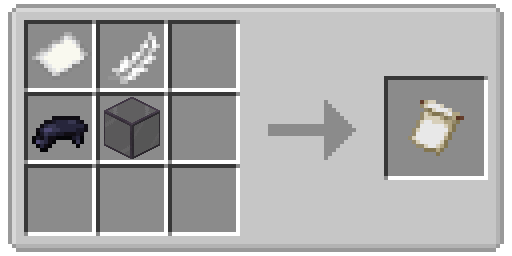
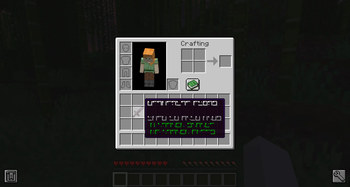
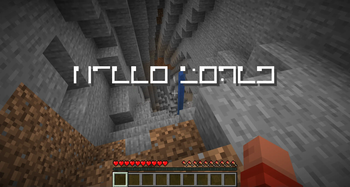
This mod adds the Nyctography substitution cipher as a Minecraft font! This font can be used for books, signs, chat messages, tooltips, and most forms of ingame text.
History
The nyctography writing system was invented in 1891 by Lewis Carrol. The goal of this system was to make writing in the dark easier, which is where the system gets its name. Text was written using a nyctograph, a stencil with squre holes that were used to align and write the characters. In modern times this writing system has been used for puzzles in games, DnD campaigns, and geocaches.
Understanding Nyctography
This writing system uses a series of dots and lines aranged around the edges of a square. For example the letter E has a dot in the top left corner and a line on the top. Each symbol loosely resembles its latin alphabet counterpart. For example the letter O has a dot in the top left corner and then a line on all sides of the box, creating a closed loop.
Similarly to braille, numbers are written using a letter. This mod will automatically handle this when writing text with the font but you will still need to know how to read them. Only consonants are used to avoid confusion with actual words.
- 0 = Z
- 1 = B (First consonant in the alphabet)
- 2 = D (Two in Latin is Duo)
- 3 = T
- 4 = F
- 5 = L (Roman for 50)
- 6 = S
- 7 = M (From Septem which is Seven in Latin)
- 8 = H (Eight in french is huit)
- 9 = N
There are five special characters in addition to the letters and numbers.
- The - Written in this mod using a dash (-). Appears as a dot in the top left, a line on the top, and two dots on the bottom.
- And - Written in this mod using an ampersand (&). Appears as a dot in the top and bottom left, and a line on the right.
- Digit - Written in this mod using a hashtag (#). Indicates that the following characters should be read as a number. Appears as only the corners of the letter F for "figures".
- Letter - Written in this mod using an asterisk (*). Indicates that the following characters are letters. Appears as only the corners of the letter L for "letters".
- Date - Written in this mod using an at (@). Indicates the following characters are a date in DDMMYY format. Appears as corners of the letter D for "date".
Technical Usage
This font can be applied to any text using Mojang's text component system, including all commands and datapack features that accept raw JSON text. This is done by setting the font property of the text to nyctography:nyctography.
Vanilla Commands
Vanilla commands will often allow you to define text using the raw JSON format. The font property controls which font will be used when rendering that text. This can be done for all fonts and is not unique to fonts added by this mod.
/give @a stone[custom_name='["",{"text":"Stone","font":"nyctography:nyctography",italic:false}]']/title @a title {"text":"Hello","font":"nyctography:nyctography"}/give @a written_book[written_book_content={pages:['[["",{"text":"Test book","font":"nyctography:nyctography"}]]'],title:"aaa",author:"bbb"}]
Bookshelf Commands
This mod depends on the Bookshelf library which offers several commands to help work with fonts. A few examples of these commands are given below.
- /bookshelf font say nyctography:nyctography
- Posts a chat message styled with the font. - /bookshelf font item nyctography:nyctography - Renames the held item to use the font.
- /bookshelf font block nyctography:nyctography X Y Z - Applies the font to the block. This will change sign text, or rename namable blocks like chests.
Scripts, Plugins, and Mods
If you have access to code or scripting tools you can apply the font to any mutable text component. This is done by setting the font ID on the style of the text component. You can find an example of how I do this in my code here.

This project is sponsored by Nodecraft. Use code DARKHAX for 30% off your first month of service!
Available Versions
How to Install Nyctography on Your Server
Order Server
Order a Minecraft Java server with at least 3 GB RAM (4 GB recommended).
Set fabric Loader
In the panel under "Egg", select the fabric loader and matching Minecraft version (26.1.2).
Install Mod
Open the mod browser in the dashboard and search for "Nyctography". Click "Install" – done! Alternatively, upload the .jar via SFTP to the /mods folder.
Compatibility
Mod Loaders
Minecraft Versions
26.1.2, 26.1.1, 26.1 (+1 more)
Server-side
✓ RequiredRecommended RAM
4 GB(min. 3 GB)Frequently Asked Questions
Nyctography server crashes on startup – what to do?
Most common cause: wrong fabric version or insufficient RAM. Check the server log (latest.log) for "OutOfMemoryError" or "Mixin" errors. With Mado Hosting: ensure at least 3 GB RAM is allocated and the loader matches the mod version (26.1.2). You can switch loaders with one click in the panel.
Is Nyctography compatible with fabric and forge and neoforge and quilt?
Nyctography officially supports fabric, forge, neoforge, quilt for Minecraft 26.1.2, 26.1.1, 26.1. Note: Forge and Fabric mods are NOT cross-compatible – pick one loader and stick with it. The Mado dashboard automatically detects incompatible loader combinations.
Server lagging with Nyctography – how to optimize performance?
Recommended RAM: 4 GB (per 8 players). Use /spark profiler to check if Nyctography consumes the most tick time. Common fixes: reduce server view-distance to 8-10, install "performant" or "starlight" as supplementary mods on Forge. With Mado Hosting, your server runs on NVMe SSDs with dedicated CPU cores for minimal latency.
Similar Mods




Rent Modded Server
Install Nyctography with just one click on your server.