
OceTags
OceTags is OceNet's tiertagger, with built-in MCTiers Support. See player's tiers directly in-game, including in nametags, the tab list, and chat.
Screenshots


About this Mod
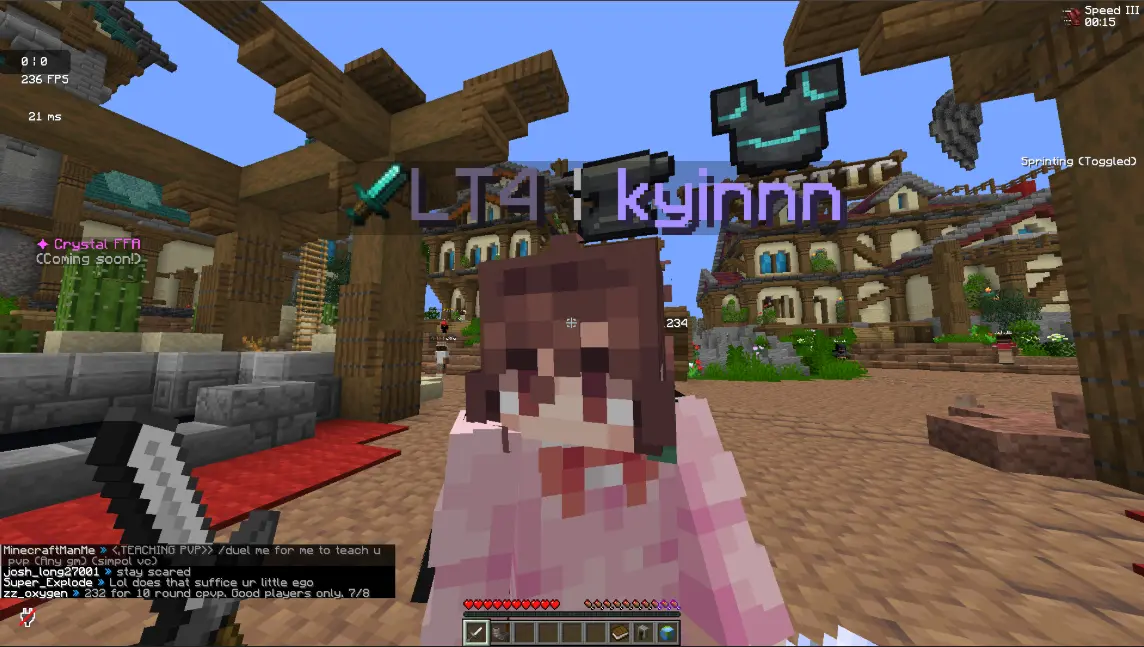 OceTags is the client-side mod that integrates the OceNet and MCTiers rankings directly into Minecraft, allowing you to see player tiers without leaving the game.
The mod displays player tiers in multiple in-game locations, including nametags, the tab list, and chat, making it easy to quickly understand a player’s tiers during gameplay. This removes the need to manually check external leaderboards and keeps all relevant information accessible while you play.
OceTags supports viewing tiers in two ways:
- Per gamemode tiers, for players focusing on a particular gamemode.
- Overall leaderboard placement, for a broader view of a player’s ranking.
Important Information
- This mod is affiliated with and endorsed by 1.9+ Oceania PvP Community (OceNet)
- It does not provide gameplay advantages or modify mechanics, it is purely informational
- An internet connection may be required to fetch up-to-date player data.
If you regularly use OceNet and/or MCTiers (or just want to flex your tier in a screenshot), OceTags offers a simple way to keep track of rankings directly in-game without interrupting your experience.
DM "Typoplays" on discord if you encounter any problems
REQUIRES UKULIB
Available Versions
How to Install OceTags on Your Server
Order Server
Order a Minecraft Java server with at least 3 GB RAM (4 GB recommended).
Set fabric Loader
In the panel under "Egg", select the fabric loader and matching Minecraft version (26.1.2).
Install Mod
Open the mod browser in the dashboard and search for "OceTags". Click "Install" – done! Alternatively, upload the .jar via SFTP to the /mods folder.
Compatibility
Mod Loaders
Minecraft Versions
26.1.2, 26.1.1, 26.1 (+1 more)
Server-side
✗ UnsupportedRecommended RAM
4 GB(min. 3 GB)Frequently Asked Questions
OceTags server crashes on startup – what to do?
Most common cause: wrong fabric version or insufficient RAM. Check the server log (latest.log) for "OutOfMemoryError" or "Mixin" errors. With Mado Hosting: ensure at least 3 GB RAM is allocated and the loader matches the mod version (26.1.2). You can switch loaders with one click in the panel.
Is OceTags compatible with fabric?
OceTags officially supports fabric for Minecraft 26.1.2, 26.1.1, 26.1. The Mado dashboard automatically detects incompatible loader combinations.
Server lagging with OceTags – how to optimize performance?
Recommended RAM: 4 GB (per 8 players). Use /spark profiler to check if OceTags consumes the most tick time. Common fixes: reduce server view-distance to 8-10, install "performant" or "starlight" as supplementary mods on Forge. With Mado Hosting, your server runs on NVMe SSDs with dedicated CPU cores for minimal latency.
Similar Mods






Rent Modded Server
Install OceTags with just one click on your server.