
Odyssey Map
Explore. Navigate. Never get lost again. A clean, lightweight minimap and fullscreen map for Minecraft.
Screenshots
About this Mod
🧭 Odyssey Map
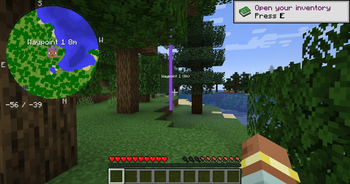
A clean, lightweight minimap designed to feel like vanilla Minecraft.








🌎 About

Odyssey Map is a modern client-side minimap mod built for players who want a clear overview of the world without clutter, performance hits, or confusing menus.
Designed to feel like a natural extension of Minecraft, Odyssey Map combines a clean UI, smooth navigation, and accurate terrain rendering while staying lightweight enough for large modpacks.
✨ Why Odyssey Map?
- 🎯 Clean and modern design
- ⚡ Lightweight and optimized
- 🌐 Multiplayer friendly
- 📦 Modpack ready
- 🗺️ Beautiful fullscreen map
- 📍 Easy waypoint management
- 🎮 Vanilla-inspired experience
🚀 Features
| Feature | Description |
|---|---|
| 🗺️ Minimap HUD | Circular or square minimap styles |
| 🧭 Rotation Modes | North-Up or Heading-Up |
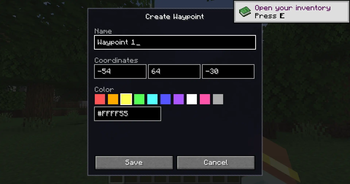
| 📍 Waypoints | Create and manage custom markers |
| ☠️ Death Points | Automatically track deaths |
| 🛏️ Bed Tracking | Quickly find your spawn point |
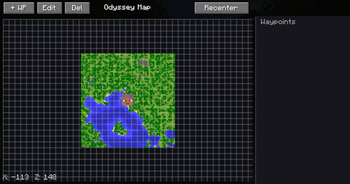
| 🌍 Fullscreen Map | Explore your world in detail |
| 🎨 Custom Colors | Override terrain colors |
| ⚙️ Fully Configurable | Customize every aspect of the map |
| 🚀 Lightweight | Designed for large worlds and modpacks |
📸 Screenshots
Minimap HUD

Fullscreen Map

Waypoint Management

⌨️ Default Keybindings
| Key | Action |
|---|---|
M |
Toggle Minimap HUD |
J |
Open Fullscreen Map |
= |
Zoom In |
- |
Zoom Out |
B |
Create Waypoint |
All keybindings can be customized through:
Options → Controls
⚙️ Configuration
Odyssey Map automatically generates the following files:
odysseymap-client.toml
Controls:
- HUD Position
- HUD Size
- Rotation Mode
- Transparency
- Marker Visibility
- Zoom Levels
- Map Shape
odysseymap-blocks.toml
Allows custom terrain colors:
minecraft:stone=minecraft:grass_block
minecraft:deepslate=minecraft:stone
🔥 Compatibility
- ✅ Singleplayer
- ✅ Multiplayer
- ✅ Dedicated Servers
- ✅ Forge
- ✅ NeoForge
- ✅ Fabric
- ✅ Quilt
- ✅ Large Modpacks
❓ Frequently Asked Questions
Does the server need the mod installed?
No. Odyssey Map is completely client-side.
Can I use it in my modpack?
Absolutely.
Does it impact performance?
Very little. Terrain data is cached efficiently.
Does it support shaders?
Yes.
Does it have cave maps?
Not currently.
Can I move the minimap?
Yes. Position and size are configurable.
🛣️ Roadmap
Planned Features
- Better waypoint categories
- Additional minimap themes
- More marker customization
- Improved fullscreen map tools
- Team markers
- More HUD customization
❤️ Support Development

💬 Community & Support
- Discord: https://discord.gg/TJc3CxR4jK
- GitHub: https://github.com/MeherBenSalem
- CurseForge: https://www.curseforge.com/members/nightbeamstudio/projects
- Modrinth: https://modrinth.com/organization/nightbeam
📜 License
✅ Feel free to include Odyssey Map in modpacks.
❌ Please do not redistribute modified versions without permission.
❤️ NightBeam Studio
Explore more. Get lost less.
Available Versions
How to Install Odyssey Map on Your Server
Order Server
Order a Minecraft Java server with at least 3 GB RAM (4 GB recommended).
Set fabric Loader
In the panel under "Egg", select the fabric loader and matching Minecraft version (26.1.2).
Install Mod
Open the mod browser in the dashboard and search for "Odyssey Map". Click "Install" – done! Alternatively, upload the .jar via SFTP to the /mods folder.
Compatibility
Mod Loaders
Minecraft Versions
26.1.2, 1.21.1, 1.20.1
Server-side
✓ RequiredRecommended RAM
4 GB(min. 3 GB)Frequently Asked Questions
Odyssey Map server crashes on startup – what to do?
Most common cause: wrong fabric version or insufficient RAM. Check the server log (latest.log) for "OutOfMemoryError" or "Mixin" errors. With Mado Hosting: ensure at least 3 GB RAM is allocated and the loader matches the mod version (26.1.2). You can switch loaders with one click in the panel.
Is Odyssey Map compatible with fabric and forge and neoforge?
Odyssey Map officially supports fabric, forge, neoforge for Minecraft 26.1.2, 1.21.1, 1.20.1. Note: Forge and Fabric mods are NOT cross-compatible – pick one loader and stick with it. The Mado dashboard automatically detects incompatible loader combinations.
Server lagging with Odyssey Map – how to optimize performance?
Recommended RAM: 4 GB (per 8 players). Use /spark profiler to check if Odyssey Map consumes the most tick time. Common fixes: reduce server view-distance to 8-10, install "performant" or "starlight" as supplementary mods on Forge. With Mado Hosting, your server runs on NVMe SSDs with dedicated CPU cores for minimal latency.
Similar Mods




Rent Modded Server
Install Odyssey Map with just one click on your server.