
Off Da Grid Blocks
This project adds a wand that can be used to places blocks on rotation.
Screenshots
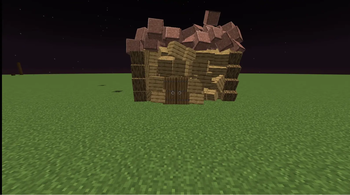
About this Mod
Break free from the grid. Off Grid Blocks lets you place every block at sub-block
positions and at the angle you're looking — freeform, tilted, offset structures that normal
Minecraft never allows. And it isn't just decoration: chests, redstone, pistons, rails, and
even nether portals keep working off the grid.
No tools or special items to learn — pull a block from your inventory and place it like normal.
It lands exactly where your cursor points, rotated to match your view.
Features
| Feature | What you get |
|---|---|
| Free placement & rotation | Blocks sit at fractional positions and tilt to your look direction — diagonal walls, leaning pillars, natural clutter |
| Real hitboxes | Collision matches each block's true shape (half slabs, thin fences, flat carpets), so you can stand on what you build |
| Working utility blocks | Crafting tables, anvils, chests, furnaces, hoppers, droppers and more open and function; contents persist |
| Doors, beds, cake, switches | Doors open, beds skip the night, cake is edible, levers/buttons toggle — visuals update to match |
| Redstone | Dust, repeaters, comparators, observers, levers, buttons and lamps wire up and pass signals |
| Pistons | Push & pull off-grid blocks at any angle, with full slime/honey adhesion and redstone power |
| Observers | Detect off-grid blocks placed or broken in front of them |
| Minecarts on rails | Lay off-grid rails, drop a minecart, and ride it through straights and curves |
| Nether portals | Build an off-grid obsidian frame, light it, and travel to the Nether and back |
| Light & gravity | Glowing blocks light the area; sand/gravel/concrete place off-grid without falling |
Controls
| Action | Result |
|---|---|
| Right-click with a block | Place it off-grid, rotated to your view |
| Right-click an off-grid block | Stack another off-grid block on it |
| Left-click an off-grid block | Break it (drops as normal) |
| Flint & steel on off-grid obsidian | Light a nether portal in the frame |
| Minecart on an off-grid rail | Spawn a cart — right-click it to ride |
| Redstone block / powered lever on a piston | Fire the piston (any side except the head) |
Before you download — please read
[!IMPORTANT]
- Requires Fabric Loader and Fabric API for Minecraft 1.21.1.
- Must be installed on both the client and the server, on the same version. A vanilla client cannot join a server running this mod and have it work.
- This mod changes how all block placement works. It's built for creative and freeform building — it is not a vanilla-compatible drop-in.
Known limitations
These are honest trade-offs, not bugs:
- Collision is axis-aligned. A tilted block still has an upright, straight hitbox — the engine can't give entities rotated collision boxes (the same reason boats and shulkers don't).
- Redstone is best-effort. It works well for flat, roughly grid-spaced layouts. Very tight sub-block spacing, tall vertical stacks, and very large contraptions aren't fully supported.
- Pistons move off-grid blocks only, not normal world blocks or entities.
How does it work under the hood? (optional reading)
Each off-grid block is a pair of entities: a vanilla Block Display for the visual (which
is what carries the rotation) and an invisible collision entity for the hitbox. Blocks
that need real function — containers, redstone, interactions — are mirrored to a hidden region
of the world so the vanilla logic still runs, and the result is synced back to what you see.
This is why the mod must be on both sides: the custom collision entity has to exist on the
client for you to actually bump into it.
Compatibility
| Minecraft | 1.21.1 |
| Loader | Fabric |
| Dependencies | Fabric API |
| Environment | Required on client and server |
If you hit an issue, please report it with a clear description of what you placed and what
happened — it really helps.
Available Versions
How to Install Off Da Grid Blocks on Your Server
Order Server
Order a Minecraft Java server with at least 3 GB RAM (4 GB recommended).
Set fabric Loader
In the panel under "Egg", select the fabric loader and matching Minecraft version (1.21.1).
Install Mod
Open the mod browser in the dashboard and search for "Off Da Grid Blocks". Click "Install" – done! Alternatively, upload the .jar via SFTP to the /mods folder.
Compatibility
Mod Loaders
Minecraft Versions
1.21.1
Server-side
✓ RequiredRecommended RAM
4 GB(min. 3 GB)Frequently Asked Questions
Off Da Grid Blocks server crashes on startup – what to do?
Most common cause: wrong fabric version or insufficient RAM. Check the server log (latest.log) for "OutOfMemoryError" or "Mixin" errors. With Mado Hosting: ensure at least 3 GB RAM is allocated and the loader matches the mod version (1.21.1). You can switch loaders with one click in the panel.
Is Off Da Grid Blocks compatible with fabric?
Off Da Grid Blocks officially supports fabric for Minecraft 1.21.1. The Mado dashboard automatically detects incompatible loader combinations.
Server lagging with Off Da Grid Blocks – how to optimize performance?
Recommended RAM: 4 GB (per 8 players). Use /spark profiler to check if Off Da Grid Blocks consumes the most tick time. Common fixes: reduce server view-distance to 8-10, install "performant" or "starlight" as supplementary mods on Forge. With Mado Hosting, your server runs on NVMe SSDs with dedicated CPU cores for minimal latency.
Similar Mods





Rent Modded Server
Install Off Da Grid Blocks with just one click on your server.