Offhand In Containers
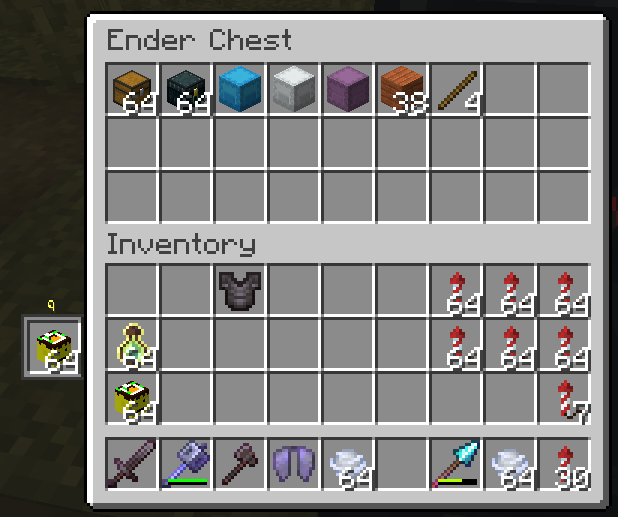
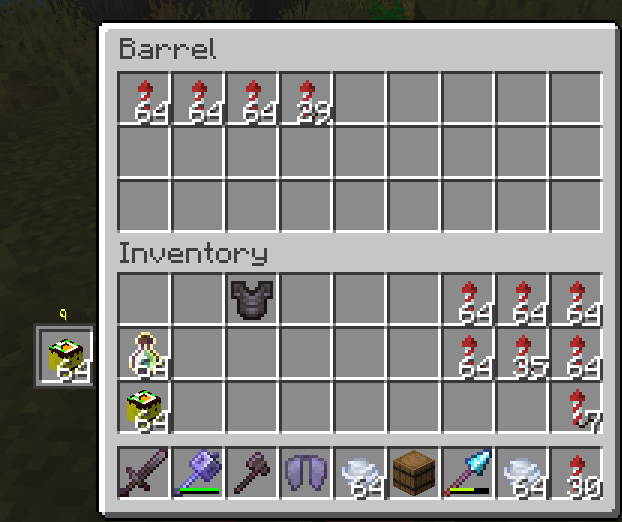
This mod adds a vanilla-looking sprite inside of any container HUD and it is fully usable inside said container screens
Screenshots
About this Mod
🖐️ Offhand In HUD
Bring your offhand slot everywhere.
No more opening your inventory just to swap a torch, Totem, food, shield, or end crystal ⚡
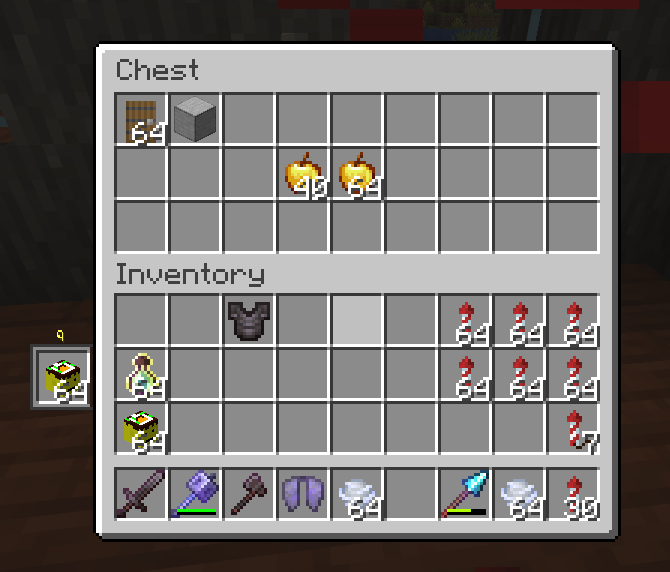
Offhand In HUD adds a fully interactive offhand slot directly into container GUIs — chests, barrels, shulker boxes, modded inventories, and basically any screen extending AbstractContainerScreen.
The slot behaves like a real vanilla slot, supports full mouse interaction, and blends seamlessly into Minecraft’s UI as if Mojang added it themselves.
✨ Features
🧩 Fully Interactive Offhand Slot
The offhand slot appears directly beside the player inventory section while any supported container is open.
It is:
Fully clickable
Fully synced
Fully server-validated
Pixel-perfect to vanilla styling
No fake rendering. No desync mess.
🖱️ Vanilla-Like Interactions
Left Click
Pick up the offhand item
Place the carried item into offhand
Swap items instantly
Automatically merge stacks when possible
Right Click
Place one item into the offhand
Pick up half the offhand stack when empty-handed
Shift Click
Shift-click the offhand slot to quick-move items into inventories/containers
Shift-click compatible items directly into the offhand for fast stacking
Two-Click Placement
🎨 Vanilla-Accurate Design
The widget is designed to feel completely native to Minecraft.
Includes:
Vanilla container/slot sprite rendering
Proper hover tint
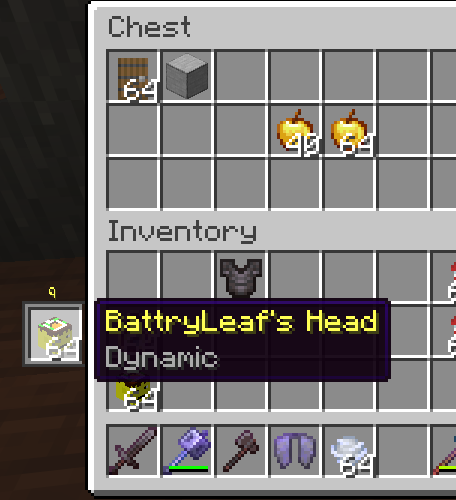
Real item tooltips
Automatic left/right positioning based on main-hand preference
Slightly expanded hitbox for easier clicking 🎯
If you didn’t know it was a mod, you’d probably assume it shipped with the game.
🔧 Technical Details
All interactions are validated server-side through a dedicated packet system for proper multiplayer compatibility and synchronization.
The mod uses:
Optimistic client updates for instant responsiveness
Server confirmations and automatic resyncing
Custom interaction handling for non-player inventory screens
📦 Compatibility
✅ Fabric 26.1 to 1.26.1.2 [more coming soon!]
✅ Vanilla containers
✅ Modded containers extending AbstractContainerScreen
✅ Multiplayer compatible
✅ Left-handed player support
Available Versions
How to Install Offhand In Containers on Your Server
Order Server
Order a Minecraft Java server with at least 3 GB RAM (4 GB recommended).
Set fabric Loader
In the panel under "Egg", select the fabric loader and matching Minecraft version (26.1.2).
Install Mod
Open the mod browser in the dashboard and search for "Offhand In Containers". Click "Install" – done! Alternatively, upload the .jar via SFTP to the /mods folder.
Compatibility
Mod Loaders
Minecraft Versions
26.1.2, 26.1.1, 26.1 (+3 more)
Server-side
✗ UnsupportedRecommended RAM
4 GB(min. 3 GB)Frequently Asked Questions
Offhand In Containers server crashes on startup – what to do?
Most common cause: wrong fabric version or insufficient RAM. Check the server log (latest.log) for "OutOfMemoryError" or "Mixin" errors. With Mado Hosting: ensure at least 3 GB RAM is allocated and the loader matches the mod version (26.1.2). You can switch loaders with one click in the panel.
Is Offhand In Containers compatible with fabric?
Offhand In Containers officially supports fabric for Minecraft 26.1.2, 26.1.1, 26.1. The Mado dashboard automatically detects incompatible loader combinations.
Server lagging with Offhand In Containers – how to optimize performance?
Recommended RAM: 4 GB (per 8 players). Use /spark profiler to check if Offhand In Containers consumes the most tick time. Common fixes: reduce server view-distance to 8-10, install "performant" or "starlight" as supplementary mods on Forge. With Mado Hosting, your server runs on NVMe SSDs with dedicated CPU cores for minimal latency.
Similar Mods






Rent Modded Server
Install Offhand In Containers with just one click on your server.