
The Offhand Mod
My interpretation of how the offhand should exist in minecraft.
Screenshots
About this Mod
About
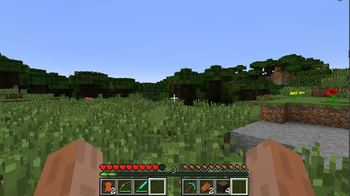
The Offhand Mod is a minecraft mod based upon Mine&Blade Battlegear 2's dual wielding mechanics that aims to change it in order to add a permanently playable and usable offhand mechanic to the game. Please do note, that this mod does not perfectly work with multiplayer. It was made with multiplayer in mind, but I most likely have missed something (please do report multiplayer bugs if found).
Note: Battlegear 2 is licensed under GPLv3, which allows me to modify and distribute modified versions of it but also obligates me to license this mod under GPLv3.
Disclaimer: Early beta. Bugs may be found. If so, please report to the issue tracker.
Changes
Reworked controls:
    Left click always triggers the main hand action, right click always triggers the offhand action. The action is swinging for a weapon, shooting for a bow, eating for food, placing for block, etc.
    Pressing left/right click and the Alt key (configurable) allows you to reverse an action and swing a bow, block a sword, etc.
    The above two changes mean that you can use any item you want, in any hand.
    Made the offhand independent from the mainhand (this was my biggest issue with battlegear)
    Added third-person swing animations
    Added ability to mine blocks with the offhand.
    Added ability to use items/place blocks when the other hand is occupied with a usable item.
    Removed any and all limitations to what you can put in the offhand and in the mainhand that were present in battlegear2.
    Instead of two pairs of three slots, there are two pairs of four slots available.
    Made it so you can shoot two bows (vanilla, does not work with modded bows) simultaneously
    Having weapons in both the mainhand and the offhand actually provides a gameplay benefit, similar to how it's done in wildycraft dual wielding (as opposed to the original battlegear dual wielding where using two swords was basically useless)
    Changed rendering of the hotbar: instead of adding to it, the mod now replaces it.
    Instead of the added slots being completely separated, they are now interchangeable with the vanilla hotbar. As a consequence, removed the GUI that was previously required to place items in the offhand.
    Turned off battlegear items, as you wouldn't expect a bunch of weapons from a dual wielding mod (but they can be re-enabled through the config)
    Removed feature that turns off dual wielding (as turning it off would provide no actual gameplay benefit anymore: see above
To get a feel of if you like these modifications or not, I would recommend trying them out in-game. I am also open to suggestions.
TODO
Rework shield mechanics, add compatibility with RPGStamina
F.A.Q
Q: When port to version x.x.x?
A: If you want to do it, go ahead. It's opensource, after all.
Q: Modpacks?
A: Of course! No need to ask.
Q: There is a crash! / This mod doesn't work with X! / I found a bug!
A: You can always report it on the issue tracker and I'll try and take a look.
Available Versions
How to Install The Offhand Mod on Your Server
Order Server
Order a Minecraft Java server with at least 3 GB RAM (4 GB recommended).
Set forge Loader
In the panel under "Egg", select the forge loader and matching Minecraft version (1.7.10).
Install Mod
Open the mod browser in the dashboard and search for "The Offhand Mod". Click "Install" – done! Alternatively, upload the .jar via SFTP to the /mods folder.
Compatibility
Mod Loaders
Minecraft Versions
1.7.10
Server-side
✓ RequiredRecommended RAM
4 GB(min. 3 GB)Frequently Asked Questions
The Offhand Mod server crashes on startup – what to do?
Most common cause: wrong forge version or insufficient RAM. Check the server log (latest.log) for "OutOfMemoryError" or "Mixin" errors. With Mado Hosting: ensure at least 3 GB RAM is allocated and the loader matches the mod version (1.7.10). You can switch loaders with one click in the panel.
Is The Offhand Mod compatible with forge?
The Offhand Mod officially supports forge for Minecraft 1.7.10. The Mado dashboard automatically detects incompatible loader combinations.
Server lagging with The Offhand Mod – how to optimize performance?
Recommended RAM: 4 GB (per 8 players). Use /spark profiler to check if The Offhand Mod consumes the most tick time. Common fixes: reduce server view-distance to 8-10, install "performant" or "starlight" as supplementary mods on Forge. With Mado Hosting, your server runs on NVMe SSDs with dedicated CPU cores for minimal latency.
Similar Mods




Rent Modded Server
Install The Offhand Mod with just one click on your server.