
Nickname - ニックネーム
日本語の説明があります。Set a custom display name for name tags, tab list, and chat with /nickname. NeoForge 26.x, no OP needed.
Screenshots
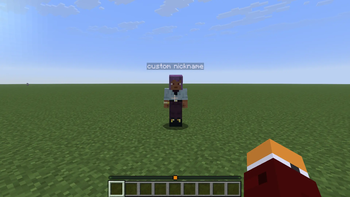
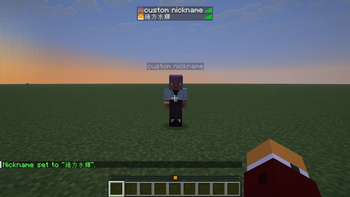
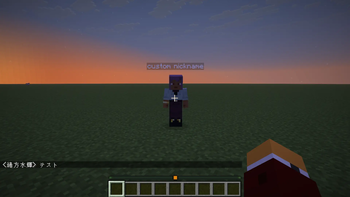
About this Mod
Nickname
Change your display name on name tags, tab list, and chat for NeoForge 26.x.
Commands
| Command | Permission | Description |
|---|---|---|
/nickname <name> |
Anyone | Set your nickname |
/nickname set <name> |
Anyone | Same as above |
/nickname / clear |
Anyone | Clear your nickname |
/nickname clearall |
OP (level 2+) | Clear all nicknames |
Rules
- Max 32 characters
- No formatting codes (
§) - Persists in server world data and syncs to all clients
Server note
Players can choose any nickname within the rules, including names that match another player's username. This can look like impersonation on tab list, chat, and name tags. Server admins should set expectations or add extra moderation on competitive / PvP servers.
Recommended for servers using Radial Teleport (player slice labels).
Credits
This mod was developed with partial assistance from AI (Claude, Gemini, etc.) to improve development efficiency and optimize code. All game balance decisions and playtesting were performed manually by the developer. If you encounter any unexpected issues, please report them via GitHub Issues.
ニックネーム
NeoForge 26.x において、ネームタグ、タブ一覧、チャットでの表示名を変更します。
コマンド
| コマンド | 権限 | 説明 |
|---|---|---|
/nickname <name> |
誰でも | ニックネームを設定 |
/nickname set <name> |
誰でも | 上記と同じ |
/nickname / clear |
誰でも | ニックネームをクリア |
/nickname clearall |
OP (レベル 2 以上) | すべてのニックネームをクリア |
ルール
- 最大 32 文字
- 書式指定コード (
§) は使用不可 - サーバーの世界データに保存され、すべてのクライアントに同期されます
サーバーへの注意
プレイヤーは、ルールに準拠する限り、他のプレイヤーのユーザー名と一致する名前を含め、任意のニックネームを選択できます。これにより、タブ一覧、チャット、ネームタグ上でなりすましのように見える場合があります。サーバー管理者は、競技用/PvPサーバーにおいて、利用上のルールを明確に設定するか、追加のモデレーションを行う必要があります。
Radial Teleport(同じ作者が提供しているMOD)を使用しているサーバーでの利用を推奨します。
クレジット
このMODは、開発効率の向上とコードの最適化を目的として、AI(Claude、Geminiなど)による一部支援を受けて開発されました。ゲームバランスの決定およびプレイテストはすべて、開発者によって手動で行われました。予期せぬ問題が発生した場合は、GitHub Issues を通じて報告してください。
Available Versions
How to Install Nickname - ニックネーム on Your Server
Order Server
Order a Minecraft Java server with at least 3 GB RAM (4 GB recommended).
Set neoforge Loader
In the panel under "Egg", select the neoforge loader and matching Minecraft version (26.1.2).
Install Mod
Open the mod browser in the dashboard and search for "Nickname - ニックネーム". Click "Install" – done! Alternatively, upload the .jar via SFTP to the /mods folder.
Compatibility
Mod Loaders
Minecraft Versions
26.1.2
Server-side
✓ RequiredRecommended RAM
4 GB(min. 3 GB)Frequently Asked Questions
Nickname - ニックネーム server crashes on startup – what to do?
Most common cause: wrong neoforge version or insufficient RAM. Check the server log (latest.log) for "OutOfMemoryError" or "Mixin" errors. With Mado Hosting: ensure at least 3 GB RAM is allocated and the loader matches the mod version (26.1.2). You can switch loaders with one click in the panel.
Is Nickname - ニックネーム compatible with neoforge?
Nickname - ニックネーム officially supports neoforge for Minecraft 26.1.2. The Mado dashboard automatically detects incompatible loader combinations.
Server lagging with Nickname - ニックネーム – how to optimize performance?
Recommended RAM: 4 GB (per 8 players). Use /spark profiler to check if Nickname - ニックネーム consumes the most tick time. Common fixes: reduce server view-distance to 8-10, install "performant" or "starlight" as supplementary mods on Forge. With Mado Hosting, your server runs on NVMe SSDs with dedicated CPU cores for minimal latency.
Similar Mods






Rent Modded Server
Install Nickname - ニックネーム with just one click on your server.