
Private Locker Chest - プライベートロッカー
日本語の説明があります。81-slot private locker for NeoForge 26.x — only the owner can open. Features a 3D skin head display on top.
Screenshots
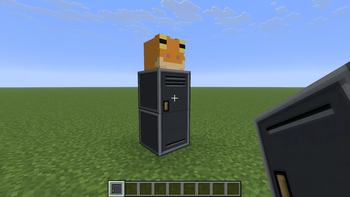
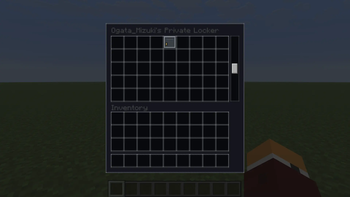
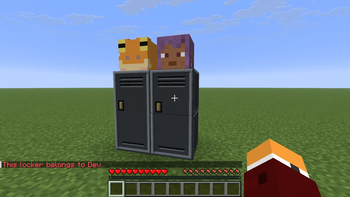
About this Mod
Private Locker Chest
Adds a private 81-slot locker for NeoForge 26.x.
Features
- Three-block-tall locker with owner-only access
- 81 storage slots (9×9) across bottom and middle sections
- Top block shows an enlarged 3D skin head of the owner
- Linked break — breaking any part removes the entire structure
- Explosion-resistant block logic
Optional Guide Lib integration provides an in-game manual and Codex entry.
Admin command (OP)
| Command | Permission | Description |
|---|---|---|
/privatechest give <targets> <ownerName> |
OP (level 2+) | Give an owner player head item (for locker placement / demos) |
Credits
This mod was developed with partial assistance from AI (Claude, Gemini, etc.) to improve development efficiency and optimize code. All game balance decisions and playtesting were performed manually by the developer. If you encounter any unexpected issues, please report them via GitHub Issues.
プライベートロッカーチェスト
NeoForge 26.x 向けに、81スロットのプライベートロッカーを追加します。
特徴
- 高さ3ブロックのロッカーで、所有者のみがアクセス可能
- 下部と中央部をクリック_で開く_81スロット**(9×9)の収納スペース
- 上部のブロックには、所有者の3Dスキンヘッドが拡大表示されます
- リンク破壊 — いずれかの部分を破壊すると、構造物全体が削除されます
- 爆発耐性があります
オプションのGuide Lib統合により、ゲーム内マニュアルとコーデックス項目が提供されます。
管理者コマンド(OP)
| コマンド | 権限 | 説明 |
|---|---|---|
/privatechest give <ターゲット> <所有者名> |
OP(レベル2以上) | 所有者プレイヤーにヘッドアイテムを付与(ロッカーの設置/デモ用) |
クレジット
このMODは、開発効率の向上とコードの最適化を目的として、AI(Claude、Geminiなど)による一部支援を受けて開発されました。ゲームバランスの決定およびプレイテストはすべて、開発者によって手動で行われました。予期せぬ問題が発生した場合は、GitHub Issues を通じて報告してください。
Available Versions
How to Install Private Locker Chest - プライベートロッカー on Your Server
Order Server
Order a Minecraft Java server with at least 3 GB RAM (4 GB recommended).
Set neoforge Loader
In the panel under "Egg", select the neoforge loader and matching Minecraft version (26.1.2).
Install Mod
Open the mod browser in the dashboard and search for "Private Locker Chest - プライベートロッカー". Click "Install" – done! Alternatively, upload the .jar via SFTP to the /mods folder.
Compatibility
Mod Loaders
Minecraft Versions
26.1.2
Server-side
✓ RequiredRecommended RAM
4 GB(min. 3 GB)Frequently Asked Questions
Private Locker Chest - プライベートロッカー server crashes on startup – what to do?
Most common cause: wrong neoforge version or insufficient RAM. Check the server log (latest.log) for "OutOfMemoryError" or "Mixin" errors. With Mado Hosting: ensure at least 3 GB RAM is allocated and the loader matches the mod version (26.1.2). You can switch loaders with one click in the panel.
Is Private Locker Chest - プライベートロッカー compatible with neoforge?
Private Locker Chest - プライベートロッカー officially supports neoforge for Minecraft 26.1.2. The Mado dashboard automatically detects incompatible loader combinations.
Server lagging with Private Locker Chest - プライベートロッカー – how to optimize performance?
Recommended RAM: 4 GB (per 8 players). Use /spark profiler to check if Private Locker Chest - プライベートロッカー consumes the most tick time. Common fixes: reduce server view-distance to 8-10, install "performant" or "starlight" as supplementary mods on Forge. With Mado Hosting, your server runs on NVMe SSDs with dedicated CPU cores for minimal latency.
Similar Mods






Rent Modded Server
Install Private Locker Chest - プライベートロッカー with just one click on your server.