
OGLinter
A beautiful Orthographic - Grammar Linter for your amazing sentences in Minecraft Chat
Screenshots
About this Mod

OGLinter - Real-Time Orthographic-Grammar Linter for Minecraft
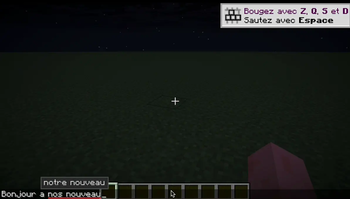
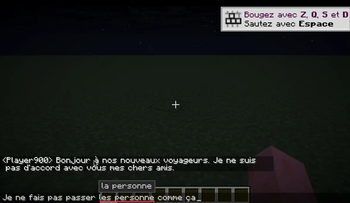
OGLinter is a client-side mod that adds real-time grammar and spelling suggestions while you type in the Minecraft chat. It helps you write cleaner, clearer, and more correct messages, without leaving the game.
Features
Grammar and spelling detection powered by LanguageTool
Supports French (🇫🇷) but more in the future !
Two modes of operation for any PC configuration:
- Real-time mode: checks the entire input live as you type
- After-word mode: only checks the full input after you finish typing a word.
Ignore list system so you can exclude certain words from checks
Suggestions appear directly below the underlined word
Click on a suggestion to instantly replace the word
Works entirely client-side (does not require any internet connexion)
Language Support
Currently, the mod supports French only (fr-FR). More languages may be added in future versions.
Commands
You can control the linter by using commands in the chat:
/og toggle
Toggle the linter on or off.
/og mode <real_time | after_word>
Change the analysis mode:
real_time: checks while typingafter_word: checks only after a word is completed
/og dico add <word>
Add a word to the ignore list (it will no longer be checked or underlined).
/og dico remove <word>
Remove a word from the ignore list.
/og dico list
View all currently ignored words.
Requirements
- Minecraft 1.21.7 or 1.21.8
- Fabric Loader
- Java 21
Modpack & Open Source
OGLinter is free to use in modpacks.
The source code is available on GitHub.
Available Versions
How to Install OGLinter on Your Server
Order Server
Order a Minecraft Java server with at least 3 GB RAM (4 GB recommended).
Set fabric Loader
In the panel under "Egg", select the fabric loader and matching Minecraft version (1.21.8).
Install Mod
Open the mod browser in the dashboard and search for "OGLinter". Click "Install" – done! Alternatively, upload the .jar via SFTP to the /mods folder.
Compatibility
Mod Loaders
Minecraft Versions
1.21.8, 1.21.7
Server-side
✗ UnsupportedRecommended RAM
4 GB(min. 3 GB)Frequently Asked Questions
OGLinter server crashes on startup – what to do?
Most common cause: wrong fabric version or insufficient RAM. Check the server log (latest.log) for "OutOfMemoryError" or "Mixin" errors. With Mado Hosting: ensure at least 3 GB RAM is allocated and the loader matches the mod version (1.21.8). You can switch loaders with one click in the panel.
Is OGLinter compatible with fabric?
OGLinter officially supports fabric for Minecraft 1.21.8, 1.21.7. The Mado dashboard automatically detects incompatible loader combinations.
Server lagging with OGLinter – how to optimize performance?
Recommended RAM: 4 GB (per 8 players). Use /spark profiler to check if OGLinter consumes the most tick time. Common fixes: reduce server view-distance to 8-10, install "performant" or "starlight" as supplementary mods on Forge. With Mado Hosting, your server runs on NVMe SSDs with dedicated CPU cores for minimal latency.
Similar Mods






Rent Modded Server
Install OGLinter with just one click on your server.