
Omni Dev
A toolkit to generate structures and loot tables directly in Game.
Screenshots
About this Mod
Omni Dev - The In-Game Developer Toolkit
Omni Dev ist a utility mod designed by developers, for developers.
Whether you are making a massiv mod, a coustom map, or just want to test vanilla mechanics.
All generated .nbt an .json files are automatically exported to your saves/YOUR_WORLD/generated/omnidev/ folder.
The Workflow
With Omni Dev, creating a fully functional dungeon is as easy as:
Build your structure and place your chests.
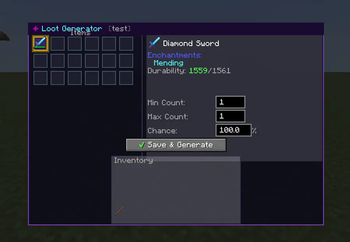
Generate custom loot using the in-game GUI (/dev_lootgen)
Assign the saved loot table to a chest just by looking at it (/dev_setloot)
Select your building using the Omni Dev Wand.
Save it! You now have a completet .nbt structure with fully working, randomzed loot tables inside.
Commands
Structure Tools:
/dev_wand - Gives you the selection stick to mark Position 1 and Position 2.
/dev_pos1 & /dev_pos2 - Manualy set your selection boundaries.
/dev_save [name] - Saves your selceted area as an .nbt structure file.
/dev_spawn [structure_id] - Spawns any structure in the game at your location (supports Vanilla and all Modded structures).
/dev_clear - undoes/deletes the last structure you spawnt with /dev_spawn.
Loot Table Tools:
/dev_lootgen [name] - Opens a GUI Visually drag and drop items into the interface to generate a fully working .json loot table, completely without writing code.
/dev_setloot [loot_table_name] - Look at any container (chest, barrel,dispenser) to permanently inject an existing loot table into it before saving your structure.
Loot Simulation:
/simulate_loot [loot_table] [runs] [enchantment_level] [player_kill] Instantly test drop rates an percentages by simulating thousands of chest openings or mob kills dircetly in you chat! The enchantment_level perfectly mimics Fortune or Looting.
Examples
/simulate_loot minecraft:entities/sheep/pink 1000 3 true (Simulates 1000 pink sheep kills with Looting 3 by a player)
/simulate_loot minecraft:chests/desert_pyramid 1000 (Simulates opening 1000 desert pyramid chests)
/simulate_loot minecraft:blocks/diamond_ore 1000 3 false (Simulates mining 1000 diamond ores with Fortune 3)
Available Versions
How to Install Omni Dev on Your Server
Order Server
Order a Minecraft Java server with at least 3 GB RAM (4 GB recommended).
Set forge Loader
In the panel under "Egg", select the forge loader and matching Minecraft version (1.20.6).
Install Mod
Open the mod browser in the dashboard and search for "Omni Dev". Click "Install" – done! Alternatively, upload the .jar via SFTP to the /mods folder.
Compatibility
Mod Loaders
Minecraft Versions
1.20.6, 1.20.5, 1.20.4 (+3 more)
Server-side
✓ RequiredRecommended RAM
4 GB(min. 3 GB)Frequently Asked Questions
Omni Dev server crashes on startup – what to do?
Most common cause: wrong forge version or insufficient RAM. Check the server log (latest.log) for "OutOfMemoryError" or "Mixin" errors. With Mado Hosting: ensure at least 3 GB RAM is allocated and the loader matches the mod version (1.20.6). You can switch loaders with one click in the panel.
Is Omni Dev compatible with forge?
Omni Dev officially supports forge for Minecraft 1.20.6, 1.20.5, 1.20.4. The Mado dashboard automatically detects incompatible loader combinations.
Server lagging with Omni Dev – how to optimize performance?
Recommended RAM: 4 GB (per 8 players). Use /spark profiler to check if Omni Dev consumes the most tick time. Common fixes: reduce server view-distance to 8-10, install "performant" or "starlight" as supplementary mods on Forge. With Mado Hosting, your server runs on NVMe SSDs with dedicated CPU cores for minimal latency.
Rent Modded Server
Install Omni Dev with just one click on your server.