
On My Mark
Find and locate your friends more easily on your mark!
Screenshots
About this Mod
On My Mark
Do you lose track of your friends and family in the depths of jungles and caves while exploring? Do you never seem to be able to keep an eye out on pesky fellow adventurers? Do questions of "where are you" plague your Minecraft sessions?
Well then, look no further as On My Mark is here to solve all your troubles! On My Mark is a quality of life mod aimed to improve the adventuring and exploration experience for Minecraft players.
It provides a few features that might just make your Minecraft sessions much more enjoyable:
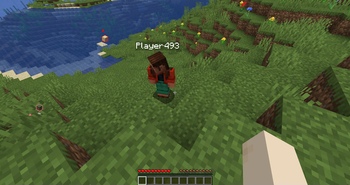
- Place markers where you're looking on blocks, mobs and any sort of entity!
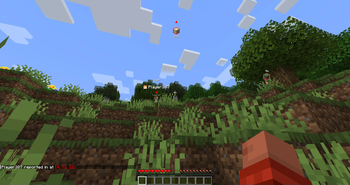
- Keep track of your fellow adventurers with a way to report in!
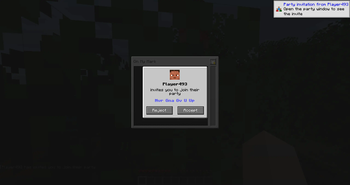
- Join a party to embark on treacherous expeditions, without disturbing your server mates!
How to Use
Controls
Once you've installed the mod, you can navigate to the key binds to remap any buttons that may be conflicting with Minecraft / other mods.
By default, you have access to these controls:
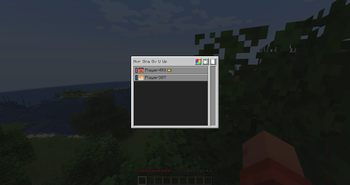
O- Opens the party menu, where you can perform party actions (create, leave, invite other player)R- Once you're in a party, you can place a marker at wherever your crosshair is!U- Press this to report your location to other players!
Creating and Managing a Party
Before you start marking anything, you'll need to create a party. Open the party menu to have access to some controls:
- Create a party - You can create your own party with a name of your choice
- Invite other players - Players in the same party will be able to view the markers that you've placed
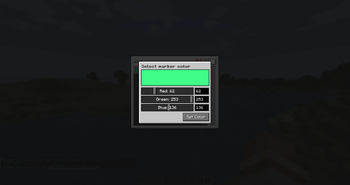
- Choose your marker color - You can configure the color of your marker from the color picker menu!
- Kick out members - Someone irritating you? You can boot them out by selecting them and kicking the boot
- Leave a party - Party too loud and you just wanna head home? Leave the party by pressing the exit button
Placing Markers
Once you're in a party, you can now tell everyone what you're looking at and where you are!
- Placing markers - Pressing the marker button will attempt to place a marker on whatever you're looking at!
- Reporting your location - Pressing the reporting in button will tell other players in the same party where you are!
Configuring On My Mark
You can use the Mod Menu to access On My Mark's configuration menu, or trigger it in-game by running /owo-lib onmymark.
For some configurations (e.g. marker expiries), if you are playing on a server, those values will be configured server-side to provide players with a unified experience.
Feature Requests and Issues
Found a bug, or have a feature suggestion? Visit the issues page and create an issue now!
Available Versions
How to Install On My Mark on Your Server
Order Server
Order a Minecraft Java server with at least 3 GB RAM (4 GB recommended).
Set fabric Loader
In the panel under "Egg", select the fabric loader and matching Minecraft version (1.21.10).
Install Mod
Open the mod browser in the dashboard and search for "On My Mark". Click "Install" – done! Alternatively, upload the .jar via SFTP to the /mods folder.
Compatibility
Mod Loaders
Minecraft Versions
1.21.10, 1.21.9, 1.21.8 (+3 more)
Server-side
✓ RequiredRecommended RAM
4 GB(min. 3 GB)Frequently Asked Questions
On My Mark server crashes on startup – what to do?
Most common cause: wrong fabric version or insufficient RAM. Check the server log (latest.log) for "OutOfMemoryError" or "Mixin" errors. With Mado Hosting: ensure at least 3 GB RAM is allocated and the loader matches the mod version (1.21.10). You can switch loaders with one click in the panel.
Is On My Mark compatible with fabric?
On My Mark officially supports fabric for Minecraft 1.21.10, 1.21.9, 1.21.8. The Mado dashboard automatically detects incompatible loader combinations.
Server lagging with On My Mark – how to optimize performance?
Recommended RAM: 4 GB (per 8 players). Use /spark profiler to check if On My Mark consumes the most tick time. Common fixes: reduce server view-distance to 8-10, install "performant" or "starlight" as supplementary mods on Forge. With Mado Hosting, your server runs on NVMe SSDs with dedicated CPU cores for minimal latency.
Similar Mods




Rent Modded Server
Install On My Mark with just one click on your server.