
Only Need One Chest
Unified management of chest storage
Screenshots
About this Mod
Mod Introduction
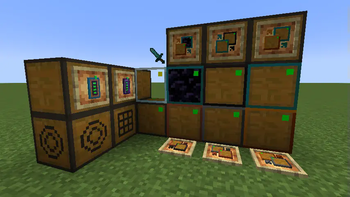
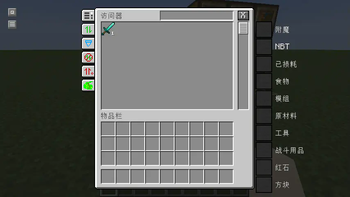
This mod includes various storage blocks with different capacities, which can be used in conjunction with accessors to access all chests within a single interface. It supports custom display settings, filtering, search in Chinese or Pinyin, and more.

Content Overview
Storage Memory Blocks
- Materials: Wood, Copper, Iron, Gold, Diamond, Nether Alloy, Obsidian, Glass
- Capacity: Starting at 27 slots for wood, each material increases capacity by 27 slots, up to 162 slots for Nether Alloy.
- Special Materials:
- Obsidian: 135 slots, explosion-proof.
- Glass: 27 slots, displays stored items in real-time.
- Display: 999 slots, a large number of items of the same type can be stored and displayed in real-time.
Storage Accessor Block/Storage Processor Block
- Storage Access Block: Directly accesses all connected storage memory blocks for normal storage operations.
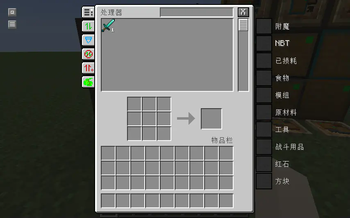
- Storage Processing Block: Allows item crafting while accessing storage.
Blank Storage Block
- Recognized and connected by accessor blocks but has no storage function.
Expansion Modules
- Corresponding expansion modules for each material (excluding non-upgradable materials).
- Directly increases the capacity of storage memory blocks, consuming one per use.
Basic/Advanced Remote Accessors
- Basic: Accesses bound coordinates of storage accessor/processor blocks within the same dimension.
- Advanced: Adds cross-dimension access to the basic remote accessor's features.
Recycle Bin
- Nine-slot storage space that automatically clears the last item when full.
- When clearing, items are prioritized to be stored in a container in front if not full; otherwise, they disappear.
Connection Cables
- Connects two non-contiguous connection blocks (all blocks within the mod are connection blocks).
Item Exporter
- Attaches to any container and transfers one stack of items to the nearest memory block every 5 ticks until empty.
- Right-click to specify item type; sneak-right-click to clear or switch matching mode.
- Matching mode only transfers existing item types in memory blocks.
Memory Extractor
- Opposite function to the item exporter; extracts one stack of items from memory blocks into a container.
- Can specify item type and switch matching modes.
Wireless Connector
- Placed on connection blocks; remotely connects two locations' memory blocks etc., through ports without distance or dimension limits.
Conversion Module
- Sneak-right-click on a chest to convert it into a wooden storage memory block; items are transferred along with it.
Recipe Processor Block/Recipe Record Card
- Put the recipe record card into the recipe processor block, put the materials of a recipe into the crafting slots, and
then take out the recipe record card to save a recipe into the recipe record card. - The recipe record card can be stored in the recipe processor block, and the recipe processor block will automatically
try to craft the recipe (requires redstone signal activation). - Automatic input and output can be achieved through the cooperation of Item Exporter and Memory Extractor.
Compressed Storage Memory Block
- Increase compression level by crafting two or more compressed storage memory blocks together; each level adds 27 slots of capacity.
Compression Upgrade Module
- Used to increase the compression level of compressed storage memory blocks.
Quick Crafting Table (Experimental)
- Connects to any storage block for automatic one-click crafting of selected items; supports tracing raw materials.
Memory Converter
- Allows any container to be accessed by accessors, such as chests, furnaces, shulker boxes, etc.
Game Rules
- maxMemoryRange: The maximum number of memory blocks an accessor can access simultaneously.
Available Versions
How to Install Only Need One Chest on Your Server
Order Server
Order a Minecraft Java server with at least 3 GB RAM (4 GB recommended).
Set fabric Loader
In the panel under "Egg", select the fabric loader and matching Minecraft version (1.20.1).
Install Mod
Open the mod browser in the dashboard and search for "Only Need One Chest". Click "Install" – done! Alternatively, upload the .jar via SFTP to the /mods folder.
Compatibility
Mod Loaders
Minecraft Versions
1.20.1, 1.20
Server-side
✓ RequiredRecommended RAM
4 GB(min. 3 GB)Frequently Asked Questions
Only Need One Chest server crashes on startup – what to do?
Most common cause: wrong fabric version or insufficient RAM. Check the server log (latest.log) for "OutOfMemoryError" or "Mixin" errors. With Mado Hosting: ensure at least 3 GB RAM is allocated and the loader matches the mod version (1.20.1). You can switch loaders with one click in the panel.
Is Only Need One Chest compatible with fabric?
Only Need One Chest officially supports fabric for Minecraft 1.20.1, 1.20. The Mado dashboard automatically detects incompatible loader combinations.
Server lagging with Only Need One Chest – how to optimize performance?
Recommended RAM: 4 GB (per 8 players). Use /spark profiler to check if Only Need One Chest consumes the most tick time. Common fixes: reduce server view-distance to 8-10, install "performant" or "starlight" as supplementary mods on Forge. With Mado Hosting, your server runs on NVMe SSDs with dedicated CPU cores for minimal latency.
Similar Mods


Rent Modded Server
Install Only Need One Chest with just one click on your server.