
One Password Auth
Authenticate your offline Fabric server with just one password for everyone. For small community servers!
Screenshots
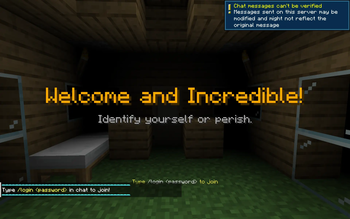
About this Mod
One Password Auth
A lightweight Fabric server-side mod that protects your offline (or online) server with a single shared password. Designed for small friend groups and private communities—no per-user accounts, no complex authentication schemes, just one password everyone shares!
✅ Core Features
- Single shared password for entire server access
- Secures all players/inventories before authenticating, even those with OP access
- Disables all known attack vectors (see below) including block-breaking packets from hacked clients
- Players authenticate once with
/login <password>then they're IP whitelisted - Customizable login title and description
- Discord webhook integration for event logging
🚀 Getting Started
Add the mod to the mods/ folder and that's it! Everything should work out of the box! The next time anyone logs in, they will be greeted with a login dialogue.
Note: On first boot, a phonetic default password (e.g.
komipu42!) is generated automatically and written toconfig/one_password_auth_config.properties. Check your server console or that file to find it.
⚙️ Customization
Upon first boot the plugin will generate a config file with a default password (such as komipu42!) and all additional customizable settings in config/one_password_auth_config.properties.
All the lines except for password= are optional! The server will kick everyone if no password is set.
To change any settings, just edit the config file and restart the server.
Example
password=komipu42!
webhook_url=https://discord.com/api/webhooks/xxx/yyy
admin_webhook_url=https://discord.com/api/webhooks/xxx/zzz
login_title=§6Welcome to my server!
login_description=§7Type /login <password> to join
timeout_seconds=180
Use § followed by a color/format code in login_title or login_description for styling (e.g. §6 gold, §l bold). See https://minecraft.wiki/w/Formatting_codes for the full list.
🛡️ Attack Vectors Defended
Before they log in, players are frozen in place, made invincible, blinded, and put into spectator. On top of that, this mod also blocks:
- Breaking blocks — via hacked clients that send fake packets
- Moving or teleporting away — players are locked in position on every tick
- External state drift & Mod interference — lockdown effects are re-asserted every tick
- Admin commands & OP powers — all op permissions are taken away on lockdown
- Minimized IP-spoofing — successful logins are saved as a user UUID and IP pair
- Same-account session hijacking — if they're already logged in, a second login gets denied instead of kicking them
- Bruteforcing — 1-second cooldown, kicked after 7 tries, kicked if idle too long
🔨 Future Development
Upon request I may add features to this mod. This mod currently only works on Fabric servers but that may change if others are interested.
Available Versions
How to Install One Password Auth on Your Server
Order Server
Order a Minecraft Java server with at least 3 GB RAM (4 GB recommended).
Set fabric Loader
In the panel under "Egg", select the fabric loader and matching Minecraft version (1.21.11).
Install Mod
Open the mod browser in the dashboard and search for "One Password Auth". Click "Install" – done! Alternatively, upload the .jar via SFTP to the /mods folder.
Compatibility
Mod Loaders
Minecraft Versions
1.21.11, 1.21.1
Server-side
✗ UnsupportedRecommended RAM
4 GB(min. 3 GB)Frequently Asked Questions
One Password Auth server crashes on startup – what to do?
Most common cause: wrong fabric version or insufficient RAM. Check the server log (latest.log) for "OutOfMemoryError" or "Mixin" errors. With Mado Hosting: ensure at least 3 GB RAM is allocated and the loader matches the mod version (1.21.11). You can switch loaders with one click in the panel.
Is One Password Auth compatible with fabric?
One Password Auth officially supports fabric for Minecraft 1.21.11, 1.21.1. The Mado dashboard automatically detects incompatible loader combinations.
Server lagging with One Password Auth – how to optimize performance?
Recommended RAM: 4 GB (per 8 players). Use /spark profiler to check if One Password Auth consumes the most tick time. Common fixes: reduce server view-distance to 8-10, install "performant" or "starlight" as supplementary mods on Forge. With Mado Hosting, your server runs on NVMe SSDs with dedicated CPU cores for minimal latency.
Similar Mods






Rent Modded Server
Install One Password Auth with just one click on your server.