OneBar
Everything you need to know to survive, in a single bar HUD!
Screenshots


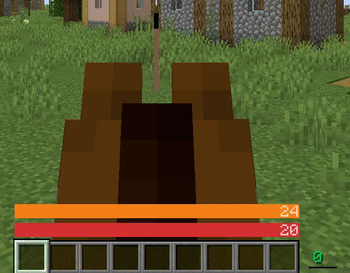
About this Mod
A sleek HUD mod for Minecraft: Java Edition using Fabric mod loader.
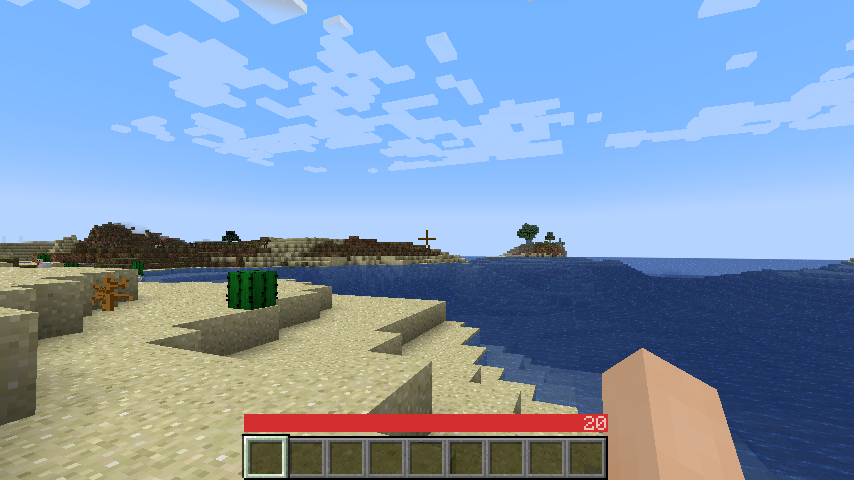
Reviews by Niche Duck: main mod (v1.2.2), config (v1.2.2). Mob arena gameplay with customized OneBar (v2.3.1) by agata_m
How it works
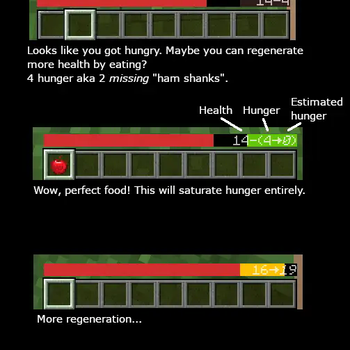
See the gallery for a tutorial image!
Tips:
- Every value and bar is displayed only when you need it.
- The positive effects, including health itself, are displayed left-to-right; negative effects are displayed right-to-left.
- If you get hungry, the hunger overlay is displayed over the health by its value.
- If you eat, you'll lose the overlay and the value, because you no longer need it.
- If you are also underwater, the water bar is displayed on top of health and hunger because it is the most important value in this case.
- Health is always the first number and hunger is almost always the last number (except when you have the hunger effect).
- Everything in between is an estimate, additional health or damage source (can be disabled).
- You can also enable "Show additional symbols" in options to get icons for those
- Remember old Minecraft without hunger and experience? This mod gives you a visually similar experience without losing modern functionality.
The mod only uses client-side data, so it is never needed on a server. There are also a lot of settings for configuring the colors and visibility of various elements.
Meanings of the colors and icons
Installation
- Install Minecraft 1.16 or later
- Install Fabric Loader
- Download OneBar, Fabric API, Mod Menu, Cloth Config API
- Place the JARs you downloaded to your Minecraft's mods folder
- Run the game!
Currently also works on Quilt, though no effort has yet been made to explicitly support it. See #21.
Mod compatibility
- Raised - moves OneBar and hotbar upwards, height of both can be adjusted
- Auto HUD - automatically shows and hides certain elements of OneBar as needed
- Exordium (beta) - improve HUD performance
- OneBar + MCC Island Compat (unofficial) - disables OneBar when you have no health bar on MCC Island
- Flour's Various Tweaks and Head-down display - partial compatibility for the auto-hide feature, does not hide OneBar elements
FAQ
Q: Why do I have to download Cloth Config API separately?
A: Because it's big, gets updated a lot and you probably have a mod or two that requires it anyway. If one of your mods already bundles it, you don't have to download it at all :)
Q: How do I edit the colors?
A: Click Esc -> Mods -> OneBar -> config button. Colors are formatted as opacity + RGB in HEX, so choose an opacity from this list and use any HEX color picker for choosing a color. For example if I want 80% opacity (CC) on blue (0000FF), I will enter #CC0000FF.
Q: Forge support?
A: No. Feel free to fork according to the license or check out my resource pack that inspired this.
Q: Backports?
A: No, latest is greatest.
Q: Snapshots?
A: Sometimes. If not published here, check GitHub Actions.
Available Versions
How to Install OneBar on Your Server
Order Server
Order a Minecraft Java server with at least 3 GB RAM (4 GB recommended).
Set fabric Loader
In the panel under "Egg", select the fabric loader and matching Minecraft version (26.1.2).
Install Mod
Open the mod browser in the dashboard and search for "OneBar". Click "Install" – done! Alternatively, upload the .jar via SFTP to the /mods folder.
Compatibility
Mod Loaders
Minecraft Versions
26.1.2, 26.1.1, 26.1 (+110 more)
Server-side
✗ UnsupportedRecommended RAM
4 GB(min. 3 GB)Frequently Asked Questions
OneBar server crashes on startup – what to do?
Most common cause: wrong fabric version or insufficient RAM. Check the server log (latest.log) for "OutOfMemoryError" or "Mixin" errors. With Mado Hosting: ensure at least 3 GB RAM is allocated and the loader matches the mod version (26.1.2). You can switch loaders with one click in the panel.
Is OneBar compatible with fabric and quilt?
OneBar officially supports fabric, quilt for Minecraft 26.1.2, 26.1.1, 26.1. The Mado dashboard automatically detects incompatible loader combinations.
Server lagging with OneBar – how to optimize performance?
Recommended RAM: 4 GB (per 8 players). Use /spark profiler to check if OneBar consumes the most tick time. Common fixes: reduce server view-distance to 8-10, install "performant" or "starlight" as supplementary mods on Forge. With Mado Hosting, your server runs on NVMe SSDs with dedicated CPU cores for minimal latency.
Similar Mods



Rent Modded Server
Install OneBar with just one click on your server.