
OnTime
A powerful and flexible timer mod for Minecraft. Create custom timers with on-screen display and command execution — ideal for minigames, events and automated server tasks.
Screenshots
About this Mod
OnTime ⏱️
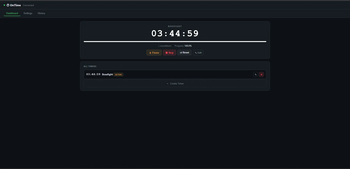
A powerful and flexible timer mod for Minecraft. Create custom timers with on-screen display, dynamic time expressions, event triggers, and a built-in web admin panel — ideal for minigames, events, modpacks and automated server tasks.








✨ Features
🕐 Timer System
- Create and manage multiple named timers
- Countdown and count-up modes
- Start, pause, resume, stop, reset and remove timers at any time
- Add or override time on active timers
- Timers persist across server restarts and auto-resume where they left off
- Repeat mode — loop a timer a set number of times or infinitely, with optional cooldown between repeats
- Timer sequences — chain timers so the next starts automatically when the current finishes, with optional cooldown between steps
- Per-timer files — every timer lives in its own
config/ontime/timers/<name>.json, ideal for backups and version control - Export / Import / Clone — share timers between worlds or instances with
/timer export,/timer import,/timer clone
🧮 Dynamic Time Expressions
- Define a timer's duration with a math expression that's evaluated when the command runs
- Supports
+ - * / %, parentheses, and live variables:players_online,score(<objective>, <holder>),ftb_quest_completed(<id>),ftb_reward_claimed(<id>) - Available on
/timer expr create,/timer expr set,/timer expr add
🎯 Conditions & Triggers
- Score conditions — finish (or start) a timer when a scoreboard objective reaches a target
- Condition expressions — full boolean DSL with
&&,||,!,>,<,>=,<=,==,!=, plus values liketime_remaining,time_elapsed,players_online,score(...) - Vanilla event triggers — fire timers on
player_death,dimension_change(any or specific dimension),advancement(specific ID) - FTB Quests triggers — fire on quest completion or reward claim by hex ID
- Each condition/trigger can be configured to either start or finish the affected timer
🖥️ Server-Controlled Display
- Real-time on-screen overlay synced to all connected players
- Smooth, jitter-tolerant client rendering — the counter updates like a real wall clock with no visual desync
- 10 position presets: Boss Bar, Action Bar, Top/Center/Bottom variants, and Custom
- Per-player visibility control — admins can show or hide the timer for specific players
- Adjustable scale (0.1× to 5.0×)
- Dynamic color gradient based on remaining time (configurable thresholds and colors)
- All display settings are managed server-side and pushed to clients automatically
- Active timer synced to scoreboard —
ontime_activeobjective updated every second, usable with/execute if score - Jade compatibility — when the timer overlaps Jade's overlay, Jade is gently displaced; restored automatically
🔊 Sound
- Configurable tick sound, volume and pitch via
/timer sound - Per-player sound toggle managed by admins via
/timer silent
⚡ Command Execution
- Attach any server command to a timer, executed automatically on completion
- Placeholder system: use
{name},{time},{seconds},{ticks},{target},{mode}in commands
🌍 Web Admin Panel
- Built-in HTTP+SSE dashboard served by the mod itself — no extra server needed
- View all timers in real time, start/pause/stop/reset, edit names/durations/commands/conditions, browse the history log, change display config
- Auto-closes after 5 minutes of inactivity (with a 1-minute warning to ops); clean shutdown on server stop
- Start/stop on demand:
/timer webpanel start [port],/timer webpanel stop,/timer webpanel info - Default port: 25580
📋 History Log
- Every timer completion is recorded in
config/ontime/history.jsonwith name, duration, mode, command and timestamp - Browsable from the web panel
⚙️ Configuration
- In-game config screen via Cloth Config (and ModMenu on Fabric)
- JSON config files in
config/ontime/ - Optional WebSocket server for external integrations (panels, Discord bots) — enable in
config.json. Default port: 25581
🔌 API & Integrations
- OnTime API — create, query, control timers and register event callbacks (
onStart,onFinish,onPause,onResume,onTick) - External finish conditions — register a custom
Supplier<Boolean>that can stop a timer from another mod - Custom renderer API — replace the timer HUD renderer entirely from a client-side mod
- LuckPerms support — per-node permission control for every subcommand, with OP-level fallback
- Entrypoint system — Fabric entrypoints and NeoForge/Forge IMC
- Placeholder API integration (Fabric)
- FTB Quests integration (compileOnly, auto-detected at runtime)
- Jade integration (auto-detected at runtime)
🎮 Quick Command Reference
# Lifecycle
/timer create <name> <h> <m> <s> [countUp] [command]
/timer set <name> <h> <m> <s>
/timer add <name> <h> <m> <s>
/timer start <name>
/timer pause
/timer stop
/timer reset [name]
/timer remove <name>

# Dynamic expressions (advanced)
/timer expr create <name> <expression>
/timer expr set <name> <expression>
/timer expr add <name> <expression>

# Behavior
/timer command <name> [command]
/timer repeat <name> [count] [cooldownSeconds]
/timer sequence <name> [nextName|clear] [cooldownSeconds]
/timer condition <name> <objective> <score> [target] | clear | if <expr> | if_start <expr>
/timer trigger <name> <player_death|dimension_change|advancement|ftb_quest|ftb_reward> [...] [start|finish] | clear

# Sharing
/timer export <name>
/timer import <filename> [newName]
/timer clone <source> <dest>

# Web panel
/timer webpanel start [port]
/timer webpanel stop
/timer webpanel info

# Display
/timer position <preset>
/timer sound <soundId> [volume] [pitch]
/timer scale <value>
/timer hide [targets]
/timer silent [targets]

# Misc
/timer list
/timer help [page|command]
All commands require operator permission level 4 (or a LuckPerms node if installed).
🌐 Localization
Available in English, Spanish (AR / ES / MX).
💬 Links
Created by MateoF24 — Licensed under CC0
Available Versions
How to Install OnTime on Your Server
Order Server
Order a Minecraft Java server with at least 3 GB RAM (4 GB recommended).
Set fabric Loader
In the panel under "Egg", select the fabric loader and matching Minecraft version (1.21.10).
Install Mod
Open the mod browser in the dashboard and search for "OnTime". Click "Install" – done! Alternatively, upload the .jar via SFTP to the /mods folder.
Compatibility
Mod Loaders
Minecraft Versions
1.21.10, 1.21.9, 1.21.8 (+8 more)
Server-side
✓ RequiredRecommended RAM
4 GB(min. 3 GB)Frequently Asked Questions
OnTime server crashes on startup – what to do?
Most common cause: wrong fabric version or insufficient RAM. Check the server log (latest.log) for "OutOfMemoryError" or "Mixin" errors. With Mado Hosting: ensure at least 3 GB RAM is allocated and the loader matches the mod version (1.21.10). You can switch loaders with one click in the panel.
Is OnTime compatible with fabric and forge and neoforge?
OnTime officially supports fabric, forge, neoforge for Minecraft 1.21.10, 1.21.9, 1.21.8. Note: Forge and Fabric mods are NOT cross-compatible – pick one loader and stick with it. The Mado dashboard automatically detects incompatible loader combinations.
Server lagging with OnTime – how to optimize performance?
Recommended RAM: 4 GB (per 8 players). Use /spark profiler to check if OnTime consumes the most tick time. Common fixes: reduce server view-distance to 8-10, install "performant" or "starlight" as supplementary mods on Forge. With Mado Hosting, your server runs on NVMe SSDs with dedicated CPU cores for minimal latency.
Similar Mods






Rent Modded Server
Install OnTime with just one click on your server.