
Oops all Beds
Everything is a bed now :)
Screenshots
About this Mod
You thought you were placing a furnace? WRONG. It’s a bed now.
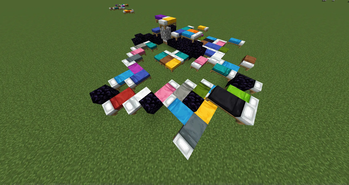
Welcome to Oops All Beds — the mod that turns your beautiful Minecraft world into a surreal nightmare of cozy slumber. Any block you try to place may instead become a bed. A randomly colored one. And yes, it’s a full bed. Foot and head. No half measures here.
This mod is a fever dream brought to life. A comedy of errors in quilted form. A woolen virus for the world.
Features
- Replaces placed blocks with a random bed. Seriously. You place dirt— you get a pink bed. Why? Because I said so
- Blocks in the way? Obliterated. If another block dares to stand where the bed will go, it gets deleted without mercy. Not dropped. Not replaced. Just gone.
- EVERYTHING is optional. What block gets placed/replaced? What direction the beds get placed. If you ask for more stuff, I'll add it if I find it funny enough.
Configuration
Whitelist mode
"whitelist": false
If set to true only blocks listed in "whitelistBlocks" WILL be replaced.
If false then blocks listed in "blacklistBlocks" WILL NOT be replaced.
Beds mode
"useBeds": true
If set to false you can use the "bedReplacements" list to add Custom blocks.
Facing based Rotation
"placeBedFacingPlayer": false
If set to false it will place the beds in Random rotations.
Available Versions
How to Install Oops all Beds on Your Server
Order Server
Order a Minecraft Java server with at least 3 GB RAM (4 GB recommended).
Set neoforge Loader
In the panel under "Egg", select the neoforge loader and matching Minecraft version (1.21.1).
Install Mod
Open the mod browser in the dashboard and search for "Oops all Beds". Click "Install" – done! Alternatively, upload the .jar via SFTP to the /mods folder.
Compatibility
Mod Loaders
Minecraft Versions
1.21.1
Server-side
✓ RequiredRecommended RAM
4 GB(min. 3 GB)Frequently Asked Questions
Oops all Beds server crashes on startup – what to do?
Most common cause: wrong neoforge version or insufficient RAM. Check the server log (latest.log) for "OutOfMemoryError" or "Mixin" errors. With Mado Hosting: ensure at least 3 GB RAM is allocated and the loader matches the mod version (1.21.1). You can switch loaders with one click in the panel.
Is Oops all Beds compatible with neoforge?
Oops all Beds officially supports neoforge for Minecraft 1.21.1. The Mado dashboard automatically detects incompatible loader combinations.
Server lagging with Oops all Beds – how to optimize performance?
Recommended RAM: 4 GB (per 8 players). Use /spark profiler to check if Oops all Beds consumes the most tick time. Common fixes: reduce server view-distance to 8-10, install "performant" or "starlight" as supplementary mods on Forge. With Mado Hosting, your server runs on NVMe SSDs with dedicated CPU cores for minimal latency.
Similar Mods





Rent Modded Server
Install Oops all Beds with just one click on your server.