
Open Simple Frames
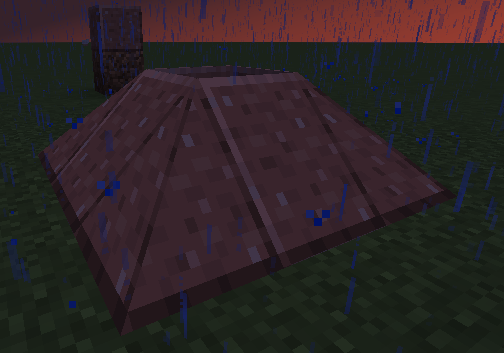
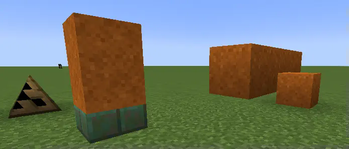
A stateful "Carpenter's Blocks" style framed block mod, put any blocks texture on various cursed shapes!
Screenshots
About this Mod
Open Simple Frames

Carpenters Blocks but using states?
The Concept
The idea of Carpenters blocks is that for any given shape in minecraft it should be able to use any texture, for this, a block has to know what model and what texture to use, by default a block already knows what model to use, but we need to store additional information about what texture to use instead, from what I gather, this is usally done using block entities, block entities feel like a lot of overhead for what is effectively a single number, as such my "frame" blocks have an additional property caled texture id.
when a player interacts with a block, if they have a block in there hand then that blocks texture is then assigned a texture id, this is universal across all frames, for instance, if stone was used on some stairs and assigned the id 1, then any other frame would use texture id 1 for stone, this does add a lot of extra states to some blocks, but at a low level, having the game take a bit longer to load but run fairly unobstructed in game, is a good thing.
Whats here?

generally all blocks can be crafted with sticks.
some odd blocks in this mod should also be noted
- ramps, and corner ramps, functionally act like stairs
- covers can have up to 3 sides of a block in one block.
- partitions are like walls
- H fences are also like walls
- giant blocks when placed are 2x2 and 4x4 respectively
- fences exist
- doors exist
- blocks that are 1.5 blocks tall one up, one down, they render as such
- there are chests, be careful with them however.

Commands
you can use /simpleframes report as an operator to see what blocks are using what texture ids/simpleframes set (id) (blockstates) can be used to change a texture
why "Open"
I am not a wizard, and I cannot put so much time into modding in the current circumstance, if someone knows how to solve an issue, please make a pull request or gist, suggestions can also be given this way to.
feel free to make addons and modifications to this mod, eventually there will be a wiki at https://github.com/LoremVIpsum/OpenSimpleFrames/wiki
Available Versions
How to Install Open Simple Frames on Your Server
Order Server
Order a Minecraft Java server with at least 3 GB RAM (4 GB recommended).
Set fabric Loader
In the panel under "Egg", select the fabric loader and matching Minecraft version (1.20.4).
Install Mod
Open the mod browser in the dashboard and search for "Open Simple Frames". Click "Install" – done! Alternatively, upload the .jar via SFTP to the /mods folder.
Compatibility
Mod Loaders
Minecraft Versions
1.20.4, 1.20.3, 1.20.2 (+10 more)
Server-side
✓ RequiredRecommended RAM
4 GB(min. 3 GB)Frequently Asked Questions
Open Simple Frames server crashes on startup – what to do?
Most common cause: wrong fabric version or insufficient RAM. Check the server log (latest.log) for "OutOfMemoryError" or "Mixin" errors. With Mado Hosting: ensure at least 3 GB RAM is allocated and the loader matches the mod version (1.20.4). You can switch loaders with one click in the panel.
Is Open Simple Frames compatible with fabric?
Open Simple Frames officially supports fabric for Minecraft 1.20.4, 1.20.3, 1.20.2. The Mado dashboard automatically detects incompatible loader combinations.
Server lagging with Open Simple Frames – how to optimize performance?
Recommended RAM: 4 GB (per 8 players). Use /spark profiler to check if Open Simple Frames consumes the most tick time. Common fixes: reduce server view-distance to 8-10, install "performant" or "starlight" as supplementary mods on Forge. With Mado Hosting, your server runs on NVMe SSDs with dedicated CPU cores for minimal latency.
Similar Mods





Rent Modded Server
Install Open Simple Frames with just one click on your server.