
Open Trade
A player to player trading system with a server-wide market.
Screenshots
About this Mod
About
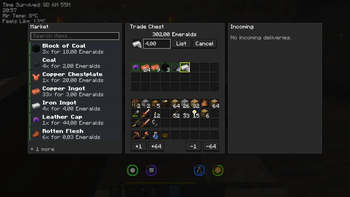
Open Trade allows you to turn any chest into a player-owned Trade Chest. Here you can list items for sale, browse a server-wide market, place buy orders, and have bought items be delivered to the buyer's chest after a certain amount of time based on distance.
Gameplay
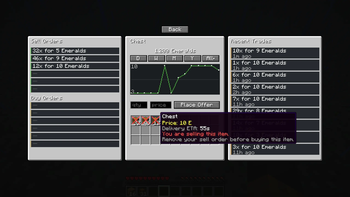
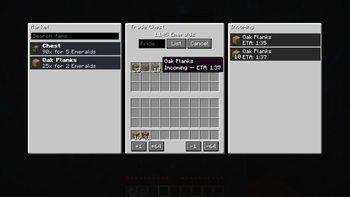
The way it works is quite simple: When you open a regular single chest you can click a button to convert it into a trade chest. From there you can use the new UI to set up your own trades, by putting an item stack in the middle panel's item slot, set a price per item and click on list. You can select already listed items below and either update the price or cancel the listing again. By clicking on an item on the left market panel you get to the item's detailed market page, showing more information regarding sale and buy orders as well as individual item information. You can also find a price graph as well as recent trade information there. The mod also comes with a distance based travel time system, which will have items take time to arrive at the buyer, based on how far the seller and buyer's chest are. Of course this, as well as the digital currency used to interact with the market can be all customized.
Features
- Convert any vanilla chest into a Trade Chest
- Digital currency to buy and sell from the market
- Market browser with item search, sell offers, and buy orders
- Distance-based delivery time
- Place buy orders that auto-fill when matching listings appear
- Recent Trades and price history
Available Versions
How to Install Open Trade on Your Server
Order Server
Order a Minecraft Java server with at least 3 GB RAM (4 GB recommended).
Set fabric Loader
In the panel under "Egg", select the fabric loader and matching Minecraft version (26.2).
Install Mod
Open the mod browser in the dashboard and search for "Open Trade". Click "Install" – done! Alternatively, upload the .jar via SFTP to the /mods folder.
Compatibility
Mod Loaders
Minecraft Versions
26.2, 26.1.2, 26.1.1 (+1 more)
Server-side
✓ RequiredRecommended RAM
4 GB(min. 3 GB)Frequently Asked Questions
Open Trade server crashes on startup – what to do?
Most common cause: wrong fabric version or insufficient RAM. Check the server log (latest.log) for "OutOfMemoryError" or "Mixin" errors. With Mado Hosting: ensure at least 3 GB RAM is allocated and the loader matches the mod version (26.2). You can switch loaders with one click in the panel.
Is Open Trade compatible with fabric and neoforge?
Open Trade officially supports fabric, neoforge for Minecraft 26.2, 26.1.2, 26.1.1. The Mado dashboard automatically detects incompatible loader combinations.
Server lagging with Open Trade – how to optimize performance?
Recommended RAM: 4 GB (per 8 players). Use /spark profiler to check if Open Trade consumes the most tick time. Common fixes: reduce server view-distance to 8-10, install "performant" or "starlight" as supplementary mods on Forge. With Mado Hosting, your server runs on NVMe SSDs with dedicated CPU cores for minimal latency.
Similar Mods



![CobbleDollars [Cobblemon Addon]](https://cdn.modrinth.com/data/s7N7AsqL/684040a264fc1d7f9b856ec5d2da39767398c7ad.png)

Rent Modded Server
Install Open Trade with just one click on your server.