
OpenZiti MC
Share your server with friends without opening firewall holes using an OpenZiti overlay network. Friends need just the service name and identity -- no port forwarding, no public listeners, no public IP.
Screenshots
About this Mod
OpenZiti MC
Share a Java Edition server with friends without opening firewall holes. OpenZiti MC routes the game's network traffic
over an OpenZiti zero-trust overlay. This means the dedicated server never needs a public IP, a
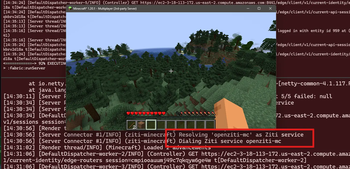
public DNS name, or an open TCP port. Connect by OpenZiti service name. The OpenZiti overlay network will then
authenticate and authorize any connections to your server before a packet ever reaches it.
What it does
- Client side: when you type an OpenZiti service name into "Add Server", the mod intercepts the Netty dial and
connects over the overlay instead of TCP. - Server side: when enabled in config, the dedicated/integrated server binds on an OpenZiti service instead of a
normal TCP listener. Only authorized identities on the overlay can reach it.
Why it works the way it does
The whole mod is three Mixins hooking Netty's Bootstrap/ServerBootstrap calls and swapping in ZitiChannelFactory
ZitiAddress.Dial/ZitiAddress.Bind. Minecraft's packet pipeline is untouched. The OpenZiti JVM SDK is bundled
in the jar, so no extra installs.
Identities are loaded from a standard OpenZiti identity file inconfig/openziti/identity.json. Drop yours in, you
are done.
Requirements
- Java Edition 1.20.1
- Fabric Loader 0.16.10+
- Fabric API
- Architectury API
- A running OpenZiti controller and at least one edge router. If you don't have an OpenZiti overlay,
set one up by following a get-started guide.
OpenZiti Setup
The repo includes a setup-ziti.ps1 script that does all of this interactively and is the recommended way to set up
the OpenZiti overlay.
- create a service (
openziti-mcby default) - one identity tagged
#minecraft-serverfor the dedicated server, plus one or more identities tagged#minecraft-clientsfor each player - create the matching Bind/Dial service policies
Server Setup
Ensure the server identity is enrolled and drop the enrolled server .json into config/openziti/identity.json, then
set "serverBind": { "enabled": true, "serviceName": "openziti-mc" } in the config/openziti.json file.
Client Setup
For each client running the OpenZiti MC mod, ensure the client identity is enrolled and then drop the enrolled client
identity into config/openziti/identity.json.
Using the Mod
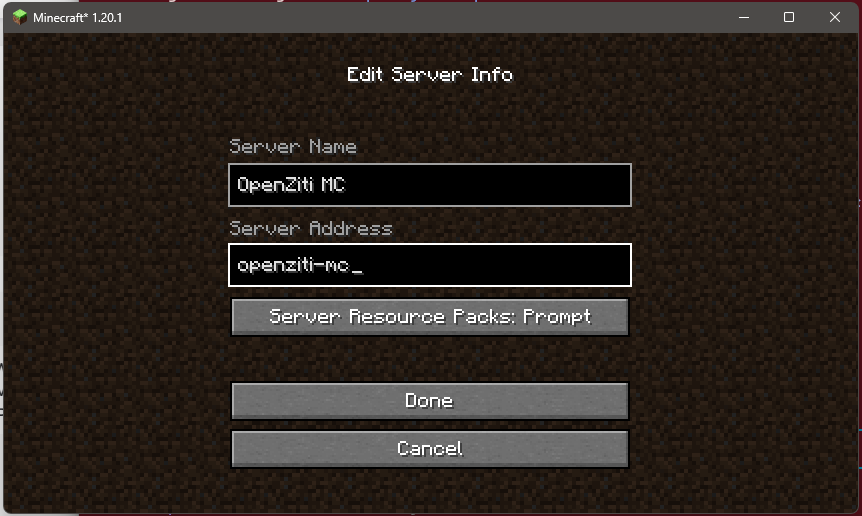
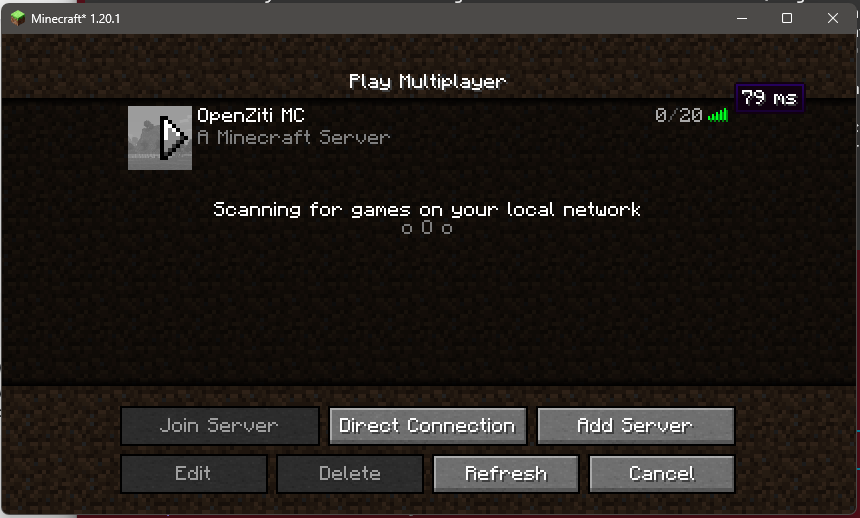
After starting Minecraft, choose: Multiplayer -> Add Server -> Server Address openziti-mc -> Done -> Join.
Additional Information
For additional information or more details see the project's main page on GitHub at
https://github.com/dovholuknf/ziti-minecraft. There you'll find a full step-by-step (controller + identities +
policies + dev runs) guide as well in the SETUP.md.
Limitations
- This release targets MC 1.20.1 only. NeoForge support is planned for a future MC bump.
- The OpenZiti SDK and Kotlin standard library are bundled, so the jar is around 28 MB. Larger than most utility mods, smaller than most content mods.
- Annotation-processor warnings about Netty mapping targets are cosmetic; they do not affect runtime behavior.
Architecture
For a technical deep-dive (Netty channel-factory hook, the smuggler InetSocketAddress pattern, the three Mixin classes, the ZitiContext warmup wait, the dial-retry loop) see
BLOG.md in the repo.
Credits
- openziti/ziti -- the OpenZiti overlay network
- openziti/ziti-sdk-jvm -- the SDK whose
ziti-nettymodule made this a small mod instead of a large one. - vgskye/e4mc-minecraft-architectury -- the smuggler-InetSocketAddress pattern and the Mixin shapes for
Connection/ServerConnectionListener.
Apache-2.0 licensed. Source at github.com/dovholuknf/ziti-minecraft.
Available Versions
How to Install OpenZiti MC on Your Server
Order Server
Order a Minecraft Java server with at least 3 GB RAM (4 GB recommended).
Set fabric Loader
In the panel under "Egg", select the fabric loader and matching Minecraft version (1.21.10).
Install Mod
Open the mod browser in the dashboard and search for "OpenZiti MC". Click "Install" – done! Alternatively, upload the .jar via SFTP to the /mods folder.
Compatibility
Mod Loaders
Minecraft Versions
1.21.10, 1.21.9, 1.21.8 (+15 more)
Server-side
✗ UnsupportedRecommended RAM
4 GB(min. 3 GB)Frequently Asked Questions
OpenZiti MC server crashes on startup – what to do?
Most common cause: wrong fabric version or insufficient RAM. Check the server log (latest.log) for "OutOfMemoryError" or "Mixin" errors. With Mado Hosting: ensure at least 3 GB RAM is allocated and the loader matches the mod version (1.21.10). You can switch loaders with one click in the panel.
Is OpenZiti MC compatible with fabric?
OpenZiti MC officially supports fabric for Minecraft 1.21.10, 1.21.9, 1.21.8. The Mado dashboard automatically detects incompatible loader combinations.
Server lagging with OpenZiti MC – how to optimize performance?
Recommended RAM: 4 GB (per 8 players). Use /spark profiler to check if OpenZiti MC consumes the most tick time. Common fixes: reduce server view-distance to 8-10, install "performant" or "starlight" as supplementary mods on Forge. With Mado Hosting, your server runs on NVMe SSDs with dedicated CPU cores for minimal latency.
Similar Mods






Rent Modded Server
Install OpenZiti MC with just one click on your server.