
Oracle Text Hub
Clear all chat spam with a single click. Transform protection and shop clutter into a clear HUD and precise sales summaries.
Screenshots


About this Mod
Oracle Text Hub
A 100% client-side tool suite that cleans spam from server chat and displays important information visually and intuitively on your screen.
At a Glance
- What is this mod?
A powerful tool that cleans chat clutter and transforms repetitive plugin messages into a clean, useful HUD. - Who should use it?
Any multiplayer server player (Survival, Economy, etc.) who is tired of spam and wants a clearer gameplay experience. - Main Features:
- Interactive Spam Filter: Instantly block any chat message with a click.
- Visual Pattern Editor: Stop dynamic spam without any programming knowledge.
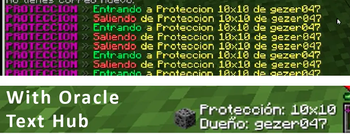
- Protection HUD: Replaces region announcement spam with an on-screen display.
- Sales Assistant: Consolidates dozens of shop messages into one elegant summary.
Detailed Features
🖱️ Interactive Spam Filter: The Power of a Programmer, the Ease of a Click.
While other mods require you to learn complex code (Regex) to create powerful filters, we give you the same power in a radically intuitive way.
Instant Blocking: See spam? Hold
Ctrl+Left-Clickon the text. A menu will appear to confirm the action. It's that simple.Friendly Pattern Editor: Does a message constantly change? Edit the rule in our visual menu and use simple wildcards like
#number#or#user#. Our menu guides you with clear instructions.Note: Blocking a message does not remove it from your current chat view. It adds a rule to intercept and block all future occurrences of that message. Don't worry if the original is still visible; it won't bother you again.

🛡️ Protection HUD
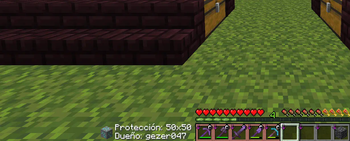
Replaces the constant "Entering/Leaving" message spam with a clean visual indicator on your screen. You'll always know what protection you're in and who owns it without flooding your chat.
- Current Compatibility: Pre-configured for PreciousStones.
- Language Support: Message detection is currently designed for servers using plugins in Spanish.

📈 Sales Assistant
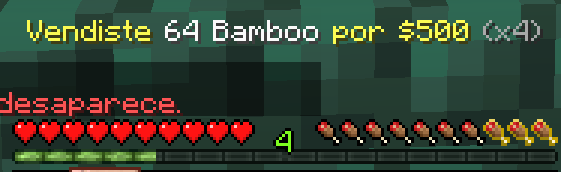
Mass selling no longer means mass spam. The mod intercepts dozens of sales messages and shows you a single, elegant final summary with your total earnings, complete with a real-time on-screen counter.
- Current Compatibility: Designed to recognize messages from the ChestShop plugin.
- Language Support: Message detection works on servers using English or Spanish.
ChestShop: Compatible with Oracle Text Hub
ChestShop
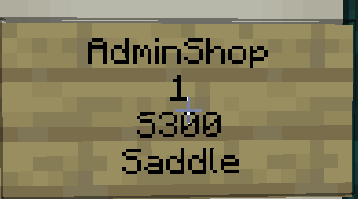
-We offer full support for ChestShop in both English and Spanish. If your language is different, the mod will default to English, and we plan to add more languages soon.
-Additionally, you can now see item names in whatever language you have configured, along with their rarity color, in both the chat and floating messages, instead of a name code like: Bow#fv.
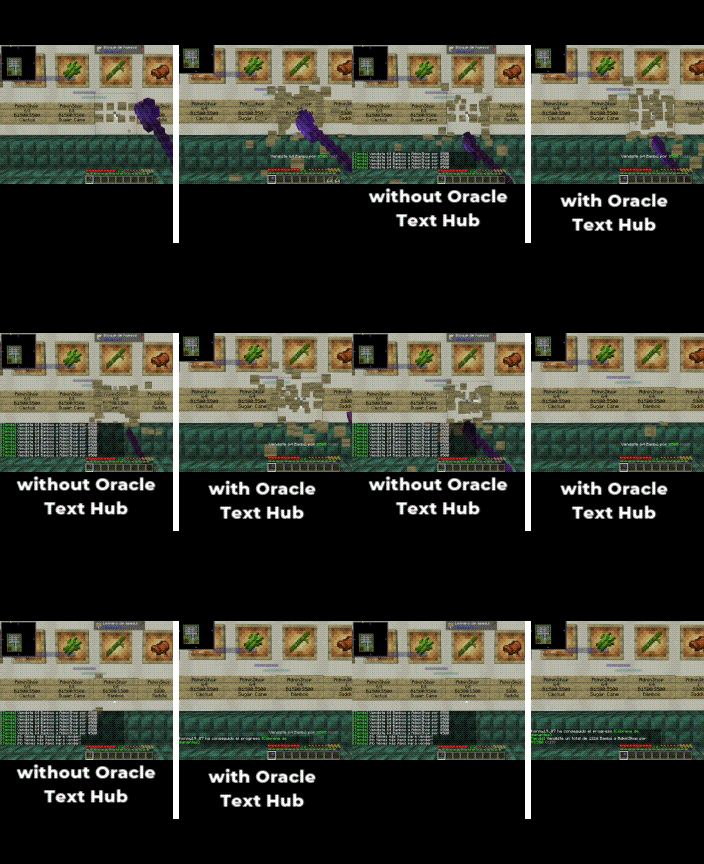
ChestShop without Oracle Text Hub
These messages are informative, but they create so much spam in the chat that it's easy to miss important things.


ChestShop with Oracle Text Hub
Instead of sending a message to the chat for every single sale, we simply show you how many you're selling in real-time, so your chat doesn't fill up with unnecessary messages. We have included a multiplier (x1, x2, x3) so that you always know how many stacks or the total quantity you've sold.
When you're finished selling, you'll see a final message with the total amount sold and the money earned. This lets you know exactly how much you made without having to count message by message and without your chat being flooded.
Of course, when someone sells to or buys from your chests, you'll also see a summary instead of 20 messages for 20 different purchases.
All the messages that normally spam the chat—for example, "You are out of stock," "You can't buy/sell here," "You don't have permission," "You can't trade with your own shop," and many more—are now displayed as a temporary on-screen notification, and their color changes depending on the severity.
Configuration & Controls
Total Control! All of the mod's key actions can be assigned to any key you want from Minecraft's main Options > Controls > Key Binds menu.
Open Oracle Config: Opens the main menu to enable or disable modules.Open Spam List: Directly access your list of spam rules to manage them.
Frequently Asked Questions (FAQ)
- Q: How do I install it?
- A: You need the Fabric API. Then, just drag the
.jarfile into your.minecraft/modsfolder.
- A: You need the Fabric API. Then, just drag the
- Q: The Protection HUD doesn't work on my server, why?
- A: This mod is in Beta. Currently, automatic support is limited to the plugins and languages it was tested on (PreciousStones, in Spanish). But don't worry! We are developing a Universal Rule System that will allow you, the user, to teach the mod to recognize messages from ANY plugin.
- Q: Why should I install it?
- A: The real question is, why haven't you already?
Future Roadmap
This is just the beginning. Our next goals are:
- Universal Rule System: Implementing the pattern editor that will allow you to make the mod compatible with any plugin.
- Full Multi-Language Support: Translating all features so that message detection works perfectly in any language.
- Expanded Plugin Support: Adding native support for GriefPrevention, Towny, and Factions.
Our Philosophy: We Didn't Invent the Wheel, We Perfected It.
We know that spam filters and chat utilities are nothing new. We aren't here to reinvent the wheel.
We're here to give you a better wheel: one that runs smoother, adapts to any terrain, and gives you a level of control you've never felt before. Think of Oracle Text Hub as the next-gen technology for the "car" that is your gameplay experience. Smarter, more intuitive, and above all, designed for you.
Available Versions
How to Install Oracle Text Hub on Your Server
Order Server
Order a Minecraft Java server with at least 3 GB RAM (4 GB recommended).
Set fabric Loader
In the panel under "Egg", select the fabric loader and matching Minecraft version (1.21.8).
Install Mod
Open the mod browser in the dashboard and search for "Oracle Text Hub". Click "Install" – done! Alternatively, upload the .jar via SFTP to the /mods folder.
Compatibility
Mod Loaders
Minecraft Versions
1.21.8, 1.21.7, 1.21.6 (+7 more)
Server-side
✗ UnsupportedRecommended RAM
4 GB(min. 3 GB)Frequently Asked Questions
Oracle Text Hub server crashes on startup – what to do?
Most common cause: wrong fabric version or insufficient RAM. Check the server log (latest.log) for "OutOfMemoryError" or "Mixin" errors. With Mado Hosting: ensure at least 3 GB RAM is allocated and the loader matches the mod version (1.21.8). You can switch loaders with one click in the panel.
Is Oracle Text Hub compatible with fabric?
Oracle Text Hub officially supports fabric for Minecraft 1.21.8, 1.21.7, 1.21.6. The Mado dashboard automatically detects incompatible loader combinations.
Server lagging with Oracle Text Hub – how to optimize performance?
Recommended RAM: 4 GB (per 8 players). Use /spark profiler to check if Oracle Text Hub consumes the most tick time. Common fixes: reduce server view-distance to 8-10, install "performant" or "starlight" as supplementary mods on Forge. With Mado Hosting, your server runs on NVMe SSDs with dedicated CPU cores for minimal latency.
Similar Mods






Rent Modded Server
Install Oracle Text Hub with just one click on your server.
Details
- License
- Creative Commons Attribution No Derivatives 4.0 International
- Server-side
- Unsupported